



If you want your agency website to turn visitors into loyal clients, you need more than just a pretty design. Every detail—from how your site looks, to the words you use, to the way visitors interact with it—can make or break your success.
This guide will show you exactly how to create a high-converting agency website by mastering design, UX, copywriting, and conversion rate optimization (CRO). Follow these proven strategies, and you’ll start seeing more leads, more trust, and more sales. Ready to make your website work harder for you?
Keep reading.
Best Agency Website Layouts That Convert (2026 Trends) focus on clear structure, user-friendly navigation, and strong calls to action. These layouts help visitors find what they need quickly and encourage them to take action. In 2026, agency websites must balance aesthetics with functionality to improve conversion rates.
The three-column layout divides content into manageable sections. It organizes services, testimonials, and contact info side by side. This layout makes scanning easy and keeps visitors engaged.
This format suits agencies with varied services and lots of content.
Using a full-width hero section grabs attention immediately. Large visuals or videos paired with a clear headline set the tone. Scroll animations guide visitors smoothly down the page.
This layout creates a modern and dynamic user experience.
A minimalist layout uses plenty of white space and simple fonts. It reduces distractions and helps users focus on key messages.
| Benefit | Description |
|---|---|
| Speed | Faster page load times improve user experience |
| Clarity | Clear visuals direct attention to calls to action |
| Mobile-friendly | Simple designs adapt well to smaller screens |
Split-screen divides the page into two vertical halves. Each side can highlight different messages or images.
This layout creates balance and emphasizes important elements equally.
Sticky navigation stays visible while users scroll. It improves site usability and keeps calls to action in view.
Persistent CTAs increase the chance visitors will convert.
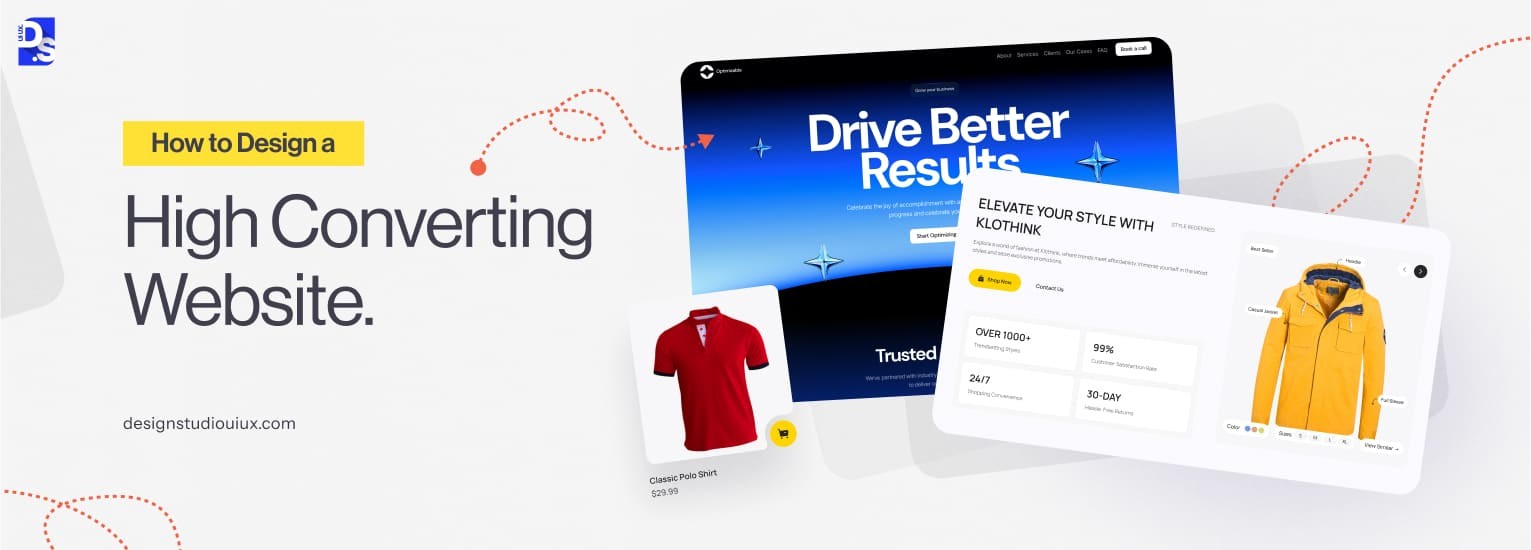
Credit: www.designstudiouiux.com
Writing conversion-optimized copy for agency websites requires clear, focused language that connects with visitors. The goal is to guide users toward taking action, such as contacting the agency or requesting a quote. Good copy highlights benefits, solves problems, and builds trust.
Start by understanding who visits the site. What problems do they face? What solutions do they want?
Knowing the audience helps tailor messages that speak directly to them.
Headlines grab attention and show value fast. Use simple words and focus on benefits, not features.
Example:
Boost Your Sales with Expert Marketing Strategies
Break copy into small chunks. Short sentences improve readability and keep visitors engaged.
CTAs guide visitors on what to do next. Use direct, simple phrases that create urgency.
| Effective CTA | Poor CTA |
|---|---|
| Get Your Free Quote Now | Submit |
| Talk to Our Experts Today | Click Here |
Place CTAs prominently and repeat them in key areas.
Visitors trust agencies with proven results. Share client feedback and success stories.
Use important keywords naturally in headlines and text. Avoid keyword stuffing.
The Service Page SEO Checklist is essential for agencies wanting more visitors and clients. It focuses on three key areas: structure, keywords, and content depth. These elements work together to help search engines understand your page and rank it higher. A well-optimized service page guides visitors smoothly, answers their questions, and encourages them to take action.
Structure organizes your content clearly and logically. It helps both users and search engines find important information quickly. Use these tips:
Keywords connect your page to what users search for. Choose them carefully and place them naturally.
Content depth means providing detailed and useful information. It builds trust and authority.
| Checklist Item | SEO Benefit | Tips |
|---|---|---|
| Clear Headings | Improves readability and keyword placement | Use H1, H2, H3 properly; include keywords |
| Keyword Placement | Helps search engines rank your page | Use keywords naturally in text and images |
| Content Depth | Increases user trust and engagement | Provide detailed answers and unique info |
| Fast Loading | Reduces bounce rate and improves rankings | Optimize images; minimize scripts |
Creating a strong “About Us” page is vital for any agency website. This page builds trust and connects visitors to your brand’s story. It shows who you are, what you do, and why you do it. Writing it clearly and honestly helps visitors feel confident about working with you. Below are key steps to write a winning “About Us” page that builds trust effectively.
Start by explaining your agency’s purpose. Share your mission in simple terms. Use clear language to describe your core values.
This helps visitors understand your commitment and what you stand for.
Tell your story in a way that connects emotionally. Include how your agency started and key milestones.
Stories make your agency relatable and memorable.
Show the people behind your agency. Use friendly photos and short bios.
| Team Member | Role | Fun Fact or Skill |
|---|---|---|
| Anna Smith | Project Manager | Loves hiking and organizing tasks |
| John Lee | Creative Director | Sketches ideas daily |
This personal touch builds trust and shows your agency’s human side.
Write simply and truthfully. Avoid jargon and long sentences. Be transparent about your services and results.
Honesty encourages visitors to trust your agency fully.
Show proof your agency delivers results. Add client testimonials or industry awards.
These elements reassure visitors of your credibility.
Social proof builds trust fast. It shows visitors real feedback from happy clients. This trust helps turn visitors into customers. Testimonials, reviews, and badges act as proof that your agency delivers quality work. Adding social proof correctly improves your website’s credibility, user experience, and conversion rates.
Testimonials share client stories and positive experiences. Use short quotes with clear names and photos for authenticity. Place them near calls to action or service descriptions.
Reviews from platforms like Google or Facebook add extra trust. Embed these reviews or summarize them on your site.
Trust badges signal reliability and security. They reassure visitors about your professionalism and safety.
| Badge Type | Purpose | Placement Tips |
|---|---|---|
| Industry Certifications | Show expertise and compliance | Footer or About page |
| Security Seals | Ensure safe browsing and transactions | Checkout and contact forms |
| Partner Logos | Build credibility through associations | Homepage or Services page |
Keep badges visible but not overwhelming. Balance them with other page elements.
The success of an agency website depends on many factors like design, UX, copywriting, and conversion rate optimization (CRO). One key decision agencies face is choosing between chatbot support and human support. Both have their strengths and weaknesses. This section explores which support method works best for agencies to boost client satisfaction and conversions.
Chatbots use automated software to answer common questions quickly. They are available 24/7 and can handle many users at once. Chatbots save time and reduce support costs. They work well for simple tasks like booking appointments or answering FAQs.
Yet, chatbots struggle with complex problems and lack human empathy. They may frustrate users who want personalized help.
Human agents bring understanding and flexibility to customer service. They can solve complicated issues and adjust their tone based on user emotions. Human support builds trust and stronger relationships.
Humans need more resources and cannot provide instant answers 24/7. Support costs are higher and response times may vary.
| Feature | Chatbot | Human Support |
|---|---|---|
| Availability | 24/7, no breaks | Limited hours |
| Response Speed | Instant replies | Minutes to hours |
| Cost | Lower | Higher |
| Complexity Handling | Low | High |
| User Experience | Efficient but robotic | Personal and empathetic |
Chatbots work best for routine tasks and quick answers. They handle high volumes and repetitive questions well.
Human support fits complex conversations or sensitive issues. It suits clients needing detailed guidance or emotional reassurance.
Many agencies find success by blending chatbot and human support. Chatbots manage simple queries first, then hand off to humans when needed.
This hybrid approach balances speed and personalization. It creates a smoother, more efficient client experience.
Optimizing Call-to-Actions (CTAs) plays a critical role in turning website visitors into leads. A well-designed CTA guides users toward the next step and encourages interaction. Small changes in CTA design, wording, or placement can significantly boost lead generation. Understanding what works best helps agencies create websites that convert more effectively.
The design of CTA buttons must grab attention without overwhelming the page. Use contrasting colors that stand out from the background. The button shape should be clear and inviting, often rounded corners work well. Size matters too; the button needs to be large enough to notice but not too big to disrupt the layout.
Words on the CTA button must be clear and encourage action. Use short, direct phrases that tell users exactly what to do. Avoid generic terms like “Submit” or “Click Here.” Instead, use action verbs and benefits, such as “Get Your Free Quote” or “Start Your Trial.”
Placing CTAs in the right spots increases the chance of clicks. Common effective locations include above the fold, at the end of content, and in the sidebar. Repeat CTAs on longer pages to catch users at different moments.
| Placement | Why It Works | Best Practice |
|---|---|---|
| Above the Fold | Visible immediately without scrolling | Use a strong CTA with a clear value proposition |
| End of Content | Users ready to take next step after reading | Reinforce the offer and use action-focused text |
| Sidebar | Constantly visible during scrolling | Keep it simple and relevant to page content |
Testing different CTA elements reveals what works best. Use A/B testing to compare button colors, text, and placement. Track metrics like click-through rate and conversion rate to measure success. Regular testing helps maintain high lead flow and improves user experience.
Lead forms are key to turning visitors into clients. Simple, clear forms encourage users to share their information quickly. Complex or long forms scare people away. Designing easy-to-fill lead forms helps improve conversion rates and grow your agency’s client base.
Long forms make people hesitate. Ask only for the most important details.
Remove unnecessary fields. Short forms feel faster and less stressful.
Arrange form fields in a single column. Avoid clutter. Use plenty of white space.
A clean design guides users smoothly through the form.
Help users fill forms correctly the first time.
Clear guidance reduces frustration and form abandonment.
People worry about their data. Reassure them.
Trust encourages users to submit their info confidently.
Use clear, action-focused text on buttons.
| Weak CTA | Strong CTA |
|---|---|
| Submit | Get Your Free Quote |
| Send | Start My Project |
| Go | Claim Your Spot |
Buttons should stand out with contrasting colors.
Adding a portfolio, case studies, and proof to an agency website boosts trust and shows real results. These elements help visitors see your skills and success clearly. Placing them in the right spots and using strong visuals and stories makes your site more convincing. This guide explains how to add these parts strategically for better engagement and conversions.
Select projects that highlight your best work and variety. Focus on quality over quantity. Show different industries or services you offer. Each piece should tell a clear story of the challenge and your solution.
Case studies prove your agency’s impact with real examples. Structure them clearly to guide readers through the problem, your approach, and the outcome.
Keep language simple and focus on facts. Use visuals like charts or before-and-after images to support your story.
Social proof such as testimonials and awards builds confidence quickly. Place them where visitors decide to contact you or buy services.
| Proof Type | Best Placement | Key Tip |
|---|---|---|
| Client Testimonials | Homepage, service pages, contact page | Use real names and photos if possible |
| Industry Awards | About page, footer, homepage | Show logos and award details clearly |
| Statistics & Metrics | Case studies, portfolio sections | Highlight key numbers in bold |
Keep proof sections clean and easy to scan. Avoid clutter to keep trust strong.
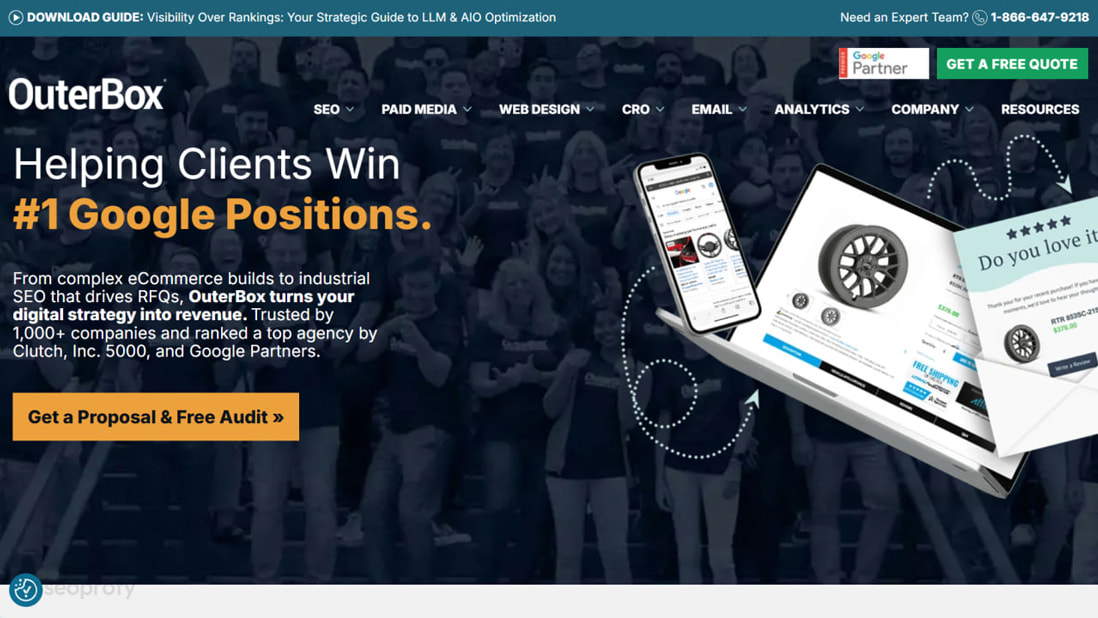
Credit: seoprofy.com
Improving website speed and mobile experience is vital for agency websites. Fast loading pages keep visitors engaged and reduce bounce rates. Mobile-friendly sites reach more users and enhance usability. These factors boost conversions and help agencies stand out.
Large images slow down websites. Compress images without losing quality. Use formats like WebP or JPEG 2000 for better compression.
Each element on a page creates an HTTP request. Fewer requests mean faster loading.
Mobile users expect smooth, easy navigation. Start with a mobile layout and scale up for desktop. Use responsive design techniques.
Slow servers delay page loading. Choose reliable hosting and optimize backend processes.
| Action | Benefit |
|---|---|
| Use a fast web host | Reduces initial load time |
| Implement a CDN | Speeds up content delivery worldwide |
| Optimize database queries | Improves server processing speed |
Remove unnecessary code from HTML, CSS, and JavaScript files. Minify files to reduce size.
Minify example for CSS body{margin:0;padding:0;background:fff;} This reduces loading time and improves performance.
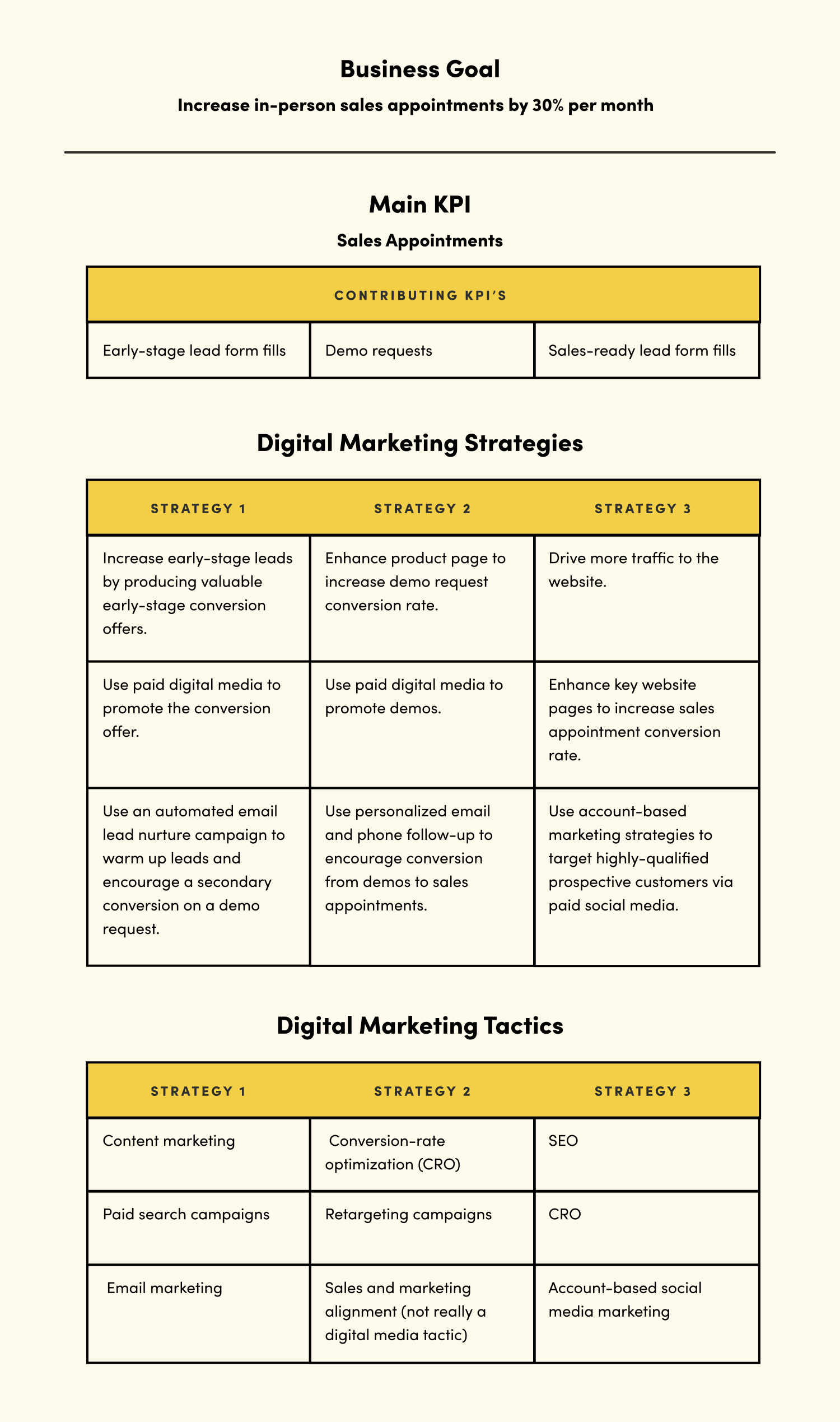
Credit: vitaldesign.com
A high-converting agency website combines clear design, user-friendly UX, persuasive copywriting, and a strong CRO strategy. These elements guide visitors smoothly toward desired actions, increasing lead generation and client engagement effectively.
Good UX ensures easy navigation, fast loading, and mobile responsiveness. It reduces friction, keeping visitors engaged and encouraging them to complete actions like inquiries or sign-ups, boosting overall conversions.
Effective copywriting communicates value clearly and builds trust. It uses compelling headlines, benefits-focused content, and calls to action that motivate visitors to respond positively, enhancing conversion rates.
CRO strategies like A/B testing, heatmaps, and user feedback help identify barriers. Optimizing forms, buttons, and content based on data increases visitor interaction and conversion success.
A strong agency website starts with clear design and smooth user experience. Good copywriting guides visitors to take action. Testing different elements boosts your conversion rates. Focus on simple navigation and clear messages. Keep your goals in mind at every step.
Small changes can lead to big results. Always review your site and adjust for better performance. Your website should help visitors quickly find what they need. This creates trust and encourages contact or sales. A well-planned strategy brings steady growth over time.







Leave A Reply Now