


Is your website running slower than you’d like? Every second your pages take to load could be costing you visitors, sales, and search rankings.
Improving your website speed is not just about faster loading times—it’s about creating a smooth, enjoyable experience that keeps people coming back. That’s where Core Web Vitals come in. These key metrics measure exactly how users perceive your site’s performance.
You’ll discover simple, actionable steps to boost your Core Web Vitals scores and make your website faster, more stable, and more responsive. Ready to turn your slow site into a speed champion? Let’s dive in.
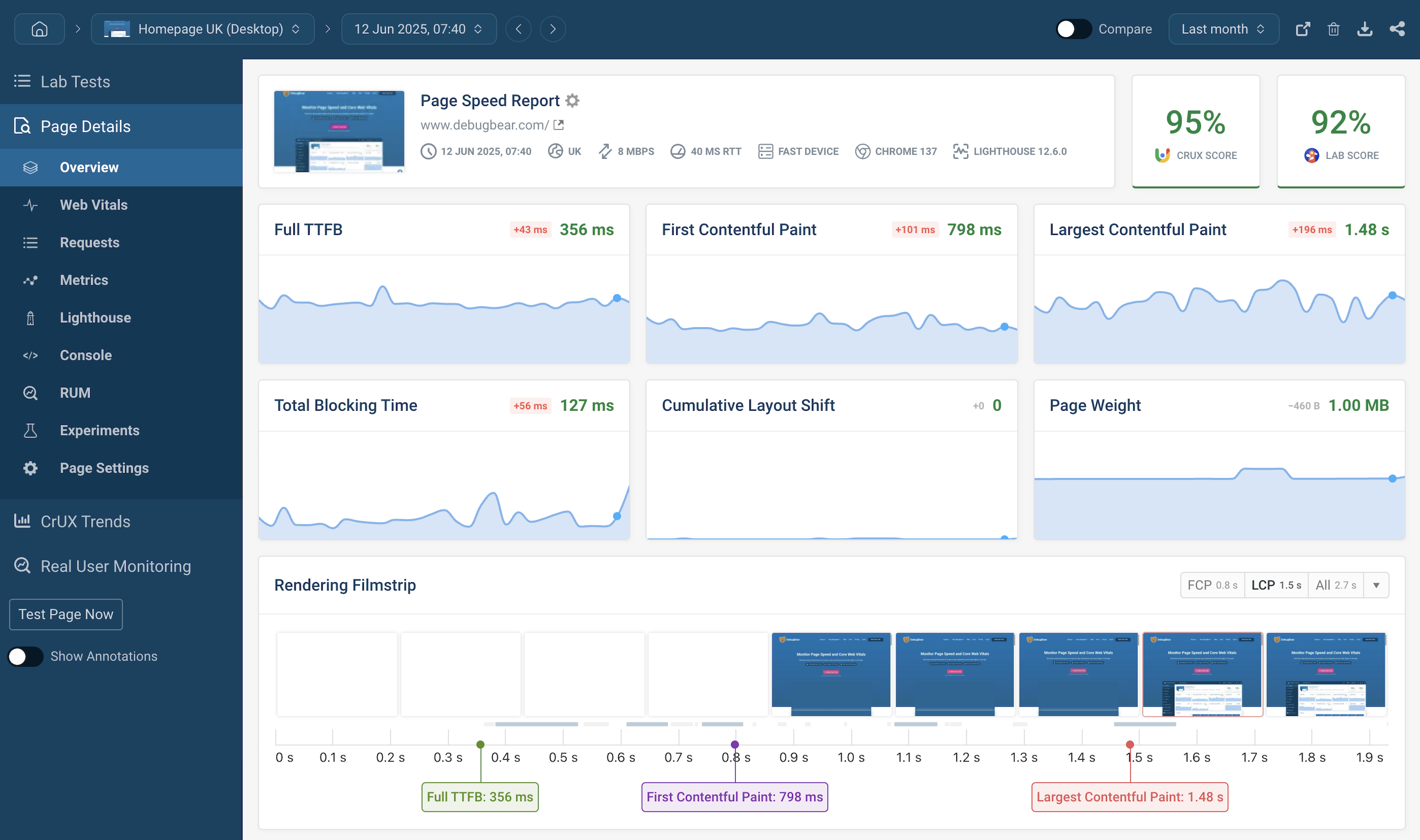
Core Web Vitals are key metrics to measure website speed and user experience. Google uses these metrics to rank websites. Understanding these helps improve site performance and visitor satisfaction. Each metric focuses on a different aspect of user interaction and loading quality.
LCP measures how long it takes for the largest visible content to load. This could be an image, video, or block of text. A fast LCP means visitors see meaningful content quickly. Aim for LCP to happen within 2.5 seconds for a good user experience.
FID measures the time between a user’s first interaction and the browser’s response. It shows how quickly a site reacts to clicks or taps. INP is a newer metric that measures responsiveness for all interactions. Low FID and INP values mean users can interact smoothly without delays.
CLS tracks unexpected layout shifts during page loading. These shifts cause page elements to move suddenly, annoying users. A low CLS score means the page layout is stable. Keep CLS below 0.1 to ensure a smooth visual experience without sudden jumps.
Credit: www.debugbear.com
Common speed issues affect how fast your website loads and how users interact with it. These problems can hurt your Core Web Vitals scores, which Google uses to rank sites. Identifying these issues helps improve user experience and search rankings.
Slow server response time delays the start of page loading. It causes visitors to wait longer before seeing any content. Factors include poor hosting, overloaded servers, or slow database queries. Fixing this means choosing better hosting or optimizing backend processes.
Render-blocking resources stop the browser from showing page content quickly. CSS and JavaScript files often block rendering until fully loaded. This creates a blank screen for users. Reducing or deferring these resources speeds up initial page display.
Large or uncompressed images take more time to load. They consume bandwidth and slow down page speed. Using the right image formats and compressing files reduces load time. Responsive images also help by loading smaller files on mobile devices.
Too much JavaScript or many third-party scripts can delay page interaction. Scripts run in the background and block other tasks. Removing unused scripts and limiting third-party tools improves speed. Loading scripts asynchronously also reduces delays.
Unexpected layout shifts happen when elements move during page load. This causes a poor user experience and lowers your visual stability score. Reserving space for images and ads prevents shifts. Avoid inserting new content above existing content.
Images play a big role in website speed. Proper image optimization helps pages load faster. It improves Core Web Vitals scores and enhances user experience.
Optimizing images means selecting the right format, loading them smartly, and reducing file sizes. Each step cuts down loading time. Here are some key techniques to optimize images effectively.
Select the best image format for your content. Use JPEG for photos with many colors. PNG works well for images with transparency. WebP offers better compression and quality. It loads faster and saves bandwidth. Using modern formats reduces image size without losing clarity.
Lazy loading delays image loading until they appear on screen. This method saves resources and speeds up initial page load. It helps especially on pages with many images. Browsers load only visible images first. Others load as the user scrolls down. This reduces unnecessary data use and improves performance.
Compress images to lower file size without visible quality loss. Tools like TinyPNG or ImageOptim can help. Resize images to match display size. Avoid using large images that get scaled down by the browser. Smaller images load faster and reduce bandwidth. This technique directly improves page speed and Core Web Vitals.

Credit: zaidapp.com
JavaScript and CSS play a big role in website speed and user experience. Optimizing these files helps improve Core Web Vitals. Faster loading pages keep visitors happy and reduce bounce rates.
Small changes in JavaScript and CSS can greatly boost your site’s performance. Focus on reducing load times and blocking scripts that delay content display. Proper management of these resources is key for a smooth browsing experience.
Minimizing JavaScript means removing extra spaces, comments, and unused code. This reduces file size and speeds up loading. Deferring scripts delays their execution until after the main content loads. This avoids blocking the page rendering, making pages appear faster.
Use the defer attribute on script tags to load JavaScript after HTML parsing. Avoid placing heavy scripts in the head section. Load essential scripts first, and defer non-critical ones to improve speed and user interaction.
Remove JavaScript that does not add value or is rarely used. Extra scripts increase load times and can slow down the page. Audit all scripts and delete those that do not improve functionality.
Limit third-party scripts like widgets or trackers. Use only what is necessary. This keeps the site light and responsive. A lean JavaScript setup helps meet Core Web Vitals requirements effectively.
Load only the CSS needed for the visible part of the page first. This practice is called critical CSS. It speeds up the time to first render by reducing CSS blocking.
Combine multiple CSS files into one to reduce HTTP requests. Minify CSS by removing spaces and comments to shrink file size. Use media queries to load style sheets only when needed, saving bandwidth and improving speed.
Server and hosting improvements play a vital role in boosting website speed. They affect how fast your web pages load and respond to users. Enhancing your server setup ensures smoother user experiences and better Core Web Vitals scores. Small changes here can reduce delays and speed up content delivery.
A CDN stores your website files on servers worldwide. It serves content from the closest server to your visitor. This cuts down the distance data travels, making pages load faster. CDNs also reduce the load on your main server. This improves speed and handles more visitors without slowing down.
TTFB measures the time a browser waits for the first byte of data from the server. A lower TTFB means quicker server response and faster page load. Optimize server settings and use fast hosting to lower TTFB. Avoid slow database queries and heavy scripts that delay response time.
Browser caching stores parts of your website on a visitor’s device. This lets returning visitors load pages faster since files are already saved. Set proper cache-control headers in your server. Define expiry times for images, CSS, and scripts. This reduces repeat requests and speeds up your site.
Layout shifts disrupt the user experience by moving page elements unexpectedly. Reducing these shifts improves visual stability and user satisfaction. Google measures layout shifts as part of Core Web Vitals under Cumulative Layout Shift (CLS). Lower CLS scores mean your website feels smoother and more reliable.
Focus on key areas that cause layout shifts. Properly sizing images and videos helps reserve space before they load. Avoid adding content dynamically after the page loads, which can push other elements around. Manage fonts and animations carefully to prevent sudden changes in layout.
Always set width and height attributes for images and videos. This practice reserves space on the page before these media files load. The browser knows exactly how much space to allocate. It stops other content from shifting when media appears.
Use CSS aspect ratio boxes if media sizes vary. This method keeps consistent space for different screen sizes. It reduces unexpected jumps and improves layout stability.
Dynamic content like ads or pop-ups can cause layout shifts if injected late. Place such content in reserved containers with fixed sizes. This way, the space is already set and does not push other content around.
Load dynamic content asynchronously but avoid inserting it above visible content. This prevents shifts in the user’s viewport. Test your site with different content to ensure smooth loading.
Fonts can cause layout shifts if they load after text is displayed. Use font-display: swap in CSS to show fallback fonts immediately. Then swap in custom fonts without moving text around.
Keep animations subtle and avoid layout-changing effects. Animate opacity or transform properties instead of size or position. This approach maintains layout stability while adding visual interest.
Testing and monitoring tools are essential for improving website speed and Core Web Vitals. They help identify issues that slow down your site. These tools provide clear data on loading times, interactivity, and visual stability. Use them regularly to track your website’s performance. This helps maintain a fast, user-friendly experience for visitors.
Google PageSpeed Insights analyzes your website’s speed on desktop and mobile. It measures Core Web Vitals like Largest Contentful Paint and Cumulative Layout Shift. The tool gives a score and detailed suggestions to fix speed problems. Use this tool to find quick wins and monitor your site’s progress over time.
The Web Vitals Chrome Extension shows real-time Core Web Vitals metrics as you browse. It tracks metrics like First Input Delay and Largest Contentful Paint on any page. This tool helps spot issues during development or testing. It is simple to use and offers immediate feedback on your site’s user experience.
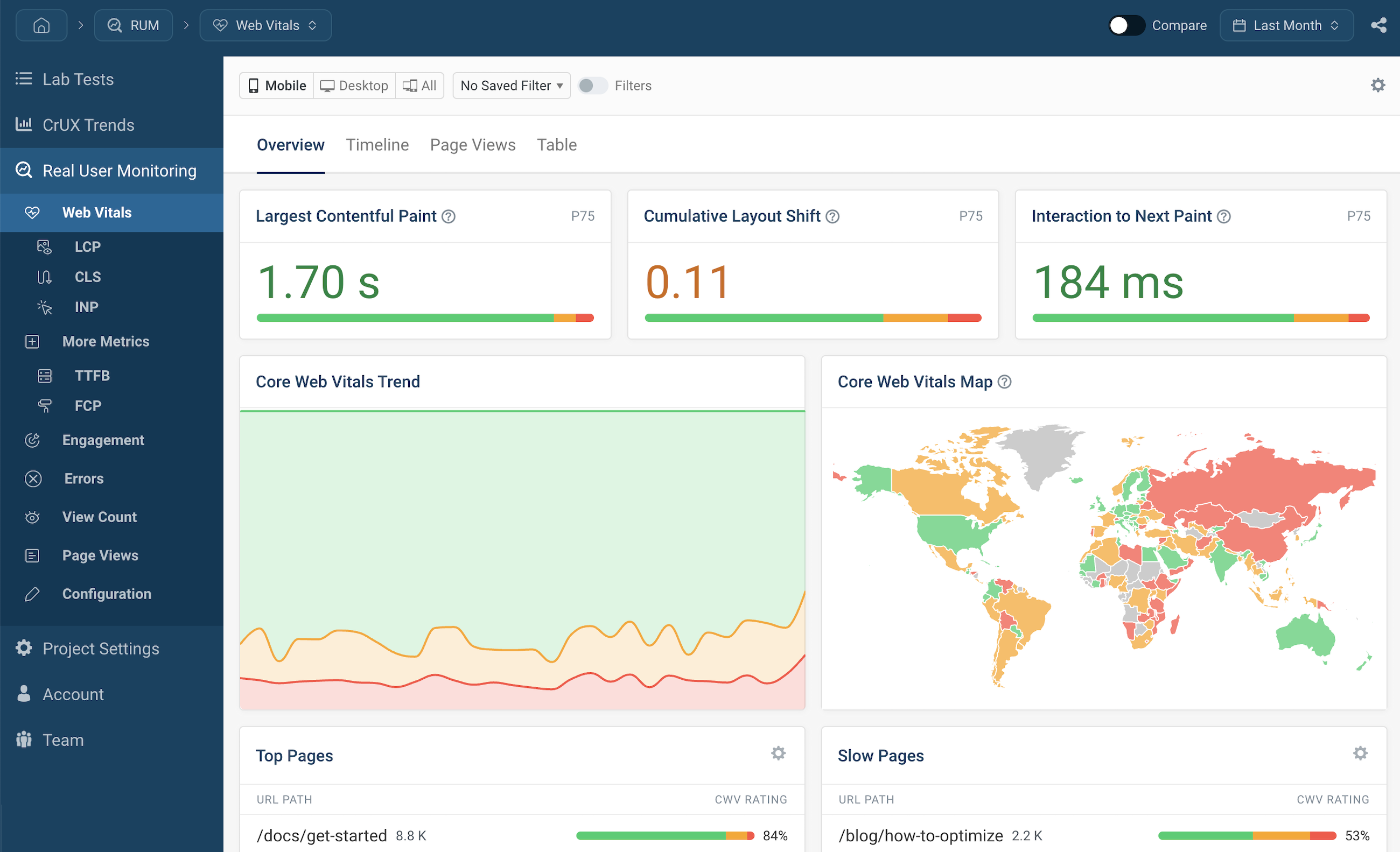
Sentry and DebugBear are powerful monitoring tools for deeper performance insights. Sentry tracks errors and performance issues across your site’s code. DebugBear focuses on Core Web Vitals and page speed monitoring with detailed reports. Both tools alert you to problems before users notice. They support ongoing optimization and faster troubleshooting.
Credit: www.debugbear.com
Improving website speed quickly helps users stay engaged and reduces bounce rates. Small changes can create noticeable improvements in Core Web Vitals. Focus on simple, effective actions that enhance loading time and interactivity. These practical tips address common speed issues and improve user experience fast.
Long tasks block the main thread and delay user interaction. Split big scripts into smaller chunks to let the browser process faster. Use techniques like requestIdleCallback or setTimeout to spread work over time. This reduces input delay and keeps the page responsive.
Each HTTP request takes time and slows down loading. Reduce the number of requests by combining CSS and JavaScript files. Use image sprites or inline small images as base64. Limit external scripts and fonts to only what is necessary. Fewer requests speed up the page.
Load important files first to improve the Largest Contentful Paint (LCP). Use preload tags for key CSS and fonts. Place critical JavaScript at the bottom or defer non-essential scripts. Inline critical CSS to render above-the-fold content faster. Prioritizing resources helps content appear quickly.
Optimize Core Web Vitals by reducing JavaScript, prioritizing LCP resources, using a CDN, minimizing layout shifts, and enabling lazy loading.
Increase website speed by optimizing images, minimizing HTTP requests, enabling browser caching, and reducing render-blocking JavaScript. Use a CDN, limit external scripts, and improve server response time for better performance.
Poor Core Web Vitals scores result from slow loading, excessive JavaScript, large images, layout shifts, and slow server response times.
Improve Core Web Vitals by optimizing images, reducing JavaScript, prioritizing server response, and minimizing layout shifts. Use lazy loading and browser caching.
Improving website speed boosts user experience and search rankings. Focus on key Core Web Vitals metrics like loading time, interactivity, and visual stability. Use simple steps: optimize images, reduce JavaScript, and enable caching. Regularly test your site to catch issues early.
Fast, smooth websites keep visitors engaged and reduce bounce rates. Small changes can make a big difference over time. Keep your site clean and efficient for lasting results. Consistent effort leads to better performance and happier users.







Leave A Reply Now