



Are you tired of juggling countless tasks just to deliver your course and support your students effectively? Imagine freeing up your time while providing a seamless learning experience that keeps your students engaged and satisfied.
Automating your course delivery and support isn’t just a smart move—it’s a game changer. You’ll discover simple, practical steps to set up automation that works for you, helping you save time, reduce errors, and boost student success. Keep reading to unlock the secrets to smarter course management and support that feels personal—even when it’s automated.
Automating course delivery offers many benefits for educators and learners. It simplifies managing courses and supports students more efficiently. Automation helps improve the overall learning process while reducing workload and errors.
Automation handles repetitive tasks like enrolling students and sending reminders. This frees up time for instructors to focus on teaching. It also reduces the need for extra staff, saving costs. Courses can run smoothly without constant manual work.
Automated systems provide instant feedback and support to learners. Students get access to course materials anytime, anywhere. This flexibility fits different learning styles and schedules. Automated communication keeps learners engaged and informed throughout the course.
Manual tasks often cause mistakes in grading and data entry. Automation ensures accuracy in these processes. It tracks progress and updates records correctly every time. This reliability builds trust and improves course quality.
Credit: zalaris.com
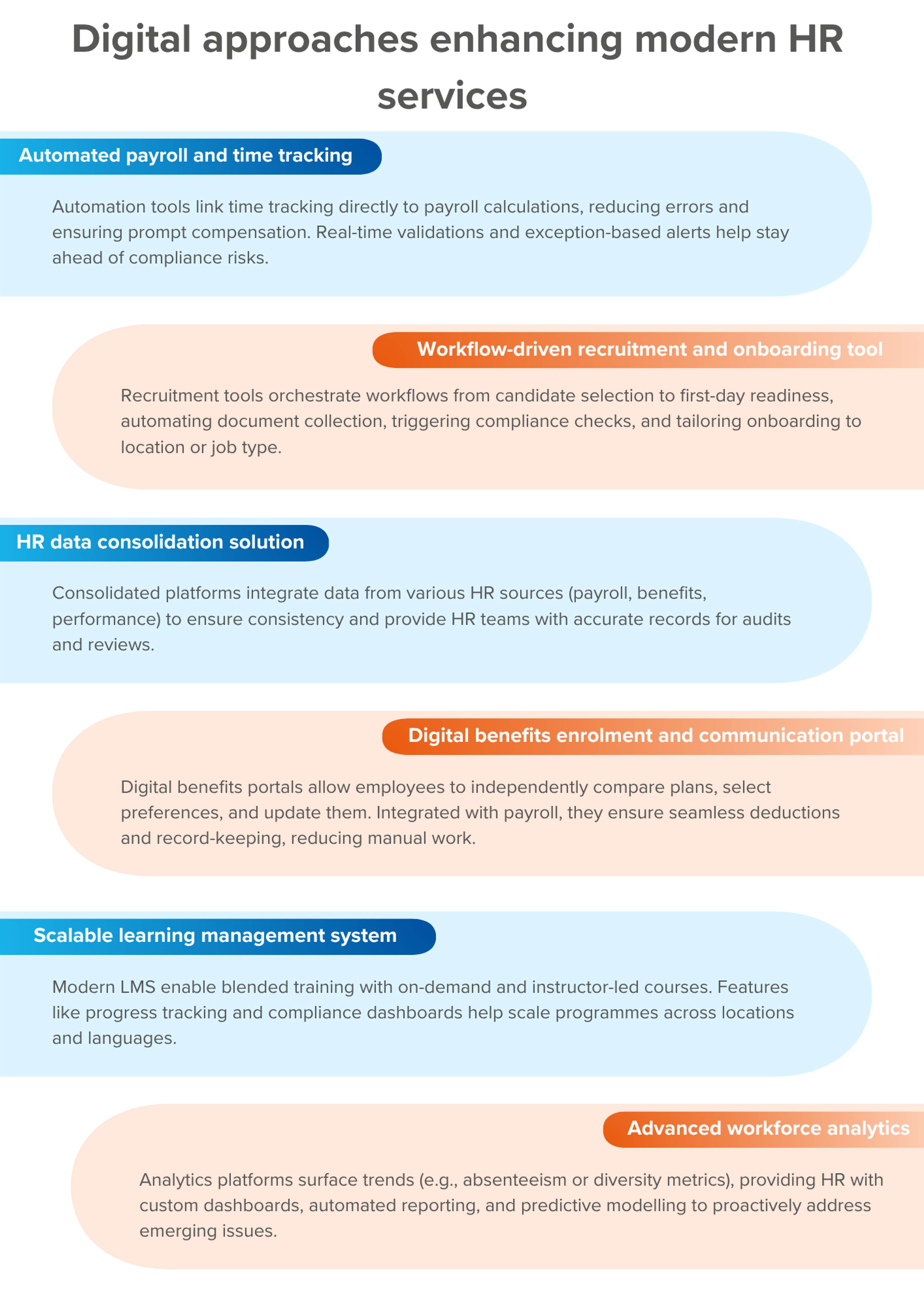
Automation tools simplify course delivery and learner support. They save time and improve student experience. Choosing the right tools helps streamline tasks and keep learners engaged.
Learning Management Systems (LMS) organize and deliver online courses. They host content, track progress, and manage enrollments. LMS platforms allow automatic notifications and reminders. This helps keep students on schedule without manual follow-up. Popular LMS options include Moodle, Canvas, and TalentLMS. These systems support multimedia lessons and quizzes for interactive learning.
Chatbots answer common student questions instantly. They provide 24/7 support without human help. Virtual assistants guide learners through course navigation and resources. These tools reduce response time and free up staff for complex issues. They use simple language to ensure clear communication. Chatbots can handle FAQs, deadlines, and technical issues efficiently.
Automated assessment platforms grade quizzes and assignments quickly. They provide instant feedback to students for faster learning. These tools reduce grading errors and save instructors time. Many platforms support multiple question types like multiple choice and essays. Automated assessments keep the evaluation process consistent and fair. They also track learner performance over time for better insights.
Automating course content delivery saves time and improves the learning experience. It ensures students get the right materials at the right time. Automation reduces manual tasks for instructors and keeps learners engaged consistently.
Automation systems can handle scheduling, personalize learning paths, and distribute content efficiently. These features create a smooth and organized course flow. They help maintain student motivation and track progress easily.
Automation manages course schedules without manual input. It enrolls students based on set rules and deadlines. Automatic reminders notify students about upcoming classes or deadlines.
This process reduces errors and delays. It allows students to start courses instantly after registration. Instructors can focus on teaching instead of enrollment tasks.
Automated systems tailor course content to each student’s needs. They adjust lessons based on progress and preferences. This keeps students challenged without feeling overwhelmed.
Personalized paths increase engagement by matching content to skill levels. Students receive feedback and new tasks automatically. This creates a more effective and enjoyable learning journey.
Automation delivers course materials through multiple channels. These include email, learning platforms, and mobile apps. Content reaches students at scheduled times or after completing tasks.
Techniques like drip content release small sections regularly. This prevents information overload and keeps learners focused. Automation tracks content access to ensure students stay on track.

Credit: papers.govtech.com
Streamlining student support is essential for smooth course delivery. Automated systems reduce wait times and improve student satisfaction. Efficient support helps students focus on learning without distractions. This section highlights key tools to simplify student assistance.
Automated FAQs provide instant answers to common questions. They save time for both students and instructors. Help desks powered by AI can guide students through typical issues. These systems are available 24/7, offering constant support. Clear, well-organized FAQs reduce repetitive queries effectively.
Real-time chatbots handle student questions immediately. They use natural language to understand and respond quickly. This instant communication keeps students engaged and supported. Complex questions can be routed to human agents seamlessly. Fast responses prevent frustration and keep students motivated.
Automated feedback tools collect student opinions effortlessly. Surveys can be sent after each module or course completion. This data helps improve course content and teaching methods. Automated reminders increase response rates without manual follow-up. Regular feedback ensures the course meets student needs continuously.
Integrating hybrid and online delivery allows educators to reach students beyond traditional classrooms. Combining in-person and digital learning creates flexibility and accessibility. This approach supports diverse learning styles and schedules. Automating course delivery in this setup improves efficiency and student experience. Technology plays a key role in blending these methods smoothly.
Use synchronous tools for live interaction and real-time feedback. Examples include video calls, live chats, and virtual whiteboards. Asynchronous tools let students learn at their own pace. These include recorded lectures, discussion boards, and quizzes. Combining both types keeps students engaged and supports different learning needs. Automation can schedule sessions and send reminders to keep things on track.
Organize content to serve both in-person and online students equally. Use learning management systems (LMS) to centralize materials and assignments. Automate attendance tracking and participation monitoring. Clear communication channels help manage questions and support requests. Tools like chatbots and automated emails reduce the instructor’s workload. This creates a seamless experience for all learners.
Analytics provide insights into student participation and progress. Track metrics such as login frequency, assignment completion, and time spent on materials. Use data to identify students who need extra help. Automation can generate reports and alerts for instructors. These insights help improve course content and teaching strategies. Regular monitoring ensures students stay motivated and supported.
Implementing automation in course delivery and support requires careful planning. Following best practices helps ensure smooth integration and effective results. Focus on selecting the right tools, preparing your team, and protecting sensitive information throughout the process.
Start by identifying your course’s specific needs. Look for automation tools that fit those requirements. Prioritize platforms that are user-friendly and easy to integrate. Check for features like automated grading, communication, and progress tracking. Test solutions with small groups before full implementation. Consider scalability for future growth and updates. Choose providers with reliable customer support and clear documentation.
Provide thorough training on new automation tools. Use simple guides and hands-on sessions for better understanding. Encourage questions and offer ongoing support. Ensure instructors know how to monitor automated processes effectively. Keep training short and focused on essential functions. Regularly update staff on new features or changes. Empower instructors to assist students with automated systems.
Protecting student data is crucial during automation. Use tools that comply with data protection laws and standards. Implement strong password policies and multi-factor authentication. Limit access to sensitive information based on roles. Regularly back up data to avoid loss. Monitor systems for unusual activity or breaches. Educate staff and students about privacy best practices. Ensure transparency about data collection and usage.
Automating course delivery and support brings many benefits but also some common challenges. These challenges can affect the learner’s experience and the smooth running of your course. Finding practical solutions helps keep automation effective and user-friendly. Below are key challenges and ways to solve them.
Technical problems can stop course delivery or frustrate learners. Common issues include platform errors, slow loading times, and broken links. Regularly test your system to spot problems early. Use simple guides and FAQs to help learners fix minor issues themselves. Also, keep a support team ready to handle complex problems quickly.
Automation should work for every learner, including those with disabilities. Make sure videos have captions and transcripts. Use clear fonts and high-contrast colors. Check that all interactive elements are keyboard-friendly. Test your course with accessibility tools to find and fix barriers. This improves learning for everyone and meets legal standards.
Automation saves time but can feel cold without personal contact. Blend automated messages with live support options. Offer scheduled live Q&A sessions or office hours. Encourage learner feedback and respond personally when needed. This balance builds trust and makes learners feel valued throughout their journey.
Measuring success and return on investment (ROI) in automated course delivery helps you understand the true impact. It shows how well your automation saves time and improves learner experience. Tracking these metrics guides better decisions and strategy improvements. Focus on efficiency, satisfaction, and feedback to get clear insights.
Start by measuring time saved on course delivery tasks. Automation should reduce manual work for instructors and support teams. Track metrics such as response time to learner queries and content update speed. Compare these numbers before and after automation. Efficiency gains often translate into cost savings and faster course updates.
Gather learner feedback regularly to see how automation affects their experience. Use surveys, ratings, and direct comments to gauge satisfaction. Monitor completion rates and engagement levels as indirect signs of satisfaction. Happy learners tend to stay longer and perform better. Automated support should feel helpful, not robotic.
Use learner input and efficiency data to improve your automation processes. Identify pain points and areas needing more human touch. Update your workflows and tools to fix issues quickly. Continuous adjustment keeps your course delivery relevant and effective. This approach maximizes your ROI by aligning automation with real needs.
Credit: www.diabetotech.com
Automation in service delivery uses technology to streamline tasks like ticketing, queries, and request resolution. It improves efficiency and customer experience.
Course delivery methods include face-to-face, online (asynchronous and synchronous), hybrid, and flexible formats like HyFlex or self-paced learning.
Automate employee training by using learning management systems (LMS), scheduling automated reminders, and integrating e-learning modules. Track progress with analytics and provide instant feedback to enhance learning efficiency.
Yes, AI can automate tasks like data entry, customer support, scheduling, and repetitive workflows. It boosts efficiency and saves time.
Automating course delivery and support saves time and reduces errors. It helps you provide quick answers to students’ questions. Automation tools keep courses organized and easy to update. Students enjoy learning without delays or confusion. Start small by automating simple tasks first.
Gradually add more features as you grow confident. Automation makes your teaching process smoother and more efficient. It lets you focus on creating great content. Embrace automation to improve both teaching and learning experiences.







Leave A Reply Now