


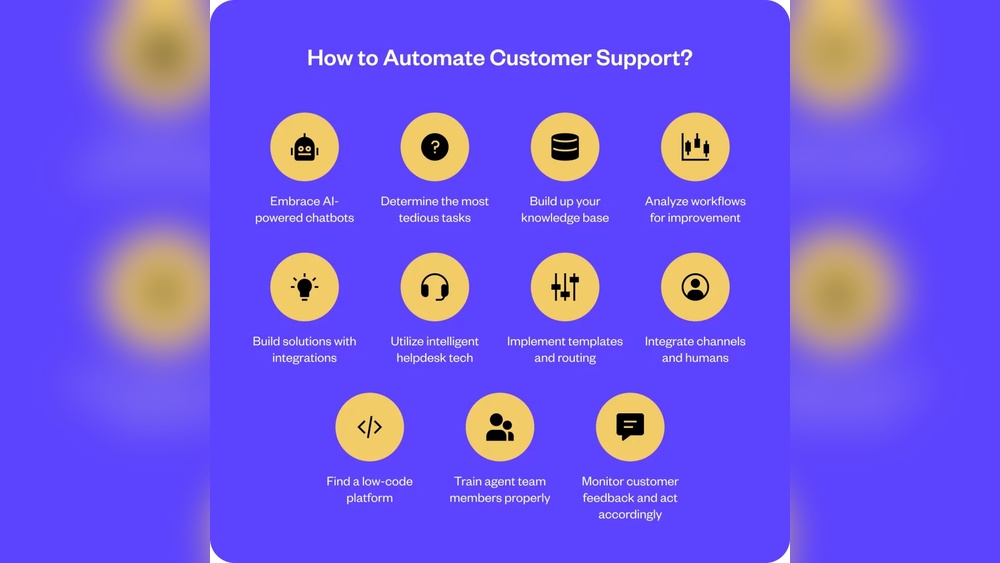
Are you tired of spending hours on the same repetitive tasks in your custom service workflows? Imagine freeing up that time to focus on what truly matters—solving complex problems and delighting your customers.
Automating these routine tasks isn’t just a nice-to-have; it’s a game-changer that can boost your productivity and reduce costly errors. You’ll discover simple, practical ways to automate your service workflows without needing a tech degree or expensive tools. Keep reading to unlock strategies that will transform your daily work and give you back control over your time.
Automation in custom service workflows brings many benefits. It helps make work easier and more reliable. Repetitive tasks that take time can be done faster and with fewer mistakes. This improves the overall quality and efficiency of service teams. Below are key advantages of using automation in your workflows.
Manual work often causes errors. People can miss details or enter wrong information. Automation follows set rules every time. This consistency lowers the chance of mistakes. It also improves data accuracy and customer satisfaction. Fewer errors mean fewer delays and complaints.
Automation handles routine tasks quickly. This frees up staff to focus on harder problems. It reduces the need for extra workers or overtime. Workloads become manageable and less stressful. Companies save money by using fewer resources on simple tasks.
Automated workflows respond faster to requests. Tasks like data entry and notifications happen instantly. Customers get answers and solutions without long waits. Faster service boosts customer trust and loyalty. It also helps your team meet deadlines with ease.
Identifying repetitive tasks is the first step in automating custom service workflows. These tasks consume time and slow down your team. Spotting them helps improve efficiency and reduces errors. Automation frees staff to focus on more complex work. It also speeds up service delivery.
Many service workflows include tasks repeated daily or weekly. Examples are data entry, status updates, and sending notifications. Routine checks and report generation also happen frequently. These tasks follow clear steps and rules. Their predictability makes them good candidates for automation.
Check how often a task occurs in your workflow. Tasks done many times use more resources and time. Next, assess the impact of errors in these tasks. Mistakes in frequent tasks can cause delays and customer dissatisfaction. Prioritize automating tasks with high frequency and impact. This approach brings the best results fast.
Choosing the right tools is essential for automating repetitive tasks in custom service workflows. The right software can save time, reduce errors, and improve overall efficiency. Selecting tools that fit your specific needs ensures smooth integration and better results.
Consider the scale of your tasks and the complexity of your workflows. Some tools offer simple drag-and-drop interfaces, while others provide advanced features for complex automation. Understanding these differences helps in making a smart choice.
Workflow automation platforms provide user-friendly environments to build and manage automated processes. They allow you to map out tasks and set rules without coding. These platforms often include templates for common service tasks, speeding up setup time. Popular platforms support notifications, approvals, and task assignments. They work well for teams wanting to improve routine service steps quickly.
Robotic Process Automation uses software bots to mimic human actions on digital systems. RPA is ideal for repetitive tasks involving multiple applications or data entry. It can handle tasks like form filling, data extraction, and report generation. RPA bots work 24/7 without breaks, increasing productivity. This tool suits workflows that need high accuracy and fast execution.
Integrations connect different software systems to share data automatically. APIs (Application Programming Interfaces) enable these connections by providing a set of rules. Using integrations and APIs lets you link your CRM, help desk, and other tools. This reduces manual work and ensures data stays consistent across platforms. Choose tools with strong API support for flexibility and scalability.
Credit: blog.happyfox.com
Designing automated workflows is a key step in improving custom service processes. It involves creating a clear plan that guides how tasks move through the system without manual help. Good design saves time, reduces errors, and ensures consistent results.
Automation works best when the workflow matches real needs. Start by understanding the current process fully. Then decide where automation fits and how it should act at each step. Clear rules and decisions help the system handle tasks smoothly.
Begin by listing all steps in the current service workflow. Note every action, who does it, and how long it takes. Use flowcharts or diagrams to visualize the process clearly. Mapping helps spot repetitive or slow tasks that automation can improve.
Include all teams and systems involved. Look for handoffs and bottlenecks. This map becomes the foundation for building your automated workflow. It ensures no important step is missed or duplicated.
Identify points where the workflow splits based on conditions or choices. These decision points guide the automation on what to do next. For example, if a request is urgent, it may follow a different path than a routine one.
Define clear rules for these decisions. Keep them simple to avoid confusion. Good decision points help the system handle varied cases and exceptions without human input.
Create specific rules that tell the system when and how to act. These include triggers, conditions, and actions. For instance, a rule might say, “If a ticket is open for more than 24 hours, send a reminder.”
Use clear, easy-to-understand language for rules. Test each rule to confirm it works as expected. Well-set rules make the workflow reliable and efficient, reducing manual work significantly.
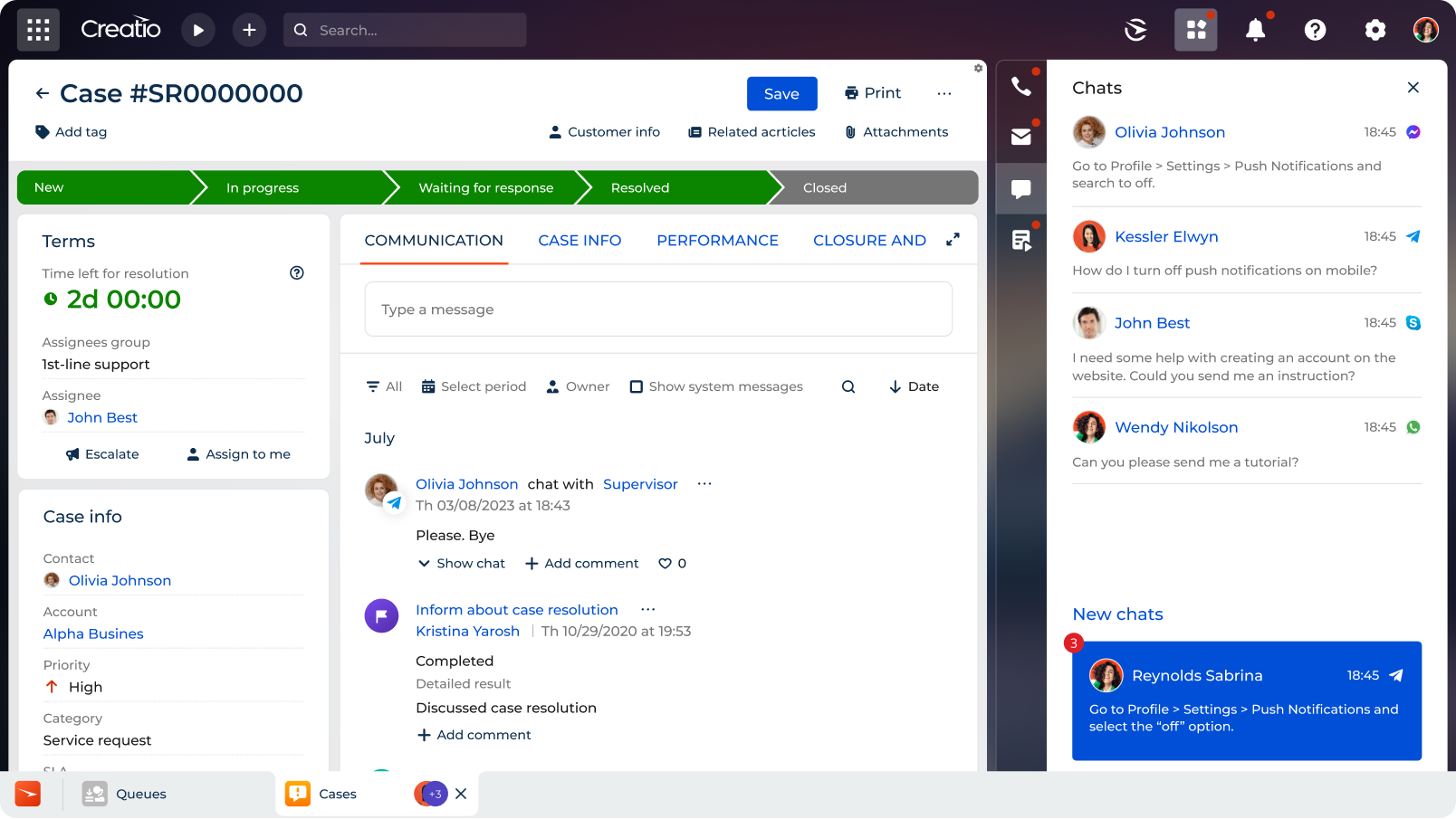
Implementing automation in custom service workflows simplifies daily operations. It helps reduce errors and saves time. Automation improves consistency and allows teams to focus on important tasks. The process starts with small steps and grows over time. Testing and refining ensure the system works smoothly. Gradual scaling avoids overwhelming the team or systems.
Begin by identifying simple, repetitive tasks. These tasks often take the most time but require little decision-making. Automate basic actions like sending emails or updating records first. Small wins build confidence and show clear benefits. This approach keeps the setup manageable and reduces risk.
Test automated workflows in a controlled environment. Look for errors or delays in task execution. Gather feedback from users to spot issues. Adjust steps to improve accuracy and speed. Regular refinement ensures the automation adapts to real needs. This step is key to smooth, reliable operations.
Once small tasks run well, add more complex steps. Introduce automation to tasks involving multiple teams or systems. Scale in stages to avoid disruptions. Monitor performance closely during each phase. Gradual growth helps maintain control and improve results steadily.
Credit: www.creatio.com
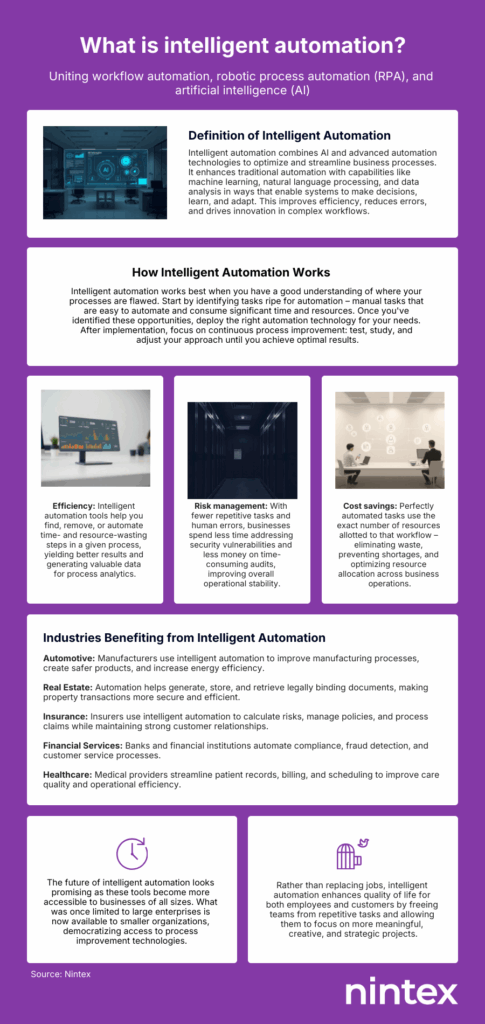
Artificial intelligence (AI) changes how businesses automate repetitive tasks. It brings smart tools to custom service workflows. AI can identify patterns and make decisions faster than manual methods. This saves time and reduces errors. Using AI helps teams focus on more complex work. It also improves customer satisfaction by speeding up responses.
AI scans incoming requests to detect task types automatically. It reads emails, messages, and forms to understand customer needs. This helps sort tasks without human help. AI recognizes common issues and flags urgent ones. It routes tasks to the right team or system. This reduces delays and avoids manual sorting mistakes.
AI generates quick replies for simple questions. Chatbots and virtual assistants use AI to answer FAQs instantly. This lowers response time and frees staff from repetitive replies. AI also suggests solutions based on past cases. It can close routine tickets automatically. This speeds up the resolution process and maintains service quality.
AI tracks workflow performance and customer feedback continuously. It learns which tasks take longer and spots bottlenecks. Over time, AI improves its accuracy and suggestions. This helps refine automation rules and task handling. The system adapts to changes without constant manual updates. Data-driven insights lead to smarter workflows and better results.
Automating repetitive tasks in custom service workflows improves efficiency and saves time. Yet, challenges appear during implementation. These challenges need careful handling to keep automation effective and smooth. Understanding common obstacles helps avoid delays and errors.
This section discusses key challenges and ways to overcome them. Focus areas include adapting to workflow changes, protecting data, and helping employees adjust.
Service workflows often evolve due to new business needs or regulations. Automation systems must adapt quickly to these changes. Use flexible automation tools that allow easy updates. Regularly review workflows to spot needed adjustments early. Testing changes before full deployment prevents errors. Keep documentation updated to help teams follow new processes.
Automated workflows process sensitive customer and business data. Protecting this data is critical to avoid breaches and maintain trust. Use encryption for data at rest and in transit. Limit access to automation tools based on roles. Monitor systems for suspicious activity continuously. Comply with data protection laws relevant to your industry and location.
Employees may resist automation out of fear or uncertainty. Clear communication about benefits helps reduce anxiety. Offer training sessions to build confidence with new tools. Involve staff in planning to gain their support. Provide ongoing help and feedback channels. Recognize efforts and improvements during the transition period.
Measuring automation success is key to knowing if your efforts bring real benefits. It helps you see how well automated tasks improve your custom service workflows. Tracking results guides better decisions and shows where to focus next.
Clear metrics give a true picture of efficiency, customer happiness, and areas that need work. This section covers how to track these important factors.
Start by measuring time saved on tasks. Compare how long tasks took before and after automation. Note the number of errors reduced. Check how many tasks complete without human help. Use software tools to gather this data automatically. Efficiency gains prove automation cuts down workload and speeds service.
Customer happiness shows if automation improves their experience. Collect feedback through surveys after service. Watch for changes in response times and issue resolution rates. Monitor repeat contacts for the same problem. Positive trends mean automation helps customers, while drops suggest needed fixes.
Use data to refine your automation processes. Identify tasks that still need manual work. Test new automation steps on small groups first. Collect feedback from employees and customers regularly. Update workflows based on results and changing needs. Continuous improvement keeps automation effective and relevant.
Credit: www.nintex.com
Common repetitive tasks include data entry, email responses, status updates, and report generation. Automating these saves time and reduces errors in service workflows.
Automation speeds up responses, ensures consistency, and frees agents to focus on complex issues. This enhances overall service quality and customer satisfaction.
Popular tools include RPA software, workflow builders like ServiceNow, and AI-powered chatbots. These platforms streamline tasks and integrate easily into existing systems.
Start by mapping your workflow, identifying repetitive tasks, and selecting automation tools that fit your needs. Begin small to test and scale gradually.
Automating repetitive tasks saves time and reduces errors in workflows. Start small by choosing one task to automate first. Use simple tools that fit your needs and skills. This approach helps improve service speed and consistency. Keep refining automation to handle more tasks over time.
The right automation makes your work easier and more efficient.







Leave A Reply Now