


Are you ready to take your course to the next level? Designing course PDFs, worksheets, and resources can feel overwhelming, but with the right approach, you can create materials that truly engage your learners and make complex ideas easy to grasp.
Imagine having clear, well-structured worksheets and resources that not only support your teaching but also inspire your students to dive deeper into the subject. You’ll discover practical tips and proven strategies to design effective course materials that keep your audience focused and motivated.
Whether you’re building a new course or refining an existing one, these insights will help you craft PDFs and worksheets that deliver real value—and keep your learners coming back for more. Ready to transform your course content? Let’s get started!
Course planning is the foundation of effective learning materials. It guides the creation of PDFs, worksheets, and resources that truly support students. Clear planning ensures every element has a purpose. This saves time and makes courses more engaging. Focus on the essentials to build a strong framework for your course.
Start by defining what learners should achieve. Objectives guide content creation and assessments. Use simple language to state goals. Make objectives specific and measurable. Clear aims help learners understand what to expect. They also keep the course focused and organized.
Know who your learners are before designing materials. Consider their age, skill level, and interests. Tailor content to match their needs and abilities. Understanding your audience helps select relevant examples and activities. This makes learning easier and more enjoyable for them.
Organize topics in a logical order. Begin with basic ideas, then build to complex concepts. Break content into small, manageable sections. Use headings and bullet points for clarity. This structure helps learners follow along and retain information. Well-structured content improves overall learning success.
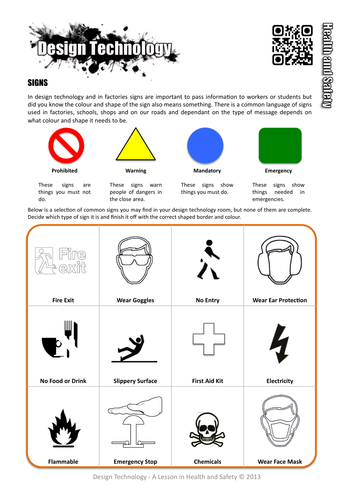
Credit: www.tes.com
Creating effective PDFs is key for course materials that students can easily read and use. A well-designed PDF improves learning and keeps users engaged. It requires clear layout, smart visuals, and fast loading. These factors make your worksheets and resources practical and enjoyable.
Use simple fonts like Arial or Helvetica for clear text. Keep font size at least 12 points for easy reading. Break content into short paragraphs and use bullet points. Maintain consistent spacing to avoid clutter. Use headings and subheadings to guide readers through the content. Avoid long sentences and complex words. White space helps separate sections and reduces eye strain.
Add charts, icons, and images to explain ideas quickly. Use high-quality visuals that match the content. Keep colors soft and limited to avoid distraction. Use contrast between text and background for easy reading. Place visuals near related text for better understanding. Avoid overcrowding pages with too many images. Visuals should support, not replace, the written content.
Compress images before adding them to keep files small. Use PDF optimization tools to reduce file size without losing quality. Large files load slowly and can frustrate users. Limit the number of embedded fonts to save space. Remove unnecessary elements like hidden layers or annotations. Test your PDF on different devices to ensure quick loading. A smaller file is easier to share and download.
Designing engaging worksheets is key to effective learning. Well-crafted worksheets help learners stay focused and absorb information better. They turn passive reading into active participation. This boosts understanding and retention. Good worksheets also make learning enjoyable and less stressful.
Creating worksheets that grab attention requires a thoughtful approach. The design must invite learners to interact and explore. Balance and clarity support easy comprehension. Accessibility ensures everyone can use the materials without barriers.
Interactive elements increase learner involvement. Include questions that prompt thinking or problem-solving. Use checkboxes, fill-in-the-blanks, or matching activities. These features make learners pause and reflect. They encourage active learning rather than passive reading.
Adding spaces for notes or doodles helps learners engage creatively. Interactive worksheets become tools for deeper understanding. This approach supports different learning styles and keeps interest alive.
Text and graphics must work together smoothly. Use short, clear sentences to explain ideas. Add relevant images, charts, or icons to support the text. Visuals break up large blocks of words and reduce fatigue.
Graphics should clarify concepts, not distract. Choose simple and clean designs that complement the content. Proper spacing between text and images improves readability. A balanced layout guides learners through the material effortlessly.
Accessibility is essential for inclusive education. Use readable fonts and large enough text size. Avoid color combinations that are hard to distinguish. Provide alternative text descriptions for images.
Design worksheets that work well on different devices and printers. Make sure content is easy to navigate. Accessible materials allow all learners to benefit equally. This respect for diversity strengthens the learning experience.

Credit: www.tes.com
Developing supporting resources enriches your course materials. These resources guide learners through the content. They help reinforce key concepts and encourage active participation. Well-crafted resources make learning clearer and more effective.
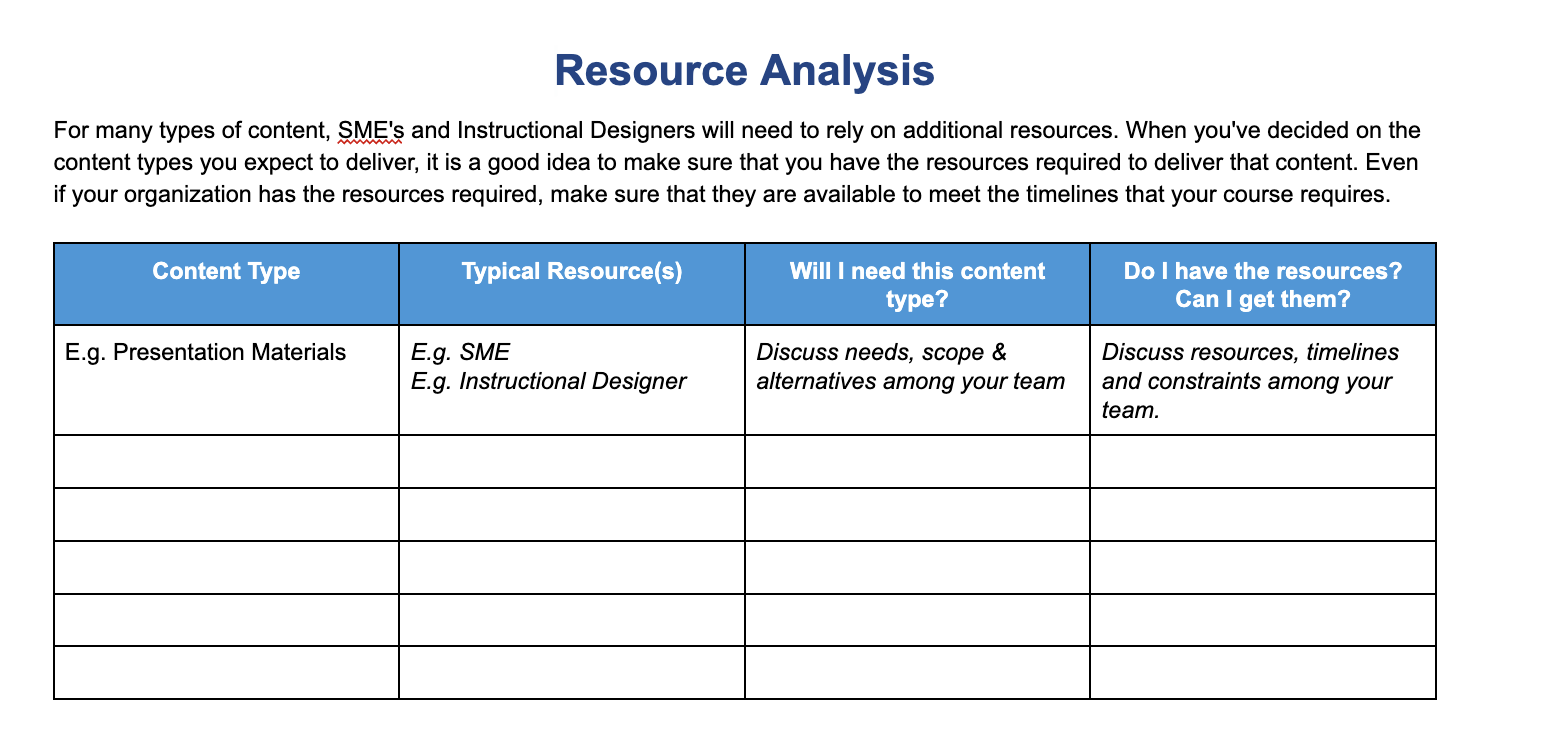
Checklists help students track their progress step-by-step. Templates provide a clear structure for assignments or projects. Both tools reduce confusion and save time. They allow learners to focus on understanding rather than organizing.
Quizzes test knowledge and reinforce learning points. Assessments measure how well students grasp the material. They provide instant feedback to guide improvement. Including these keeps learners engaged and motivated.
Practical projects let students apply what they have learned. They encourage hands-on experience and problem-solving skills. Projects make lessons more relevant and memorable. This approach builds confidence and deepens understanding.
Creating effective course PDFs, worksheets, and resources needs the right tools and software. These tools help organize content, improve visuals, and enhance learning experience. Choosing user-friendly and reliable software saves time and effort. This section explains essential tools for design, PDF creation, and teamwork.
Graphic design shapes how learners see your materials. Use simple tools to create clear layouts and visuals. Focus on typography, color, and spacing to improve readability. Programs like Canva and Adobe Spark offer easy templates. They help non-designers produce attractive worksheets fast. Good design guides attention and supports understanding.
PDFs keep your course materials consistent across devices. Tools like Adobe Acrobat and Nitro PDF allow easy editing and conversion. Free options such as Smallpdf and PDFescape work well for basic tasks. These tools enable adding links, images, and forms to PDFs. They help create interactive and printable resources for students.
Teamwork speeds up course development and improves quality. Platforms like Google Drive and Microsoft OneDrive let multiple users edit files simultaneously. They offer version control to track changes and avoid errors. Tools such as Trello and Asana organize tasks and deadlines. Collaboration software ensures smooth communication and resource sharing.
Credit: docs.openedx.org
Testing and feedback are essential steps in designing effective course PDFs, worksheets, and resources. These steps help ensure that your materials meet learners’ needs and support their success. Careful testing reveals gaps and areas that need improvement. Gathering feedback from actual users provides insights you might miss on your own.
Engaging learners early in the process lets you create clearer and more useful content. The goal is to refine the materials based on real experiences. This process saves time and effort in the long run. It also boosts learner satisfaction and learning outcomes.
Pilot testing involves sharing your course materials with a small group of learners. This group represents your target audience. Their interaction with the materials shows how well the content works. You can observe if instructions are clear and tasks are doable.
Use pilot testing to check layout, design, and flow. Note any confusion or errors that learners encounter. Pilot tests reveal practical challenges that need fixing. This step prevents bigger problems during full course delivery.
Collect feedback directly from learners after they use your materials. Surveys, interviews, or informal chats work well. Ask simple questions about clarity, usefulness, and engagement. Learners often suggest improvements you may not expect.
Focus on their experience, not just content accuracy. Pay attention to common themes in their feedback. Look for patterns in what helps or hinders learning. This input is key to making learner-centered resources.
Use feedback and test results to revise your materials. Fix unclear instructions, add examples, or simplify complex parts. Repeat testing after changes to confirm improvements. Each iteration makes your resources stronger and easier to use.
Small, steady updates lead to high-quality course PDFs and worksheets. Iteration also shows your commitment to creating helpful learning tools. Keep refining until learners find the materials clear and engaging.
Effective distribution strategies are essential for sharing course PDFs, worksheets, and resources. These strategies help ensure learners access materials easily. They also improve the overall learning experience. Choosing the right distribution method depends on the course goals and audience needs. This section covers digital delivery methods, print versus digital choices, and tracking engagement.
Digital delivery offers fast and flexible ways to share course materials. Common options include email attachments, learning management systems (LMS), and cloud storage links. Using an LMS allows centralized access and better organization. Cloud services like Google Drive or Dropbox enable easy updates and sharing. Email works well for smaller groups or quick distribution. Selecting the right tool depends on your learners’ tech skills and internet access.
Print materials provide a tangible experience that some learners prefer. They work well in low-tech environments or for hands-on activities. Printed worksheets can be annotated and saved offline. Digital files save paper and allow interactive elements such as hyperlinks and videos. They also support easy updates and mass distribution. Consider your audience’s preferences, access to devices, and costs before choosing print or digital formats.
Tracking how learners use your materials helps improve course design. Digital tools can monitor downloads, views, and time spent on resources. This data shows which materials are popular or need improvement. Some LMS platforms provide detailed reports on student activity. For printed materials, feedback forms or quizzes can gauge understanding and engagement. Regular tracking ensures resources meet learners’ needs and support their progress.
Creating course PDFs, worksheets, and resources requires careful attention to legal and copyright rules. Protecting your work and respecting others’ rights is essential. Avoiding legal issues helps maintain your professionalism and credibility. Understanding copyright basics ensures your content is safe and ethical.
Only use content you have permission to use. Licensed content includes images, text, and videos. Check the license terms before including anything. Some licenses allow free use with restrictions. Others require payment or permission. Using unlicensed content can lead to legal problems.
Always give credit to original creators. Include the creator’s name and source clearly. Follow the license instructions for attribution. Place attributions near the content or in a credits section. Proper attribution shows respect and avoids plagiarism claims.
Add copyright notices to your materials. Use watermarks on images or PDFs if needed. Register your work with copyright offices for extra protection. Share your resources with clear terms of use. This discourages unauthorized copying and distribution.
Designing course PDFs requires clear structure, engaging visuals, and concise content. Use headings, bullet points, and images to enhance readability. Ensure your PDFs are accessible and mobile-friendly for better learner engagement and retention.
Worksheets reinforce learning by encouraging active participation and practice. They help learners apply concepts, assess understanding, and retain information. Well-designed worksheets align with course objectives and include varied question types for diverse learning styles.
Use templates, graphic design tools, and checklists to streamline PDF creation. Resources like Canva and Adobe Acrobat offer design flexibility. Additionally, utilize course design workbooks and worksheets to plan content and structure effectively.
Optimize course PDFs by using relevant keywords in titles, headings, and metadata. Include descriptive file names and alt text for images. Ensure fast loading times and mobile compatibility to improve search engine ranking and user experience.
Designing course PDFs, worksheets, and resources takes planning and care. Clear layouts help learners follow content easily. Use simple language and visuals to support understanding. Worksheets encourage practice and reinforce key ideas. Well-made resources save time and improve teaching quality.
Keep updating materials based on feedback and new information. Thoughtful design makes learning more effective and enjoyable.







Leave A Reply Now