


Are you struggling to keep your agency’s projects on track? Managing multiple clients, deadlines, and team members can quickly become overwhelming without the right tools.
That’s where project management platforms like ClickUp, Trello, and Notion come in. These tools are designed to simplify your workflow, boost your team’s productivity, and give you clear oversight of every task. But which one fits your agency’s unique needs?
You’ll discover how each tool works, what makes them stand out, and how to choose the perfect fit for your projects. Keep reading to find the game-changer that will transform how your agency works.
Choosing the right project management tool is essential for agencies to stay organized and meet deadlines. Tools like ClickUp, Trello, and Notion help teams manage tasks, collaborate, and track progress. Each tool offers unique features that suit different agency needs. Understanding these features helps pick the best fit for your workflow.
ClickUp offers multiple views such as List, Board, and Calendar. It supports task management with custom fields and priorities. Automations reduce repetitive work and save time. ClickUp includes goal tracking to monitor progress. It integrates with many apps for seamless workflow. The platform provides built-in forms for collecting information. Teams can comment and attach files to tasks easily.
Trello uses a simple Board and Card system. Each card represents a task or idea. Drag and drop cards to move tasks between lists. Trello supports checklists and due dates for cards. Users can add comments and attachments. It offers Power-Ups to add extra features. Trello works well for visualizing work and keeping tasks visible. Its interface is easy to learn and use.
Notion combines notes, databases, and tasks in one place. It allows creating custom pages and templates. Users can link pages for better organization. Notion supports tables, calendars, and kanban boards. It works well for knowledge management and note-taking. Collaboration happens through shared pages and comments. Notion’s flexible structure suits many types of projects and workflows.
Choosing ClickUp as your project management tool can boost your agency’s productivity. It offers strong features that help teams stay organized and meet deadlines efficiently. Many agencies prefer ClickUp for its balance of power and ease of use.
ClickUp allows detailed task tracking with multiple views. You can organize tasks in lists, boards, or calendars. It supports custom fields and priorities, so every task fits your workflow. Automations reduce repetitive work and keep projects moving smoothly. This makes managing complex projects simple and clear.
ClickUp works well for bigger teams with many roles. It offers user permissions to control who sees what. Teams can communicate inside tasks using comments and mentions. The tool integrates with popular apps, connecting your entire workflow. These features help large teams collaborate without confusion.
ClickUp provides many features even in its free plan. Paid plans offer advanced tools like goal tracking and time tracking. This gives agencies more options without extra costs. The platform updates often, adding useful tools that improve work. Agencies get strong value without paying too much.
Choosing Notion as a project management tool offers agencies a unique blend of flexibility and simplicity. It fits well with teams that need more than just task lists. Notion allows you to build a workspace tailored to your agency’s needs. It supports a range of workflows from creative brainstorming to strategic planning.
Notion lets you create pages, databases, and templates that suit your projects. You can mix text, tasks, tables, and media in one place. This freedom helps agencies adapt the tool to their specific methods. Customizing your workspace means you stay organized your way. It also grows with your team and projects over time.
Notion works well for those who need to connect ideas. Creators can gather notes, drafts, and references in one spot. Strategists benefit from seeing the big picture and details together. The tool links pages easily, making research and planning smoother. It supports deep thinking without losing track of tasks.
Notion is not just for teams; it shines in personal use too. You can track to-do lists, budgets, and goals simply. This helps individuals keep work and life organized. Personal dashboards in Notion keep daily tasks visible and manageable. Everyone can create a system that fits their habits and needs.
Notion has a minimal and clear interface that avoids clutter. This design makes navigation easy for all users. The simple look reduces distractions and helps focus on work. Its drag-and-drop features speed up page building and editing. Clean design means less time learning and more time doing.
Choosing Trello as your project management tool offers a straightforward way to organize agency tasks. It suits teams that want clarity without complexity. Trello’s design is easy to grasp, making it ideal for agencies with varying tech skills. Its visual style helps everyone see project progress at a glance.
Below are key features that make Trello a solid choice for agency project management.
Trello uses boards, lists, and cards to display tasks visually. Each board represents a project. Lists show workflow stages like “To Do” or “Done.” Cards hold individual tasks or ideas. This layout is easy to follow and update. Teams quickly know what needs attention. The drag-and-drop feature simplifies task movement across stages.
Teams can comment directly on cards to share updates. Members receive notifications about changes or deadlines. Trello supports assigning tasks to specific people. This keeps responsibility clear and work organized. It works well for remote teams and in-office groups alike. Collaboration feels natural and keeps everyone on the same page.
Trello connects with many popular apps. Calendars, Slack, Google Drive, and more sync easily. These integrations reduce switching between tools. Automation features help save time on repetitive tasks. Customizable power-ups let agencies add needed functions. This flexibility helps tailor Trello to fit specific agency workflows.
Choosing the right project management tool helps agencies work smarter. ClickUp, Trello, and Notion serve different needs. Understanding their key differences clarifies which fits your team best. This section breaks down their unique traits under important aspects.
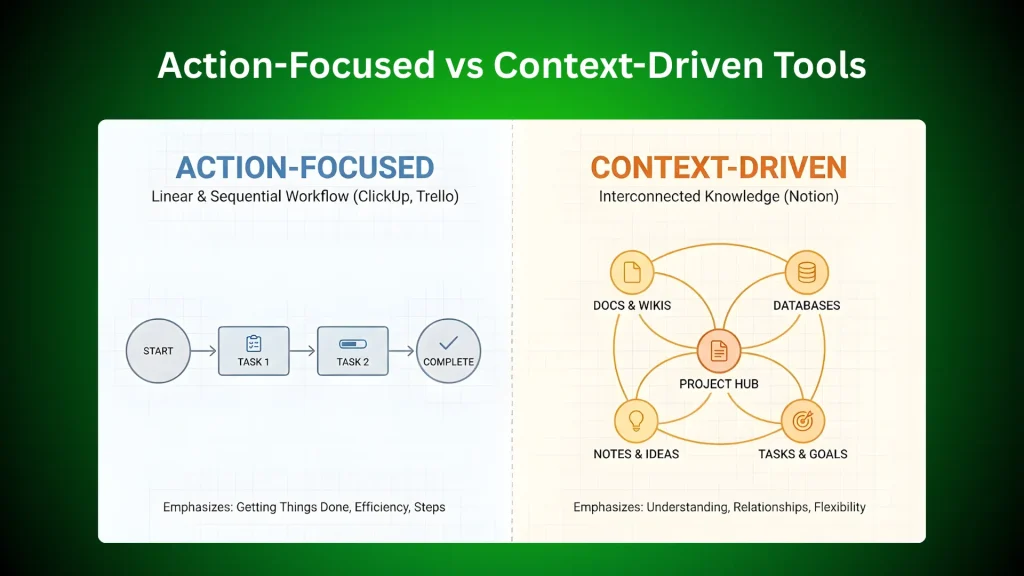
ClickUp focuses heavily on action. It helps teams track tasks, deadlines, and progress clearly. Trello also emphasizes task management but uses a simple card and board system. Notion, in contrast, centers on context. It builds knowledge bases, notes, and documents. Teams use Notion to connect ideas and information deeply.
ClickUp comes with many ready-made templates and workflows. It suits teams wanting a quick start with strong structure. Trello offers a flexible but straightforward setup with boards you customize freely. Notion requires more initial building. It lets users design custom pages and databases from scratch. This flexibility suits teams needing tailored workspaces.
ClickUp is feature-rich but can feel complex at first. It fits agencies ready to invest time in learning. Trello is simple and easy to use right away. Its drag-and-drop style appeals to beginners. Notion strikes a balance, with moderate complexity. Users enjoy its clean interface but must learn its unique blocks system.
Credit: gonetravellingproductions.com
Project complexity factors greatly affect how agencies use tools like ClickUp, Trello, and Notion. These factors shape the approach to managing tasks, timelines, and team collaboration. Understanding them helps agencies pick the right features and workflows. Each project brings unique challenges that these tools must handle effectively.
Complex projects have many moving parts. ClickUp offers detailed task views and dependencies to manage this. Trello uses boards and cards to keep tasks simple and visible. Notion allows flexible pages to break down complicated ideas into clear sections. Each tool helps reduce confusion and keeps teams focused.
Some tasks are urgent and impact the whole project. ClickUp’s priority settings highlight critical items immediately. Trello uses labels and due dates to show urgency at a glance. Notion can create reminders and track deadlines inside notes. These features help teams avoid delays and focus on what matters most.
Projects must follow rules and standards. ClickUp supports custom fields and checklists for compliance checks. Trello’s automation can remind teams of required steps. Notion stores policies and guidelines in shared databases. These tools keep agencies aligned with legal and client requirements.
Every agency has its own way of working. ClickUp adapts with customizable workflows and views. Trello’s simple drag-and-drop suits creative and flexible teams. Notion’s open workspace invites collaboration and knowledge sharing. These tools fit different team styles and improve communication.
Team well-being affects project success. ClickUp tracks workloads to prevent burnout. Trello offers easy visibility to balance tasks fairly. Notion encourages note-sharing for emotional support and feedback. Caring for team members leads to better focus and results.
Integrations and automation play a vital role in streamlining agency workflows. They connect project management tools with other apps, reducing manual work. This saves time and cuts errors. Agencies can focus more on creative and strategic tasks.
ClickUp, Trello, and Notion offer various integration options. Automation features help teams stay organized and productive. Understanding these can help agencies pick the best tool for their needs.
ClickUp connects with Slack, Google Drive, Zoom, and more. These integrations help teams share files and communicate easily.
Trello links with Dropbox, Gmail, and Microsoft Teams. This allows smooth task updates and file attachments.
Notion integrates with Google Calendar, Slack, and GitHub. It helps centralize information and sync schedules.
ClickUp automates task assignments, reminders, and status changes. Users create custom workflows without coding.
Trello’s Butler bot handles repetitive actions like moving cards or sending alerts. This reduces manual updates.
Notion offers basic automation through third-party tools like Zapier. It connects Notion with hundreds of apps.
Integrations reduce app switching, keeping teams focused. Automation cuts down on repetitive tasks and mistakes.
Teams deliver projects faster with fewer delays. Clear workflows improve communication and accountability.
These tools support remote work by syncing updates in real time. Everyone stays informed and aligned.
Choosing the right project management tool for your agency depends a lot on pricing and plans. Each tool offers a mix of free and paid options. Understanding what you get at each level helps you decide which fits your needs and budget.
ClickUp, Trello, and Notion have different pricing structures. These affect how your team collaborates and grows. Let’s explore their free vs paid features, find the best value options, and see how each scales as your agency expands.
All three tools offer free plans with basic features. Trello’s free version gives you unlimited cards and up to 10 boards. ClickUp’s free plan supports unlimited users but limits advanced features. Notion’s free tier allows unlimited pages and blocks for individuals.
Paid plans unlock more power. ClickUp adds goals, automation, and time tracking. Trello includes advanced automation and more board views. Notion’s paid plans provide unlimited team members and version history. The paid tiers enhance productivity and team collaboration.
ClickUp offers rich features even at lower prices. Its paid plan suits teams needing complex workflows. Trello’s pricing is simple and good for small teams wanting easy task management. Notion’s pricing works well for those needing flexible workspace and note-taking.
ClickUp often leads in value for agencies needing detailed project control. Trello fits agencies that want straightforward task boards. Notion excels for agencies that want a mix of notes and project tracking.
As your agency grows, your tool must support more users and projects. ClickUp scales well with unlimited users and advanced permissions. Trello’s Business Class plan adds more power but can get costly with many users. Notion scales by adding more team members and integrations.
ClickUp suits agencies aiming for growth and complex project needs. Trello is best for smaller teams or simple projects. Notion fits agencies that value flexible spaces over strict project management.
Agencies handle many tasks and projects every day. Using project management tools helps keep everything organized. ClickUp, Trello, and Notion each serve different needs. They help agencies manage projects, collaborate, and meet deadlines. Understanding how each tool fits different agency tasks improves workflow and results.
Client projects need clear plans and easy updates. ClickUp offers detailed task views to track progress. Trello uses boards and cards for simple visual organization. Notion allows creating custom pages for each project. Agencies can assign tasks, set priorities, and monitor status. These tools keep clients informed and projects on track.
Teams need to work together smoothly. Trello’s boards make sharing ideas easy and visible. ClickUp supports comments and real-time notifications for instant feedback. Notion provides shared workspaces for notes and documents. These features reduce email overload and improve communication. Teams stay connected and aligned on goals.
Meeting deadlines is critical for agency success. ClickUp includes calendar views and reminders to avoid delays. Trello’s due dates and checklists help track task completion. Notion allows setting goals and tracking progress in one place. Agencies can quickly see what needs attention and plan work better. Staying on schedule boosts client trust and team efficiency.
ClickUp suits teams needing structured project management with advanced features. Notion excels in flexible, customizable knowledge and note management. Choose ClickUp for task-focused workflows; choose Notion for creative, personal, or collaborative workspace building. Both serve different purposes, so pick based on your specific needs.
The 5 C’s of project management are Complexity, Criticality, Communication, Commitment, and Coordination. They ensure project success by managing challenges, risks, team alignment, and collaboration effectively.
ClickUp, Trello, and Notion are top project management tools. ClickUp suits structured workflows; Notion excels in customization; Trello offers simplicity. Choose based on your team’s size, project complexity, and preferred features.
ClickUp has largely replaced Trello as a powerful project management tool. It offers advanced features like Gantt charts, automations, and multiple task views. Notion also serves as an alternative, focusing on flexible knowledge management and customization. Choose based on your team’s needs and workflow preferences.
Choosing the right project management tool depends on your agency’s needs. ClickUp works well for detailed task tracking and larger teams. Trello offers simple, visual boards that are easy to use. Notion suits those who want flexible note-taking and organizing ideas.
Each tool has strengths and fits different work styles. Test them to see which matches your workflow best. Efficient project management helps your agency stay organized and meet deadlines. Use these tools to improve teamwork and project success. Keep it simple and adapt as your agency grows.







Leave A Reply Now