



Launching a custom project can feel overwhelming. You want everything to work perfectly from the start—no glitches, no downtime, no last-minute surprises.
That’s exactly why having a clear deployment checklist is a game-changer for your success. This checklist will guide you step-by-step through crucial tasks like environment setup, configuration, testing, and monitoring. By following it, you’ll save time, avoid costly mistakes, and confidently deliver your project exactly as planned.
Ready to make your deployment smooth and stress-free? Keep reading to discover the essential checklist that every custom project needs before going live.

Credit: community.atlassian.com
Setting clear deployment goals is a vital step in any custom project. It directs the entire process and helps avoid confusion. Without clear goals, teams can lose focus and waste time on unnecessary tasks.
Clear goals provide a roadmap for the deployment. They align the team and stakeholders on what to achieve. This clarity improves communication and decision-making throughout the project.
Start by listing the main objectives of the deployment. What does the project aim to solve or improve? Define these objectives in simple and specific terms. Clear objectives guide all deployment activities and priorities.
Consider the needs of users and business requirements. Objectives should reflect these needs to ensure the deployment delivers real value. Keep the list concise to maintain focus.
Success criteria measure whether the deployment meets its goals. Define clear, measurable indicators of success. These can include performance targets, user adoption rates, or error reduction levels.
Success criteria help track progress and identify issues early. They also provide a way to celebrate achievements and motivate the team. Make sure everyone understands these criteria before deployment begins.
Preparing the environment is a key step in deploying custom projects. It ensures the system is ready and stable before the launch. This phase reduces risks and prevents common issues. Setting up the right hardware and software creates a strong foundation. Proper environments for development and testing allow smooth workflows and accurate results.
Select hardware that meets project requirements. Check CPU, memory, storage, and network capabilities. Install the necessary operating system and updates. Set up all required software, including databases and runtime environments. Verify compatibility between hardware and software components. Configure security settings to protect data and resources. Regularly update software to avoid vulnerabilities.
Create separate environments for development and testing. The development environment allows coding and initial checks. The testing environment simulates real-world conditions for quality assurance. Use the same software versions in both environments to prevent conflicts. Automate environment setup to save time and reduce errors. Backup environments regularly to protect against data loss. Monitor environment performance to detect issues early.
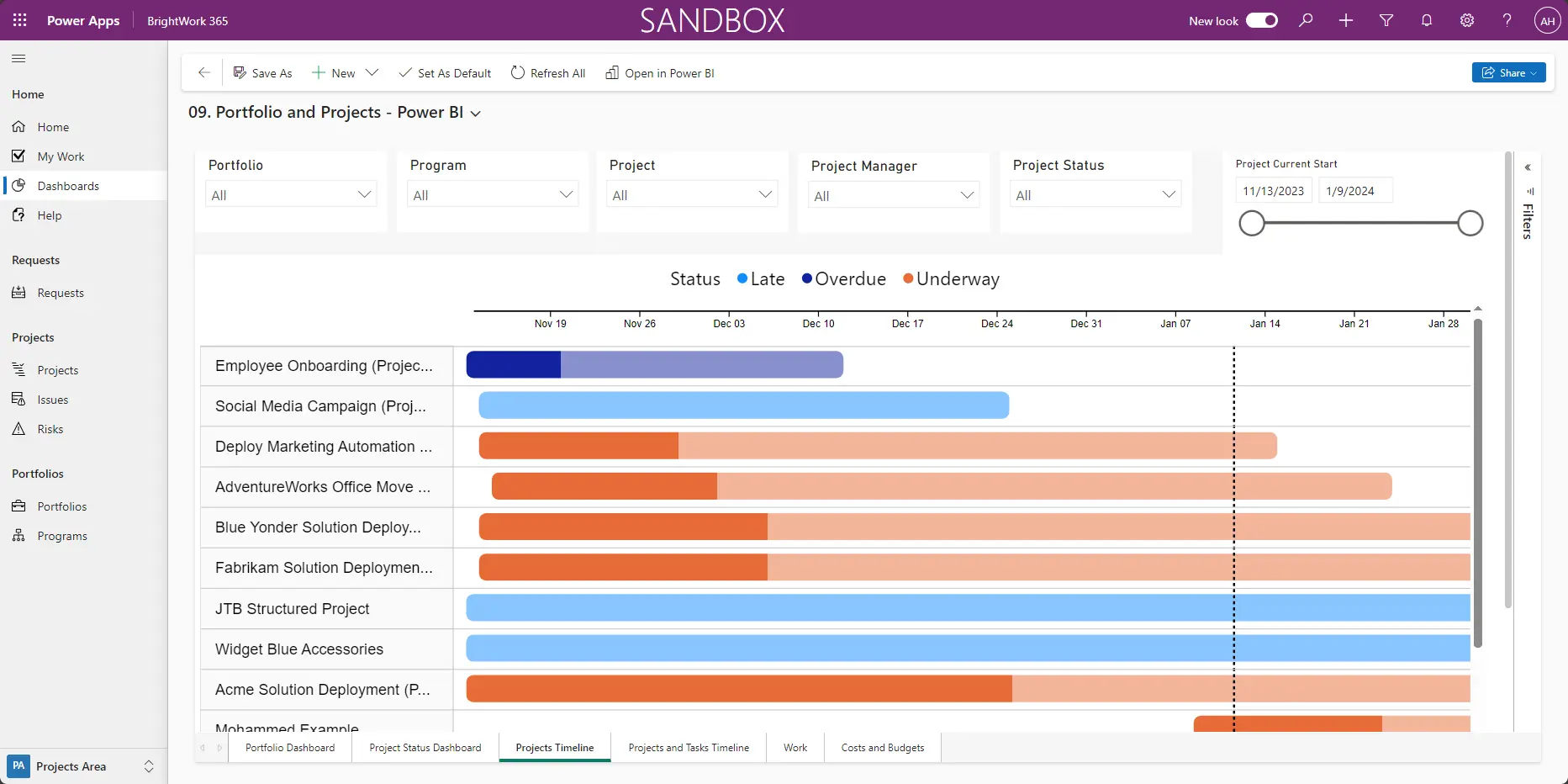
Planning deployment phases is crucial for a successful custom project launch. It breaks down the process into clear, manageable parts. This approach helps track progress and reduces risks. Careful planning ensures smooth transitions and fewer surprises.
Dividing deployment into phases allows teams to focus on each step. It also helps identify issues early and fix them quickly. Proper planning keeps everyone aligned and ready for the next stage.
Start by defining key milestones for the deployment. Milestones mark important goals or checkpoints in the project. Examples include completing development, testing, and final approval.
Each milestone should have a clear deadline and responsible team members. Tracking milestones helps measure progress and keeps the project on schedule. Setting milestones also motivates the team by showing visible achievements.
Plan the rollout in small, controlled steps. This reduces the chance of failures affecting the entire system. Rollout steps can include beta releases, phased user access, or feature toggles.
Assign specific dates and tasks for each rollout step. Clear scheduling helps coordinate teams and resources. It also allows time for testing and feedback before full deployment.
By scheduling rollout steps carefully, you ensure a safer and smoother deployment. This method improves user experience and lowers downtime risks.
Credit: www.brightwork.com
Implementing CI/CD pipelines is vital for smooth deployment of custom projects. It helps teams deliver software faster and with fewer errors. Automation reduces manual work and improves consistency. Developers can focus on coding while pipelines handle building, testing, and deploying. This approach supports frequent updates and quick fixes. It also increases project reliability and customer satisfaction.
Automating build processes speeds up software delivery. Code changes trigger automatic builds, compiling source code into deployable packages. This eliminates manual build steps, reducing human errors. Automation ensures that every build is consistent and repeatable. It also helps identify build issues early before deployment. Using tools like Jenkins or GitLab CI simplifies this automation.
Continuous testing runs automated tests on every code change. This catches bugs early and prevents faulty code from reaching production. Tests include unit, integration, and functional testing. Automated tests improve code quality and reduce manual testing time. Integration with CI/CD pipelines ensures tests run without delays. This practice builds confidence in the software’s stability.
Conducting pre-deployment testing is a vital step in launching custom projects. It helps catch bugs and issues early. Testing ensures the software works as expected and meets quality standards.
This stage reduces risks and prevents costly errors after launch. It also confirms the system handles real-world use. Proper testing builds confidence in the deployment process.
Functional tests check if each feature works correctly. Test all user actions and workflows. Validate inputs, outputs, and error handling. Ensure the software meets the project requirements. Fix any issues found before moving forward.
Performance tests measure speed, responsiveness, and stability. Simulate real users to find bottlenecks. Optimize slow areas to improve user experience. Security checks identify vulnerabilities and risks. Test for common threats like injections and data leaks. Address all security flaws to protect users and data.
Configuring monitoring and logging is essential for any custom project deployment. These processes help track system health and identify issues quickly. Proper setup ensures smooth operation and faster problem resolution.
Real-time monitoring tracks your project’s performance continuously. It alerts you immediately if anything goes wrong. Choose tools that fit your project size and technology. Monitor key metrics like server load, response times, and error rates. Keep the dashboard simple for quick understanding. Regularly review alerts and adjust thresholds as needed.
Logging records system events and errors for later analysis. Define what information to log to avoid overload. Use consistent formats and timestamps for easy searching. Store logs securely and ensure they are accessible to your team. Set up log rotation to manage disk space. Analyze logs regularly to find hidden issues and improve performance.
Training the deployment team is a crucial step in any custom project rollout. Well-trained team members follow procedures accurately and ensure smooth execution. This reduces errors and saves time during deployment. Clear understanding of tasks boosts confidence and improves coordination.
Effective training covers all deployment phases. Team members learn to handle tools, follow checklists, and communicate clearly. Training also prepares them for unexpected issues. Being ready to solve problems quickly avoids delays and downtime.
Start by going over the entire deployment plan with the team. Explain each step clearly and why it matters. Use simple language and examples to ensure understanding. Walk through the checklist together and highlight key actions. Practice critical tasks to build familiarity. Encourage questions to clear any doubts. Confirm that everyone knows their roles and responsibilities.
Equip the team to handle common deployment problems. Teach them how to identify issues fast. Provide guidelines on troubleshooting steps and escalation paths. Share contact information for technical support and key stakeholders. Run simulations of potential problems to practice responses. Stress the importance of documenting issues and solutions. This preparation helps maintain deployment momentum and reduces risks.
Executing deployment is a critical phase in any custom project. This step puts your careful planning into action. It ensures your project moves smoothly from development to live environment. Proper execution reduces errors and downtime. It also confirms that all features work as expected for users.
Use the deployment checklist to guide your process step-by-step. Check each item before moving forward. This prevents missing important tasks. Verify environment setup, configuration, and backup creation. Confirm code versions and dependencies match the project requirements. Test the deployment in a staging area if possible. Document every completed step for accountability. The checklist acts as a safety net throughout deployment.
Clear communication among team members is essential during deployment. Share updates frequently to keep everyone informed. Assign roles and responsibilities before starting. Use simple, direct messages to avoid confusion. Quickly report any issues or delays. Keep channels open for questions and feedback. Coordination helps the team respond fast and resolve problems. This keeps deployment on track and ensures success.
Managing rollback procedures is a critical part of deploying custom projects. It ensures you can quickly revert changes if something goes wrong. A clear rollback plan minimizes downtime and protects data. This section guides you through essential steps to manage rollbacks effectively.
Identify specific issues that require a rollback. These triggers could be system crashes, failed tests, or user complaints. Set clear criteria to decide when to initiate rollback. This helps avoid confusion and speeds up response times. Document these triggers and share them with your team.
Create backups of all data and configurations before deployment. Store backups securely and verify their integrity regularly. Have automated tools in place to restore backups quickly. Testing your backup and restore process ensures readiness. A solid backup plan reduces risk during deployment.
Performing a post-deployment review is a vital step after launching a custom project. This phase ensures the system runs smoothly and meets user needs. It helps identify any issues early and provides insights for future improvements.
During this review, the focus shifts from deployment to monitoring and feedback collection. Teams evaluate stability and gather opinions to enhance the system’s performance. This process keeps the project on track and aligned with its goals.
Check the system for any errors or crashes. Monitor key functions to ensure they work as expected. Track performance metrics like response times and resource usage. Confirm that integrations with other systems operate smoothly. Stability verification prevents downtime and builds user confidence.
Collect input from users and stakeholders about their experience. Use surveys, interviews, or direct observations to gather data. Identify areas needing enhancement or additional features. Prioritize feedback based on impact and feasibility. Feedback guides future updates and boosts user satisfaction.

Credit: www.stakeholdermap.com
A deployment checklist ensures all essential steps are completed before launching. It helps avoid errors, reduces downtime, and guarantees smooth project delivery tailored to unique project needs.
Proper environment setup ensures the software runs correctly in production. It prevents configuration mismatches and compatibility issues, leading to a stable and reliable deployment.
CI/CD automates code integration and delivery, reducing manual errors. It speeds up deployment cycles and ensures continuous testing, resulting in faster, more reliable custom project releases.
Rollback procedures provide a plan to revert to a stable state if deployment fails. They minimize downtime and data loss, ensuring quick recovery and maintaining service availability.
A clear deployment checklist keeps your project on track. It helps avoid common errors and delays. Follow each step carefully for best results. Test thoroughly before going live to catch issues early. Monitor your system after deployment to ensure stability.
Keep your team informed throughout the process. A well-planned deployment makes your project successful and smooth. Simple steps lead to reliable, efficient custom project launches.







Leave A Reply Now