


Managing custom projects can quickly become overwhelming if you don’t have the right tools at your fingertips. You want something that fits your unique workflow, keeps your team on the same page, and helps you hit every deadline without stress.
That’s where powerful project management platforms like ClickUp, Jira, and Notion come in. Each offers distinct features designed to simplify your work, boost productivity, and keep your projects running smoothly from start to finish. Ready to discover which tool matches your style and needs perfectly?
Keep reading to find out how ClickUp, Jira, and Notion can transform the way you manage your custom projects.
ClickUp offers a wide range of features designed to simplify custom project management. It combines task tracking, team collaboration, automation, and reporting in one platform. Teams can customize workflows and stay organized with ease. The platform suits various project types and team sizes.
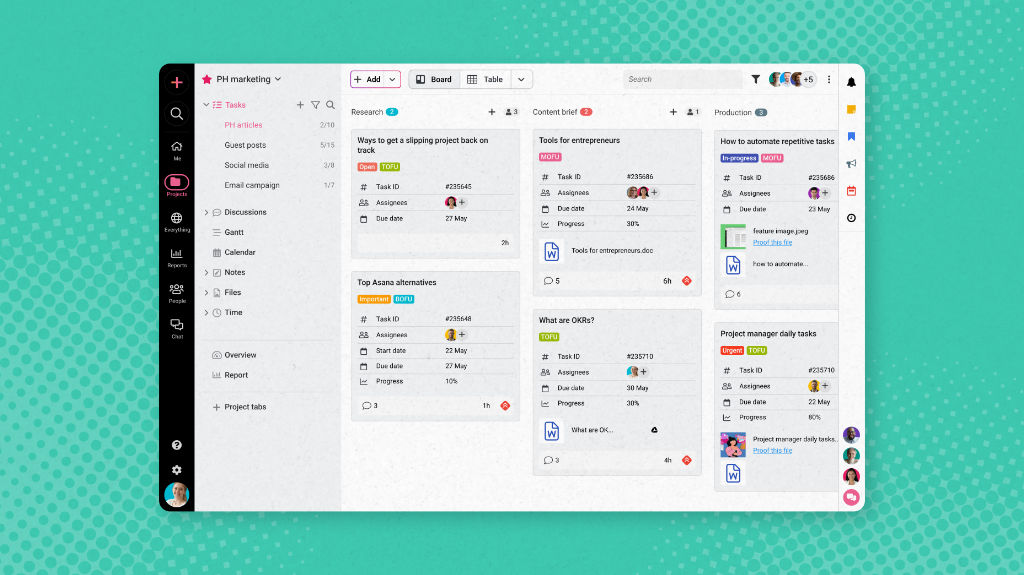
ClickUp lets you create, assign, and organize tasks quickly. Tasks can have priorities, due dates, and statuses. Multiple views like List, Board, and Calendar help track progress visually. Subtasks and checklists break work into smaller steps. Task dependencies keep everything on schedule.
Automation in ClickUp reduces repetitive work. You can set rules to change statuses, assign tasks, or send alerts automatically. This saves time and prevents errors. Automations trigger based on task changes or dates. Custom automation fits unique project needs.
Teams communicate inside ClickUp to keep discussions in context. Comments, mentions, and chat help share updates fast. File sharing and real-time editing make teamwork smooth. Collaborative docs and whiteboards support brainstorming and planning. Notifications keep everyone informed.
ClickUp provides detailed reports to track team performance. Dashboards show task completion, time spent, and workload. Custom reports highlight bottlenecks and areas for improvement. Visual charts make data easy to understand. Insights help teams make better decisions.
ClickUp connects with many popular apps for seamless workflows. Integrations include Slack, Google Drive, Zoom, and more. Sync calendars and emails to stay updated. APIs allow custom connections to other tools. This flexibility helps centralize project data.

Credit: www.sprintzeal.com
Jira offers many advantages for managing custom projects, especially in software development. It supports teams with powerful tools that improve workflow and communication. Jira helps keep projects organized and on track by focusing on key aspects like agile methods, issue tracking, and integration.
Jira is designed for agile teams. It supports Scrum and Kanban boards to visualize work. Teams can easily plan sprints and track progress. This helps in delivering projects faster and with better quality. Jira also allows quick changes in plans to adapt to new needs.
Jira’s issue tracking system is strong and flexible. It helps teams report, monitor, and resolve bugs or tasks quickly. Each issue can be assigned, prioritized, and tracked until completion. This clear visibility reduces errors and improves product quality.
Jira is built with developers in mind. It integrates well with code repositories and development tools. This connection allows teams to link code changes to specific tasks. Developers can work more efficiently and keep all project details in one place.
Teams can create custom workflows in Jira to match their processes. This flexibility supports different project types and styles. Workflows can include steps, approvals, and automation. Custom workflows keep work organized and ensure nothing is missed.
Jira works with many other tools and apps. It integrates with communication, testing, and documentation software. This creates a seamless environment for teams to collaborate. The wide integration options help connect all parts of the project smoothly.
Notion stands out as a versatile tool for managing custom projects. It combines many features in one place. Teams can adapt it for various workflows and project types. Its strengths lie in flexibility and creativity, making it suitable for diverse project needs.
Notion offers flexible databases to organize information easily. Users can create tables, lists, calendars, and boards. This helps track tasks, notes, and deadlines in one spot. The databases link to each other, keeping data connected and clear.
Notion provides an all-in-one workspace to store everything. Documents, tasks, and databases live together without switching apps. This saves time and reduces confusion. Teams can manage projects, write notes, and plan strategies in one place.
Notion supports creative ways to handle projects. Users can design custom pages and templates. Visual elements like images and embeds make projects engaging. It works well for brainstorming, planning, and tracking creative workflows.
Collaboration is simple in Notion. Teams can comment, mention members, and share pages instantly. Real-time updates keep everyone informed. Permissions control who can view or edit content, ensuring security and smooth teamwork.
Notion allows deep customization to fit team needs. Users can adjust layouts, add properties, and build templates. This flexibility helps teams create systems that match their workflow perfectly. It adapts to projects rather than forcing a fixed method.
Credit: www.proofhub.com
Choosing the right tool for managing custom projects depends greatly on the user interface. The interface shapes how easily you navigate tasks and keep your team aligned. ClickUp, Jira, and Notion each offer distinct designs that cater to different project styles. Understanding these differences helps pick the best fit for your needs.
ClickUp offers a clean and simple interface. It focuses on making task management straightforward for all users. Jira has a steeper learning curve. Its interface suits software developers and agile teams used to complex workflows. Notion uses a minimal design that feels like a digital notebook. It is easy for beginners but may need time to master advanced features.
ClickUp provides multiple views like lists, boards, and calendars. This helps users see tasks in ways that fit their style. Jira’s layout centers on issues and sprints, ideal for tracking software development. Notion’s layout is flexible, allowing users to create pages, tables, and boards. It supports both task tracking and detailed note-taking.
ClickUp allows deep customization of workflows and dashboards. It adapts well to different project types and team sizes. Jira excels in customizing issue types and workflows for software projects. Its settings can be complex but powerful. Notion offers high customization through blocks and templates. Users can build unique project spaces but need to set them up manually.
Understanding the pricing and plans of project management tools is essential for choosing the right one. Each platform offers a range of options to fit different team sizes and project needs. This section breaks down the free tiers, paid plans, and the overall value for money of ClickUp, Jira, and Notion.
ClickUp offers a free plan with unlimited tasks and users. It includes basic features like task management and limited integrations.
Jira’s free tier supports up to 10 users. It provides essential agile tools like scrum and kanban boards.
Notion’s free plan allows unlimited pages and blocks. It suits individuals or small teams starting simple projects.
ClickUp’s paid plans start at $5 per user per month. They add advanced reporting, automation, and goal tracking.
Jira’s paid plans begin at $7 per user per month. Features include advanced permissions and audit logs.
Notion charges $8 per user per month for the team plan. It unlocks collaboration tools and admin controls.
ClickUp delivers many features even in lower-priced plans. It suits teams needing a robust all-in-one tool.
Jira is ideal for software teams focusing on agile development. Its pricing reflects specialized project tracking.
Notion works well for flexible project organization and knowledge management. It offers good value for creative teams.
Choosing the right project management tool depends on the project type and team size. ClickUp, Jira, and Notion each serve different needs. Understanding their best use cases helps teams work smarter. These tools support a variety of workflows and industries.
Notion shines for small teams needing flexible organization. It combines notes, tasks, and databases in one space. Teams can customize workflows without complex setups. ClickUp also suits small teams focused on task management. It offers simple views and automation. Jira is less common here due to its complexity.
Jira excels in software development projects. It supports agile methods like Scrum and Kanban. Developers track bugs, features, and sprints easily. ClickUp offers similar features but with more customization. Notion can document project details but lacks advanced dev tools. Jira is the top choice for agile teams.
Notion fits creative teams needing a flexible workspace. It allows rich media, notes, and task tracking. ClickUp supports creative projects with visual boards and collaboration. Jira is less ideal here due to its technical focus. Creative teams benefit from Notion’s adaptable structure and easy sharing.
ClickUp and Jira serve large enterprises well. ClickUp offers deep features, reporting, and integrations. Jira handles complex workflows and large teams with strong issue tracking. Notion may lack some enterprise-level controls but works for documentation. Enterprises choose tools based on scale, complexity, and team structure.
Choosing the right tool for managing custom projects is crucial for success. Each project has unique needs that affect tool choice. The right software improves collaboration, tracks progress, and keeps the team aligned. Factors like team size, project complexity, and needed features guide this decision.
Small teams benefit from simple, user-friendly tools. Large teams need software that supports many users and roles. Tools like ClickUp and Jira scale well for bigger groups. Notion works best for smaller teams or those needing flexible workflows. Think about how many people will use the tool daily.
Simple projects need fewer features and easy setup. Complex projects require advanced options like task dependencies and reporting. Jira excels with software development and agile projects. ClickUp offers deep customization for varied tasks. Notion suits creative projects with adaptable structures. Match the tool’s capabilities to your project’s complexity.
Identify must-have features before choosing a tool. Task management, time tracking, and reporting are common needs. ClickUp provides many built-in features for diverse workflows. Jira is strong in issue tracking and agile boards. Notion offers flexible databases for notes and content. Choose a tool with features that fit your workflow.
Check if the tool connects with other apps your team uses. Integration with email, calendars, or code repositories saves time. Jira integrates well with developer tools like Bitbucket and GitHub. ClickUp supports many apps, including Slack and Google Drive. Notion integrates with fewer apps but offers API access. Ensure the tool fits smoothly into your existing system.
Credit: www.smarttask.io
Notion excels in flexible, all-in-one workspace customization, ideal for creative teams. ClickUp suits task-focused workflows with deep features and automation. Choose based on your project needs: Notion for adaptability, ClickUp for detailed task management and reporting.
ClickUp excels in deep features and AI tools; Asana suits versatile teams; Trello is simple and visual. Jira fits software teams, Monday. com offers automation, and Wrike supports large enterprises. Choose based on team size, project complexity, and needed integrations for the best project management tool.
ClickUp offers a user-friendly interface with versatile features, while Jira excels in software development and agile teams. Choose based on your project type and team needs.
Yes, ClickUp excels in project management with features like task tracking, automation, collaboration, and customizable workflows. It suits teams of all sizes.
Choosing the right tool helps keep your custom projects on track. ClickUp offers strong task management for focused workflows. Jira suits software teams with agile methods and issue tracking. Notion provides a flexible space for notes and creative collaboration. Each tool fits different needs and team styles.
Try them to see which matches your project best. Good project management reduces stress and improves results. Start simple, then explore features as your project grows. Success comes from clear planning and easy communication.







Leave A Reply Now