


Are you struggling to understand how your website is performing on Google? If you want to boost your SEO results and attract more visitors, tracking your SEO performance is a must.
Google Search Console is a powerful, free tool that gives you clear insights into how your site appears in search results. By learning how to use it effectively, you can spot what’s working, find areas to improve, and make smarter decisions that grow your online presence.
Keep reading to discover simple, step-by-step ways you can track your SEO performance in Google Search Console and take control of your website’s success.
Setting up Google Search Console is the first step to track your website’s SEO performance. It helps you monitor how Google views your site. You get data about search traffic, indexing, and site issues. Proper setup ensures you access all important reports easily.
Follow the steps below to create an account, verify your website, and connect Google Search Console with Google Analytics. This setup will give you a complete view of your SEO efforts.
Go to the Google Search Console website. Use your Google account to sign in or create one. Click on “Start Now” to begin. Enter your website’s URL carefully. Choose the correct URL prefix or domain property type.
Domain properties track all URLs across protocols and subdomains. URL prefix tracks only the exact URL entered. Pick the option that fits your needs best.
Verification proves you own the website. It unlocks access to your site data in Search Console. Google offers several verification methods. The most common is uploading an HTML file to your website.
You can also add a meta tag to your homepage’s HTML code. Other options include linking your domain provider or using Google Analytics. Pick the method you find easiest.
After adding the verification file or code, click “Verify” in Search Console. If done correctly, Google confirms ownership quickly. This step is crucial for full access to SEO data.
Linking Google Analytics with Search Console gives more insights. You see how visitors find and use your site. In Google Analytics, go to Admin and select Property Settings.
Scroll to Search Console settings and click “Adjust Search Console.” Choose your verified site from the list. Save the changes to connect both tools.
Once linked, you can view Search Console reports inside Google Analytics. This connection helps you understand SEO and user behavior together.
The Performance Report in Google Search Console offers a clear view of your website’s search traffic. It helps you understand how users find your site on Google. Navigating this report is key to tracking your SEO progress. You can explore different data points and focus on what matters most for your site’s growth.
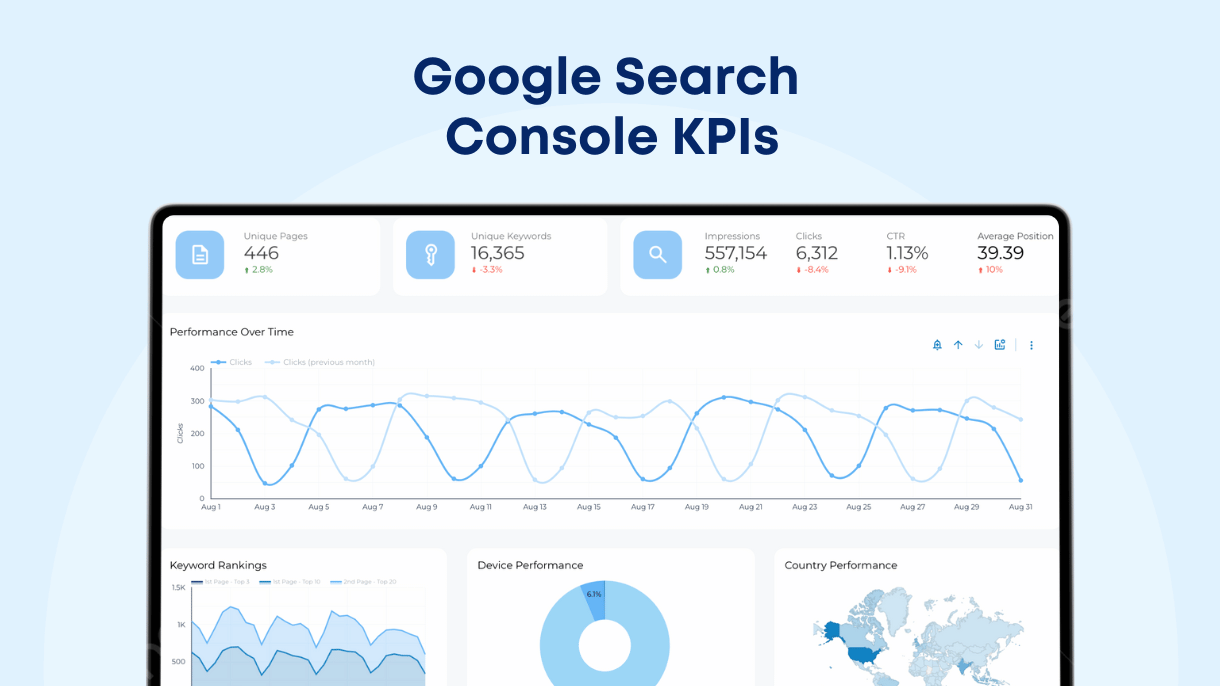
Clicks show how many times users clicked your site in search results. Impressions count how often your site appeared in searches. The Click-Through Rate (CTR) tells the percentage of impressions that turned into clicks. Average position reveals where your site ranks on Google for certain queries. Tracking these metrics helps you measure SEO success and spot areas to improve.
Filters let you focus on specific search queries or pages. You can see which keywords bring the most traffic. Filtering by pages shows which content performs best in search results. This helps identify strong pages and those needing optimization. Use filters to tailor your analysis and make smarter SEO decisions.
Look at clicks and impressions together to understand user behavior. High impressions but low clicks may mean your title or description needs work. Compare these numbers over time to find trends or drops in performance. This analysis guides you on where to focus SEO efforts for better results.
Using Search Analytics in Google Search Console helps you measure your SEO success. It shows how your site performs in Google search results. This tool provides data on clicks, impressions, and other key metrics. You can use this data to improve your SEO strategies and increase traffic.
Average position tells you where your pages rank in search results. Lower numbers mean higher rankings. Monitoring this helps you see which pages perform well or need improvement. Track changes over time to spot trends and adjust your SEO efforts accordingly.
CTR, or click-through rate, shows the percentage of users who click your link after seeing it. High CTR means your titles and descriptions attract users. Check CTR for different pages and queries. Improve low CTR by making your snippets more appealing and relevant.
Search Analytics reveals which keywords bring the most traffic. Focus on these keywords to boost your content strategy. Find new keyword opportunities by analyzing queries with potential. This helps you target terms that increase your site’s visibility in search.
Understanding crawl and indexing insights is key to tracking SEO performance. These insights reveal how Google explores and adds your site pages to its search results. You can spot issues that stop pages from showing up in searches. Fixing these problems helps improve your site’s visibility and ranking.
Crawl errors happen when Googlebot cannot access your pages. The Crawl Errors report in Google Search Console shows these issues. Look for errors like “404 Not Found” or “Server Errors.” Fix broken links and server problems quickly. This keeps your site easy for Google to explore and index.
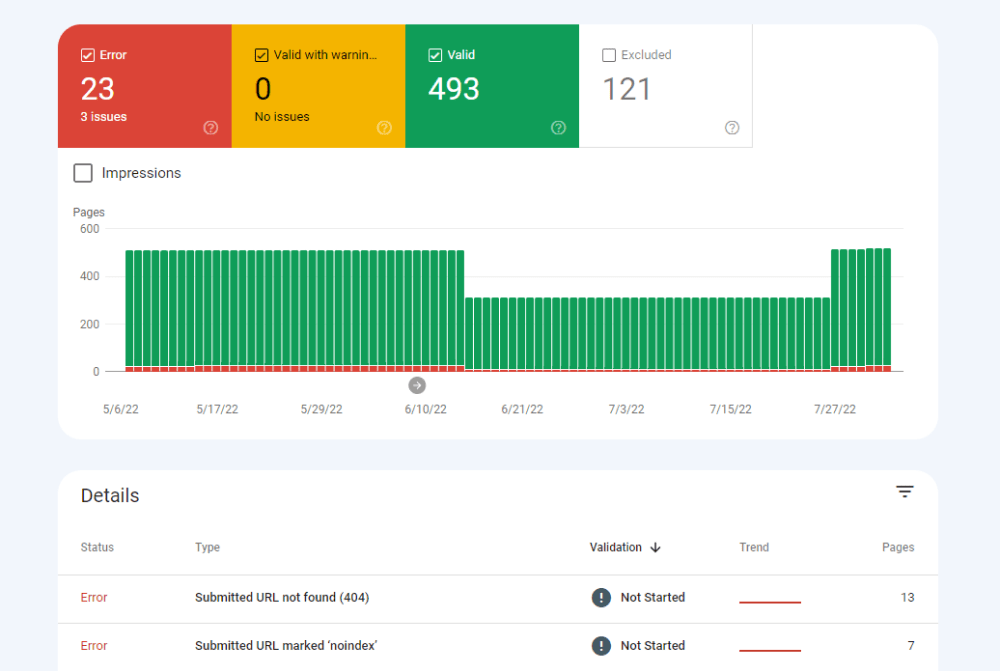
The Index Coverage report shows which pages Google added to its index. It also lists pages with problems. These issues might include pages blocked by robots.txt or pages with errors. Review this report often to find and fix indexing problems. A clean index means more pages appear in search results.
Sitemaps help Google find all your important pages. Use the Sitemaps tool in Google Search Console to submit your sitemap file. This ensures Google knows about new and updated pages fast. Manage sitemaps by checking if Google reads them without errors. Regular sitemap updates support better site crawling and indexing.
Improving site health is vital to maintain strong SEO performance. Google Search Console provides clear data to identify and fix technical issues. These fixes help your website run smoothly and rank better in search results.
Focus on structured data, mobile usability, and page experience. These areas directly affect how Google views your site and how users interact with it.
Structured data helps Google understand your content better. Use the Search Console’s “Enhancements” report to find errors in your markup. Fixing these issues ensures rich results can display in search. Correct structured data improves your site’s visibility and click rates.
Mobile usability is critical because most users browse on phones. The Mobile Usability report shows problems like text too small or clickable elements too close. Fixing these issues enhances user experience on mobile devices. A mobile-friendly site ranks higher and keeps visitors engaged.
Page experience includes loading speed, interactivity, and visual stability. Check the Page Experience report to see Core Web Vitals scores. Improve slow loading times and reduce layout shifts to boost scores. Better page experience leads to higher rankings and happier users.
Credit: www.link-assistant.com
Integrating data from different sources helps you understand SEO performance better. Google Search Console alone shows valuable metrics. Combining it with other tools gives a fuller picture of your website’s health and user behavior. This deeper insight guides smarter SEO decisions and improves your site’s ranking over time.
Google Analytics tracks user behavior on your website. Linking it with Google Search Console merges search data with on-site actions. You see which keywords bring visitors and how they interact with pages. This integration highlights areas for SEO improvement and content adjustments. It also reveals user paths and conversion rates from organic search.
Looker Studio (formerly Data Studio) creates clear, visual SEO reports. Connect it to both Search Console and Google Analytics. Visual dashboards make trends easier to spot. Custom charts show clicks, impressions, and user engagement side by side. Visual data helps communicate SEO performance to clients or team members quickly.
Monitoring SEO metrics regularly shows how strategies work. Use Search Console reports to track clicks, impressions, and average position. Compare data week by week or month by month. This practice identifies growth or decline early. Adjust tactics based on these trends to keep your SEO efforts effective.
Troubleshooting common SEO issues is crucial for keeping your website visible in search results. Google Search Console helps identify and fix problems that affect your site’s ranking. Regular checks prevent small errors from turning into big setbacks.
Below are key areas to focus on when troubleshooting SEO problems with Google Search Console.
Manual actions occur when Google finds rule violations on your site. These actions can lower your rankings or remove your site from search results. In Search Console, check the “Manual Actions” report for any alerts. Follow Google’s instructions to fix the issues. After correcting problems, request a review to lift the penalty.
The Coverage report shows how Google indexes your pages. Errors here mean some pages are not found or blocked from indexing. Common issues include 404 errors, server problems, or blocked resources. Use the report to find affected pages. Fix broken links, update your sitemap, and ensure robots.txt does not block important pages.
Site speed affects user experience and SEO rankings. Google Search Console’s Core Web Vitals report highlights speed and loading issues. Slow sites lose visitors and rank lower. Improve speed by compressing images, enabling browser caching, and minimizing code. Monitor speed regularly and fix new issues promptly to keep your site fast.
Credit: www.databloo.com
Advanced SEO tracking in Google Search Console helps you dive deeper into your site’s performance. It goes beyond basic metrics to offer more control and insight. These tips improve how you analyze data and adjust strategies. You can better understand user behavior and competition.
Custom filters let you focus on specific data sets in Search Console. Filter by queries, pages, countries, or devices. This narrows down your reports to what matters most. It helps spot trends or issues quickly. Use filters to compare traffic sources or track campaign performance.
Keep an eye on the keywords your competitors rank for using Search Console. Export your data and compare it with competitor data from other tools. Find keyword gaps to target new opportunities. Watch shifts in keyword rankings to stay competitive. This insight helps refine your content and SEO efforts.
The Search Console API allows automated access to your site’s data. Use it to build custom dashboards or reports. Automate routine tasks like data extraction and analysis. This saves time and reduces errors. Developers can integrate Search Console data with other tools for deeper insights.

Credit: www.digidop.com
Use Google Search Console to track clicks, impressions, and CTR. Analyze search queries, fix indexing issues, submit sitemaps, and improve page experience. Monitor performance reports regularly to optimize your SEO strategy effectively.
Track SEO performance using Google Search Console by monitoring clicks, impressions, CTR, and average position. Combine data with Google Analytics for deeper insights. Regularly analyze search queries, page indexing, and user behavior to optimize your site effectively.
The Performance report in Google Search Console displays key metrics like clicks, impressions, CTR, and average position. It helps track your site’s search traffic and query performance over time.
Google offers SEO tools like Google Search Console and Google Lighthouse. These help analyze and improve your website’s SEO performance. Enter your URL in Google’s SEO checker to see how Google views your site and get actionable insights.
Tracking SEO performance in Google Search Console helps you understand your site’s strengths. It shows which pages attract visitors and which keywords bring traffic. Regularly checking the data lets you spot problems and fix them quickly. This keeps your site healthy and improves search rankings over time.
Use the reports to guide your SEO efforts with clear, simple insights. Stay consistent and patient—SEO growth happens step by step. Google Search Console remains a valuable tool for every website owner.







Leave A Reply Now