



Are you ready to bring your app or website ideas to life but don’t know where to start? Wireframe and prototype development are the first crucial steps that turn your vision into a clear, workable plan.
Imagine having a simple blueprint that shows exactly how your project will look and function—before writing a single line of code. That’s what wireframes and prototypes do for you. In this beginner’s guide, you’ll discover how these tools help you save time, avoid costly mistakes, and communicate your ideas clearly to designers, developers, or clients.
Keep reading, and you’ll learn how to create effective wireframes and prototypes that make your projects succeed from the very start.

Credit: www.creativecorner.studio
Wireframes form the foundation of any digital design project. They offer a simple visual guide that outlines the structure of a webpage or app. Wireframes focus on layout and functionality, not on colors or detailed graphics. This helps teams plan the user experience clearly and efficiently.
Understanding wireframe basics is essential for beginners. It ensures smoother communication between designers, developers, and clients. Let’s explore what wireframes show, the different types available, and the common elements used in wireframes.
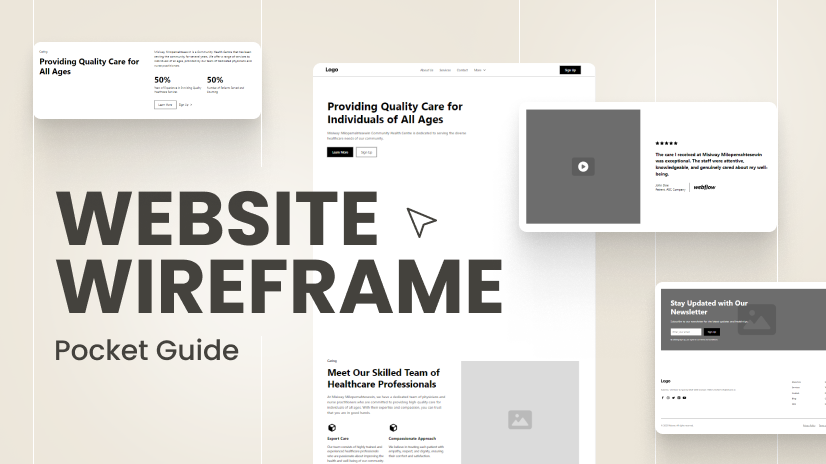
Wireframes display the basic layout and structure of a page. They highlight the placement of content, buttons, menus, and images. Wireframes focus on how users will interact with the interface. They do not include colors, fonts, or detailed graphics. Instead, wireframes show the hierarchy of information and key features. This helps teams understand how the page will work before adding design details.
There are three main types of wireframes. Low-fidelity wireframes are simple sketches with basic shapes and lines. They are quick to create and useful for early ideas. Mid-fidelity wireframes include more detail, such as button labels and content blocks. High-fidelity wireframes are closer to the final design. They show exact spacing, content, and interface elements. Choosing the right type depends on the project phase and audience.
Wireframes use standard elements to represent page components. Boxes often show images or videos. Lines or rectangles indicate text areas. Buttons are marked with simple shapes and labels. Navigation menus are usually horizontal or vertical bars. Icons and placeholders represent interactive features. These elements keep wireframes clear and easy to understand for everyone involved.
Prototypes are vital tools in design and development. They help visualize ideas before full production. Understanding prototype essentials makes the process clearer and more effective.
Prototypes bring concepts to life, allowing teams to explore and improve designs early. They save time and resources by identifying issues quickly. Let’s dive into what makes a prototype essential.
Prototypes show how a product will work. They help test ideas and user interactions. Feedback from prototypes guides better design decisions. They reduce risks by revealing problems early. Prototypes also help communicate ideas to stakeholders clearly.
Fidelity refers to a prototype’s detail and accuracy. Low-fidelity prototypes are simple sketches or wireframes. They focus on layout and basic functions. High-fidelity prototypes look and feel like the final product. They include colors, images, and detailed interactions. Choosing the right fidelity depends on project needs and stage.
Interactive prototypes let users click and navigate. They simulate real product behavior and flow. Static prototypes are fixed images or screens without interaction. They show design and layout but no user actions. Interactive prototypes provide better user testing. Static prototypes are quicker to create and useful for early feedback.
Wireframes and prototypes are essential tools in design and development. They help visualize and test ideas early. Understanding their differences guides better project decisions. Both serve unique roles yet work well together. This section explains their key differences, when to use each, and benefits of combining both.
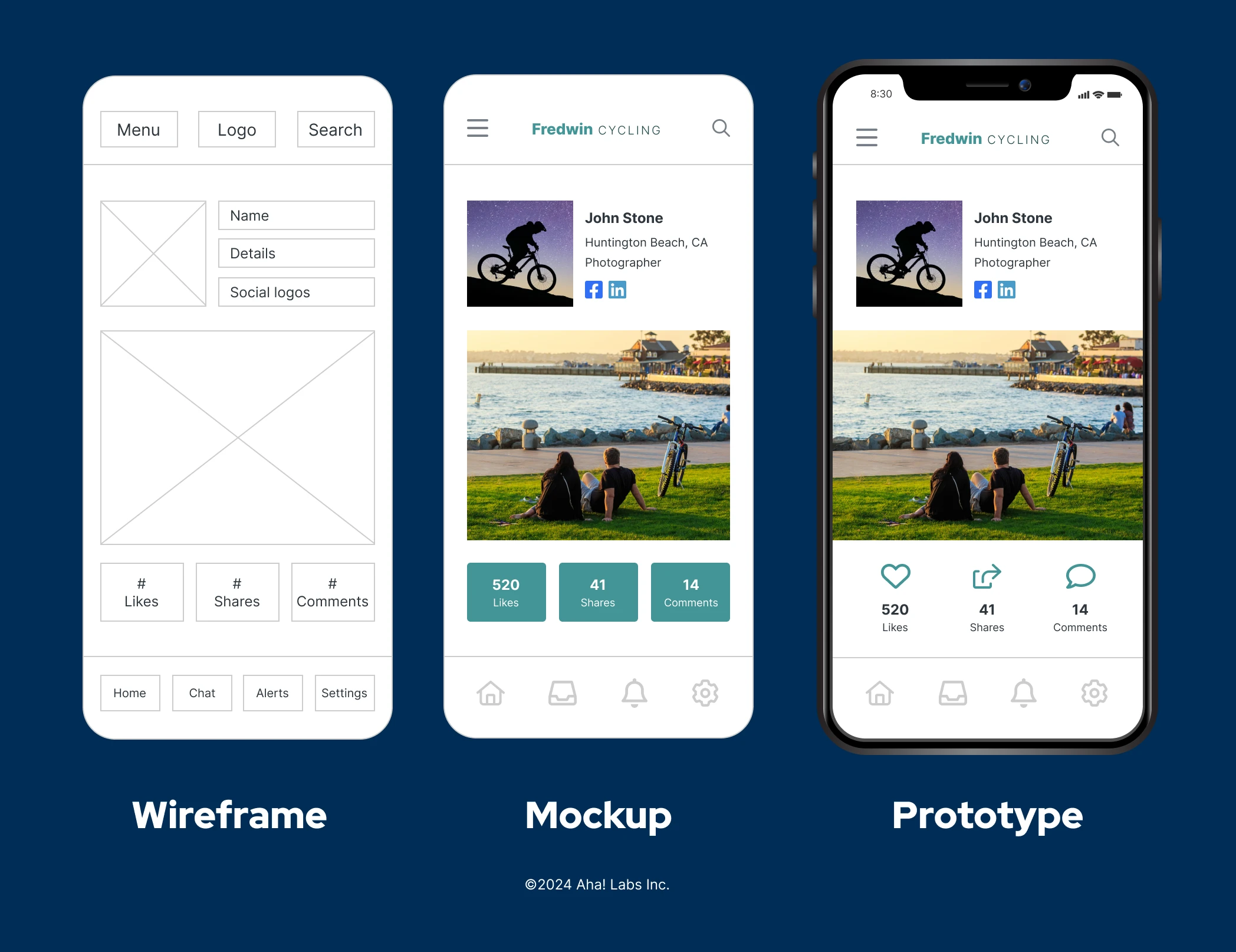
A wireframe is a simple layout outline. It shows structure and placement of elements. Wireframes focus on content and functionality, not style.
A prototype is a working model. It simulates user interaction and flow. Prototypes show how the final product looks and behaves.
Wireframes are low-fidelity, while prototypes are high-fidelity. Wireframes are faster to create. Prototypes take more time but provide realistic experience.
Use wireframes at the start of design. They help plan the basic layout and gather feedback. Wireframes save time by clarifying ideas early.
Use prototypes after wireframes are approved. Prototypes test user flows and interactions. They uncover usability issues before coding begins.
Wireframes guide structure; prototypes validate functionality. Both are important in different design stages.
Combining wireframes and prototypes improves design clarity. Wireframes set clear goals and structure. Prototypes confirm user experience and design choices.
Using both reduces costly changes later. Teams communicate ideas better. Stakeholders see progress in stages.
This approach leads to smoother development and better final products.
Credit: htmlburger.com
Choosing the right tools is key in wireframe and prototype development. Tools help visualize ideas clearly. They save time and improve teamwork.
Different tools serve different purposes. Some focus on wireframing, others on prototyping. Some tools combine both functions in one place.
Wireframing tools create simple layouts and blueprints. They focus on structure, not style. Balsamiq is well-known for its easy drag-and-drop interface. It mimics hand-drawn sketches. Another popular tool is Sketch, favored for Mac users. It offers clean, vector-based design. Adobe XD is also widely used. It supports wireframing and basic prototyping in one app.
Prototyping tools build interactive models. They show how users move through a product. Figma is a favorite for real-time collaboration. It works in browsers without installation. InVision offers strong prototyping and feedback options. Marvel is simple and great for beginners. It allows quick linking of wireframes to create flow.
Decide based on project needs. For quick sketches, pick a simple wireframing tool. For detailed, clickable models, choose prototyping software. Consider team size and collaboration features. Budget also matters; some tools offer free plans. Test a few tools to find what feels best. The right tool makes design faster and clearer.
Creating wireframes and prototypes is essential for designing effective websites and apps. This step-by-step process helps you visualize the structure and flow before the final build. Follow these clear stages to develop your wireframe and prototype smoothly.
Start by understanding the main goals of your project. Decide what content and features are most important. Think about how users will navigate through your site or app. Organize the information logically to create a smooth user experience. Sketch a rough map of the pages or screens you need. This plan will guide your wireframe design.
Use simple shapes to outline the basic layout of each page. Focus on placement of headers, images, buttons, and text blocks. Keep details minimal to avoid distractions. This stage helps you test different ideas quickly. Draw by hand or use wireframing tools to make digital sketches. Review and adjust your wireframes until they clearly show the structure.
Turn your wireframes into clickable prototypes to simulate user interaction. Add links between pages or screens to show flow. Use prototyping software that supports easy drag-and-drop features. Test the prototype yourself to find navigation issues. Share it with others for feedback. Interactive prototypes help identify problems before development starts.
Following best practices in wireframe and prototype development ensures your project meets user needs and project goals. These practices help create clear, effective designs that guide the development process smoothly. Focus on key areas like user experience, early testing, and simplicity to build strong foundations for your product.
Always prioritize the user in your design process. Understand their goals, needs, and pain points. Design wireframes that make navigation intuitive and tasks easy to complete. Keep user flow logical and consistent. A good user experience reduces frustration and increases satisfaction.
Start testing your wireframes and prototypes as soon as possible. Gather feedback from real users or team members. Use this feedback to improve your design step by step. Early testing helps catch issues before they become costly to fix. Iteration leads to better, user-friendly results.
Simplicity is key in wireframing and prototyping. Avoid clutter and unnecessary details. Use clear layouts and straightforward elements. Simple designs communicate ideas faster and reduce confusion. Focus on core features and content to keep users engaged.
Wireframe and prototype development often presents several challenges for beginners. Understanding these common obstacles helps create better designs and smoother workflows. Addressing these issues early prevents delays and confusion.
Beginners sometimes add too many details to wireframes. This over-design slows down the process and distracts from the main purpose. Wireframes should focus on structure and user flow, not final visuals. Keeping designs simple helps teams focus on functionality and usability.
Collecting and handling feedback can be difficult. Different team members may have conflicting opinions. It is important to listen carefully and prioritize changes based on project goals. Clear communication helps avoid endless revisions and keeps the project on track.
Finding the right balance between detail and speed is tough. Spending too much time on details delays progress. Rushing may leave out important elements. Start with rough sketches and gradually add details. This approach ensures steady progress without sacrificing quality.
Applying wireframes and prototypes is a key step in the design process. It helps turn ideas into clear visuals. This stage improves communication and guides development. Wireframes provide a basic layout, while prototypes simulate user interaction. Together, they help teams work efficiently and avoid costly mistakes later.
Wireframes and prototypes make teamwork smoother. Designers, developers, and marketers share one clear vision. Early feedback is easy to collect and apply. Everyone understands project goals and user needs better. This reduces confusion and speeds up decision-making. Collaboration tools allow real-time updates and comments.
Prototypes help show ideas clearly to stakeholders. They visualize how the final product will work. Stakeholders can interact and provide input. This builds trust and confidence in the project. Wireframes offer a simple overview of structure and flow. Presentations become more engaging and productive.
Developers use wireframes and prototypes as a blueprint. They clarify features, layout, and user experience. This reduces guesswork and coding errors. Prototypes guide the building of interactive elements. Teams can test functionality before full development. It saves time and ensures the product meets expectations.
Credit: www.aha.io
A wireframe is a basic layout showing structure and content placement. A prototype is an interactive model simulating user experience and functionality. Wireframes focus on planning, while prototypes test design and usability.
Wireframes help organize content and define page hierarchy. They save time by clarifying ideas early. Wireframes improve communication between designers and stakeholders, reducing costly changes later.
Prototypes allow users to interact with a design before final development. This helps identify usability issues early. Prototyping refines functionality and ensures the product meets user needs effectively.
Popular tools include Figma, Sketch, Adobe XD, and Axure. They offer easy drag-and-drop interfaces and collaboration features. Choosing depends on your project needs and team workflow.
Wireframe and prototype development help shape your ideas clearly and quickly. They make it easier to plan how a website or app will work. Using simple sketches first saves time and reduces mistakes. Testing early designs lets you improve user experience step by step.
This process guides your project from a rough draft to a polished product. Start practicing these steps to build better digital experiences. Keep learning and experimenting to grow your design skills.







Leave A Reply Now