


If you run a WordPress site, you might already know how important it is to protect your visitors’ privacy and stay on the right side of the law. But setting up GDPR compliance and a clear privacy policy can feel confusing and overwhelming.
What exactly do you need to do? How do you make sure your site respects user data without turning away visitors? This guide will walk you through the simplest, most effective steps to get your WordPress site GDPR-ready. By the end, you’ll have a clear plan to build trust with your audience and avoid costly legal headaches.
Ready to take control of your site’s privacy? Let’s dive in.
Understanding GDPR essentials is critical for WordPress site owners. GDPR, or General Data Protection Regulation, protects user privacy in the European Union. Even if your site targets users outside the EU, following GDPR rules builds trust and keeps you safe from penalties. This section covers the basic GDPR principles, its impact on WordPress sites, and the rights users have over their data.
GDPR stands on several key principles. First, data must be collected fairly and legally. You must explain why you collect data and how you use it. Data should be limited to what is needed for your purpose. It must be accurate and kept secure. You must keep data only as long as necessary. Finally, users should have control over their data.
WordPress sites handle many user details, like names and emails. GDPR forces site owners to review how they collect and store this data. You need clear privacy policies that explain data use. Consent must be obtained before collecting personal information. Plugins and themes should comply with GDPR rules. Encryption and secure hosting help protect user data. Regular updates reduce security risks.
Users have important rights under GDPR. They can ask to see their data. They can request corrections if data is wrong. Users can also demand their data be deleted. They have the right to restrict data use. Users can withdraw consent at any time. Your site must make it easy to exercise these rights. Respecting these rights builds user trust and loyalty.
Creating a clear and effective privacy policy is crucial for every WordPress site. It informs visitors about how their data is collected and used. A well-crafted policy builds trust and helps meet legal requirements like GDPR. Keep the language simple and the structure organized.
Your privacy policy should explain what data you collect. Include information about cookies, contact forms, and analytics tools. Describe how you use this data and who can access it. Mention data storage, protection measures, and users’ rights. Be honest and transparent to avoid confusion or legal issues.
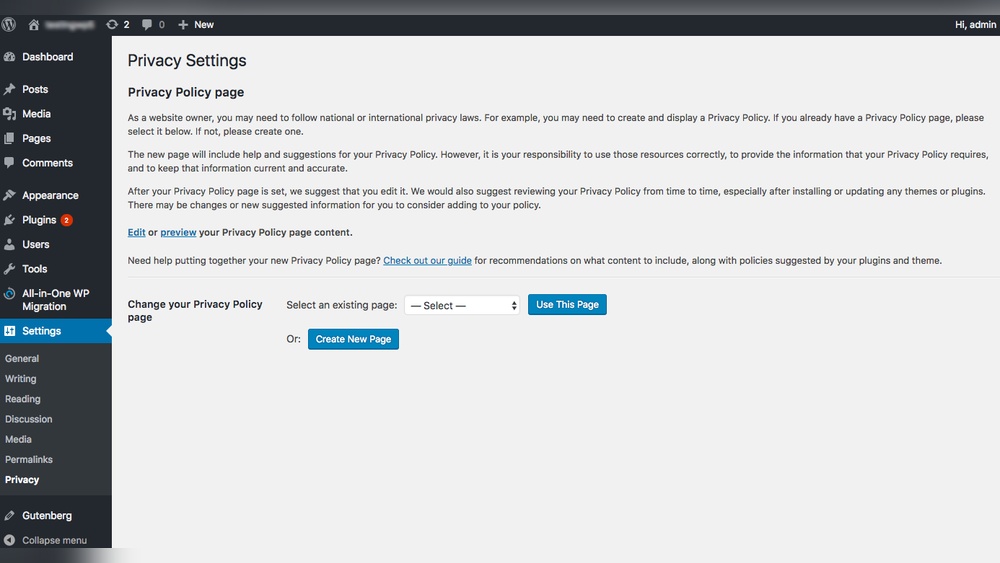
WordPress offers built-in privacy tools to help create your policy. Navigate to the Settings menu and find the Privacy section. Use the default template as a starting point. It covers basic requirements and is easy to customize. These tools also help you link your privacy policy page to your website footer.
Tailor the policy to match your site’s specific needs. Add details about third-party services or plugins you use. Clearly state how you handle user consent and data sharing. Update the policy regularly to reflect changes in practices or laws. Keep the text straightforward and easy to read for all visitors.
Creating a clear privacy policy page is essential for GDPR compliance on WordPress sites. This page explains how your website collects, uses, and protects visitor data. Visitors feel safer knowing their information is handled responsibly. WordPress makes it easy to set up this important page quickly.
Log in to your WordPress dashboard and go to Settings > Privacy. Click the Create New Page button to add a default privacy policy template. This template covers basic legal requirements and can be customized. WordPress automatically saves the page draft for you to edit later. Give the page a clear title like “Privacy Policy.”
Review the default content and update it to reflect your site’s practices. Include details about data collected, storage methods, and third-party services used. Mention cookies, analytics tools, and user rights under GDPR. Write in simple language so visitors easily understand your policy. Keep sentences short and avoid complex legal jargon.
Make the privacy policy easy to find by adding a link in your website footer. Use WordPress widgets or menu settings to place the link on every page. This practice increases transparency and trust with your audience. It also helps search engines recognize your site’s compliance efforts. Check that the link works properly on all devices.
Credit: wordpress.org
Managing cookies and consent is a key part of making your WordPress site GDPR compliant. Cookies track user data, so you must ask visitors for permission before placing them. Clear communication builds trust and follows privacy rules.
This section covers cookie consent banners, popular GDPR plugins, and how to block third-party cookies. Each step helps protect user privacy and keeps your site legal.
Cookie consent banners inform visitors about cookies on your site. They ask users to accept or reject cookies before loading them. These banners should be easy to see and simple to use. Good banners show what cookies are used and why. They give users control over their data. This transparency helps your site meet GDPR rules.
Many WordPress plugins help manage cookie consent and GDPR compliance. Plugins like CookieYes, Complianz, and GDPR Cookie Consent are widely used. They offer cookie banners, cookie scans, and consent logs. These tools make it easy to set up cookie management. They also allow users to change their consent anytime. Using plugins saves time and reduces legal risks.
Third-party cookies come from external services on your site. These cookies track users across different websites. GDPR requires blocking these cookies until users give consent. Many GDPR plugins include automatic blocking features. Blocking third-party cookies protects user privacy. It also ensures your site follows GDPR guidelines strictly.
Data collection and storage are vital parts of running a WordPress site. You must understand what data you collect from visitors. Then, you must store it safely. This helps protect user privacy and follow GDPR rules.
Clear steps ensure data is handled properly. Focus on how you collect data, how you keep it secure, and if your hosting provider meets GDPR standards. These steps build trust and keep your site compliant.
Check all forms and tools that collect data on your site. Identify what personal information is gathered. Limit collection to only what is necessary. Avoid asking for extra details without reason. Make sure users know why you collect their data.
Keep collected data safe from theft or loss. Use encryption for data stored and sent. Regularly update your WordPress plugins and themes to fix security flaws. Restrict access to data only to authorized staff. Backup data to prevent accidental loss.
Choose a hosting provider that follows GDPR rules. Confirm your host stores data within approved regions. Ask if they have security measures like firewalls and backups. Read their privacy and data handling policies carefully. A compliant host reduces your legal risks.

Credit: complianz.io
Updating WordPress for compliance is essential for protecting user data. Keeping your website aligned with GDPR rules requires constant attention. WordPress updates help secure your site and manage privacy properly. Regular updates reduce risks and build trust with visitors. This section covers key steps to maintain compliance through updates.
WordPress regularly releases updates to improve security and privacy. Installing these updates closes vulnerabilities that hackers might exploit. Updated core software ensures your site follows the latest GDPR standards. Always use the most recent WordPress version. This keeps your site stable and protects user information.
Plugins add features but can pose privacy risks. Regular audits help identify outdated or unsafe plugins. Remove or replace plugins that do not comply with GDPR. Check plugin settings for data collection and consent options. Only keep plugins that respect user privacy and security.
HTTPS encrypts data between your site and visitors. It is a must for GDPR compliance. Secure websites build user trust and protect sensitive information. Obtain an SSL certificate and activate HTTPS on your WordPress site. This simple step improves privacy and search engine rankings.
User Rights Management is essential for GDPR compliance on WordPress sites. It ensures users control their personal data easily and securely. Proper management builds trust and meets legal obligations. This section covers key aspects of handling user rights efficiently.
Users have the right to see the data collected about them. Your WordPress site must provide a clear way to request this data. Set up a simple form or contact method to receive these requests. Respond promptly with the requested information in a readable format.
Tracking access requests helps stay organized and compliant. Use plugins that log user requests automatically. This reduces manual work and speeds up response times.
Users can ask to delete their personal data from your site. Your system should allow easy deletion of this data on request. This includes comments, account details, and other stored information.
Ensure deletion processes are secure and permanent. Backup copies must also respect deletion requests. Automate deletion where possible using WordPress tools or plugins.
Users must be able to withdraw consent for data processing anytime. Make withdrawing consent as simple as giving it. Provide clear instructions and easy access to this option.
Update your records immediately after consent withdrawal. Stop processing data related to that user unless legally required. Use cookie consent plugins that support easy withdrawal options.
Monitoring and maintenance are vital for keeping your WordPress site GDPR compliant. Privacy laws and data practices change often. Staying updated protects your visitors and your business. Consistent checks and updates help avoid penalties and build trust.
Schedule regular reviews of your site’s data collection and storage. Confirm that all user data is handled according to GDPR rules. Test cookie consent banners and data access requests. Use tools or plugins that monitor compliance automatically. Fix any issues quickly to maintain trust.
Privacy policies must reflect current data use and legal requirements. Review your policy at least once a year or after changes in your business. Update the policy language to remain clear and simple. Inform your visitors about any changes in a visible way. This keeps your site transparent and trustworthy.
Educate your team about GDPR and privacy best practices. Regular training helps avoid accidental data breaches. Share updates about new rules and compliance techniques. Encourage staff to report privacy concerns immediately. Awareness reduces risk and supports a secure website environment.

Credit: termly.io
Update WordPress and plugins regularly. Enable HTTPS for secure data transfer. Create and display a clear Privacy Policy page. Use a GDPR consent plugin to manage cookies. Limit data collection and review third-party integrations for compliance.
Go to WordPress dashboard, click Settings > Privacy, then click Create a Privacy Policy page. Add your policy content and publish it.
Yes, you need a privacy policy on your WordPress website to disclose how you collect and use visitor data. It ensures legal compliance and builds trust.
The GDPR privacy policy plugin for WordPress helps websites comply with data protection laws. It displays cookie consent banners and manages user consent for data collection. The plugin blocks third-party cookies until users agree, ensuring transparency and legal compliance. It simplifies GDPR requirements for WordPress sites.
Setting up GDPR and privacy policies on WordPress protects your visitors’ data. Clear policies build trust and keep your site legal. Regular updates ensure ongoing compliance with new rules. Use simple language your audience can easily understand. Take action today to keep your WordPress site safe and respectful.
Compliance is not just a rule—it’s a commitment to your users.







Leave A Reply Now