


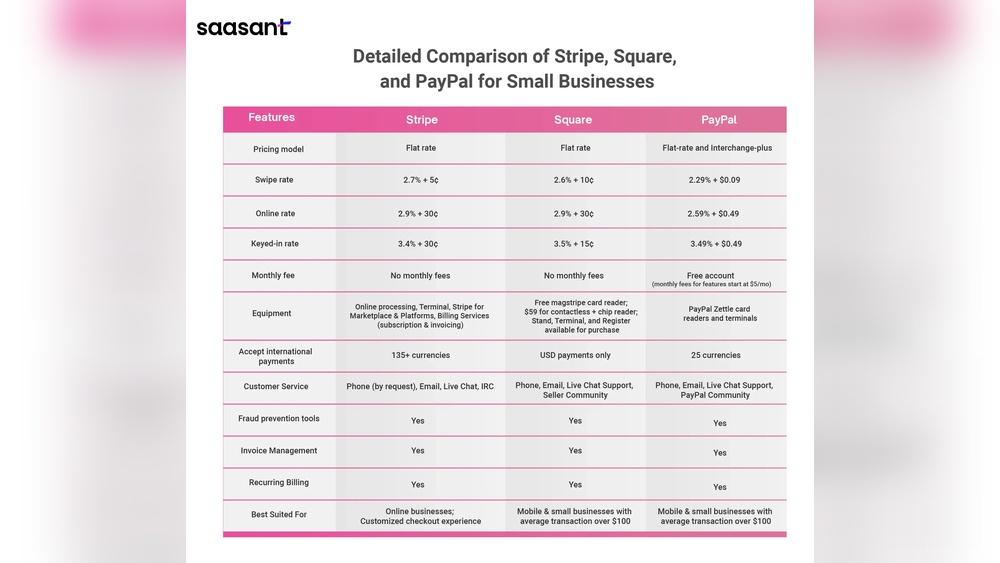
Choosing the right payment processor is very important for businesses. It helps you get paid easily. Today, we will compare three popular options: Stripe, PayPal, and Square. Each one has its own strengths and weaknesses. We will look at how they work, their fees, and their features. This will help you decide which one suits your business best.
A payment processor is a service that helps businesses accept money from customers. This can be online or in person. Payment processors make transactions smooth and safe. They connect your bank, your customer’s bank, and the credit card companies. Without a good payment processor, it is hard to sell products or services.

Credit: paperform.co

Credit: paperform.co
| Feature | Stripe | PayPal | Square |
|---|---|---|---|
| Main Use | Online payments, developer tools | Online and in-person payments | In-person and small business payments |
| Setup Speed | Moderate, needs developer skills | Fast and easy | Fast and easy |
| Transaction Fees | 2.9% + 30¢ per transaction | 2.9% + 30¢ per transaction | 2.6% + 10¢ per swipe |
| International Use | Yes, supports many countries | Yes, widely accepted | Limited outside US and Canada |
| Hardware for Payments | No | Limited | Yes, offers card readers |
| Best For | Developers and online businesses | Anyone, especially beginners | Small shops and in-person sales |
What is Stripe?
Stripe is a payment processor mainly for websites and apps. It is popular with developers. Why? Because it gives many tools to build custom payment systems. Many big companies use Stripe for online payments.
What is PayPal?
PayPal is one of the oldest and most known payment services. It works for both online and in-person sales. Many people already have PayPal accounts, so it is easy to use.
What is Square?
Square is designed for small businesses and shops. It works great for selling in person. Square provides card readers and point-of-sale software. It also supports online payments, but its strength is in face-to-face sales.
Fees matter when choosing a payment processor. Let’s look at the fees for each.
| Type of Transaction | Stripe | PayPal | Square |
|---|---|---|---|
| Online Payment | 2.9% + 30¢ | 2.9% + 30¢ | 2.9% + 30¢ |
| In-Person Payment | Not available | 2.7% + 0¢ (card present) | 2.6% + 10¢ (card swipe) |
| International Sale | 3.9% + 30¢ | 4.4% + fixed fee | Limited support |
| Chargeback Fee | $15 | $20 | $15 |
From the table, Square is the cheapest for in-person sales. Stripe and PayPal have similar fees online. PayPal charges more for international sales.
| Feature | Stripe | PayPal | Square |
|---|---|---|---|
| Mobile Payments | Yes, through apps | Yes, with app | Yes, with card readers |
| Subscription Billing | Yes | Yes | Limited |
| Invoices | Yes | Yes | Yes |
| Multi-Currency Support | Yes | Yes | No |
| Fraud Protection | Strong | Strong | Good |
| Developer Tools | Excellent | Limited | Limited |
It depends on your business type and needs.
Think about your customers. Where do they pay? Online? In person? Also, think about your budget and skills.
| Processor | Best For | Main Advantage | Main Disadvantage |
|---|---|---|---|
| Stripe | Online businesses and developers | Flexible and powerful tools | Needs technical skills |
| PayPal | Beginners and international users | Easy setup and trusted brand | Higher fees for some sales |
| Square | Small businesses and in-person sales | Low fees for face-to-face payments | Limited international support |
Choosing a payment processor is not one-size-fits-all. Each option has its own strengths. Stripe is great for custom online payments. PayPal is simple and trusted worldwide. Square is perfect for shops and restaurants.
Look at your business needs. Think about your customers. Consider your budget and skills. Then pick the best payment processor for you.
With the right choice, your business can accept payments smoothly and safely. That helps your business grow and succeed.
Stripe and PayPal charge about 2. 9% + $0. 30 per transaction. Square’s fees are similar but lower for in-person sales.
Stripe is best for online stores with custom needs. PayPal is easy to set up. Square focuses more on physical stores.
Yes, many businesses use more than one processor. It helps to cover both online and in-person payments.
All three use strong encryption and fraud detection. They comply with major security standards like PCI DSS.







Leave A Reply Now