


Choosing the right software model can make or break your business operations. You might be wondering whether to go with traditional software or switch to SaaS (Software as a Service).
Each option has its own set of benefits and challenges that can impact your costs, control, and flexibility. But which one truly fits your unique needs? This article will help you cut through the noise and understand exactly how SaaS and traditional software compare—so you can make a confident decision that drives your business forward.
Keep reading to discover which model aligns best with your goals and resources.

Credit: www.beecoded.io
The Software as a Service (SaaS) model changes how businesses access and use software. Instead of buying and installing software on each device, companies use software hosted online. This model offers flexibility and convenience. Understanding the basics of the SaaS model helps businesses decide if it fits their needs.
SaaS uses a subscription pricing model. Businesses pay a regular fee, usually monthly or yearly. This fee covers software use, support, and updates. There is no large upfront cost, which helps manage budgets. Subscription pricing allows businesses to scale usage up or down easily.
SaaS software is hosted on the cloud. This means it runs on remote servers managed by the provider. Users access the software via the internet from anywhere. Cloud hosting removes the need for local hardware and maintenance. It also improves collaboration by allowing multiple users to work together online.
Software updates happen automatically in the SaaS model. The provider maintains and upgrades the software behind the scenes. Users always have access to the latest features and security improvements. This removes the need for manual updates and reduces downtime. Businesses benefit from continuous improvements without extra effort.
Traditional software has been the foundation of business technology for decades. Many companies still rely on it for core operations. Understanding its basics helps in making the right choice for your business.
This software model usually involves buying a license. It requires installing the program directly on your computers. Updates and maintenance often need manual effort from your IT team.
Traditional software is bought with a one-time payment. This license grants the right to use the software indefinitely. No recurring fees are required unless you want support or upgrades.
This approach can save money over time. But upfront costs are usually high. Businesses need to budget carefully for the initial purchase.
The software installs on your own servers or computers. You control the hardware and data environment. This setup offers full control over security and access.
However, it needs physical space and technical staff. Installation can take time and may disrupt daily work. Regular backups and system checks are essential.
Updating traditional software is a manual process. IT staff must download and install patches or new versions. This can cause downtime during business hours.
Delays in updates might expose the system to risks. Staying current requires constant attention and resources. This task can be challenging for smaller teams.
Choosing between SaaS and traditional software often depends on cost. Understanding the cost differences helps businesses decide. The expenses vary in initial payments, ongoing fees, and hidden charges. Each model has its own financial impact. This section breaks down these costs clearly.
Traditional software usually requires a large upfront payment. You buy a license and sometimes hardware. This can be costly for small businesses. SaaS asks for a smaller initial fee. It works on a subscription basis. This lowers the barrier to start using the software.
Traditional software may need yearly maintenance fees. Updates and support can add to costs. SaaS includes updates and support in the subscription price. Payments are regular, often monthly or yearly. This helps with budgeting but can add up over time.
Traditional software might have hidden fees for upgrades or extra features. You may need to pay for IT staff or servers. SaaS reduces these costs by hosting software in the cloud. Still, overuse or extra users can increase SaaS charges. Businesses should watch for these extra expenses.
Deployment is a key factor that separates SaaS and traditional software. It affects how fast you can start using the software and what resources you need. Understanding these differences helps pick the best fit for your business needs.
SaaS software is ready to use almost immediately. You just sign up and log in. No long installation or configuration is needed. Traditional software requires downloading, installing, and sometimes complex setup. This process can take days or weeks, delaying your workflow.
SaaS runs on the provider’s servers, so your business does not need special hardware. This saves money and space. Traditional software often needs servers or powerful computers in your office. You must maintain this hardware and keep it secure, which adds costs and effort.
SaaS platforms easily scale up or down based on your needs. You can add or remove users with a few clicks. Traditional software scaling can be slow and costly. It might require buying new licenses or hardware. This limits flexibility and can slow business growth.
Control and customization are key factors when choosing between SaaS and traditional software. These aspects affect how well the software fits your business needs. The level of control you have can shape your daily operations and long-term strategies. Customization options determine how the software adapts to your unique workflows. Data ownership impacts how you manage and protect your business information. Understanding these points helps you make a better decision.
Traditional software usually offers more user control. You install it on your own servers or computers. This setup lets you manage updates and settings directly. You decide when and how to change the software. SaaS gives less control. The provider hosts the software and handles maintenance. You rely on their schedule for updates and changes. This can limit your flexibility but reduces your IT workload.
Traditional software often allows deeper customization. You can modify code or add features to match your business. This works well for companies with special needs. SaaS products offer customization but within fixed limits. Providers offer settings or add-ons but not full access to the code. This model suits businesses that want quick setup and easy use. However, it might not fit complex or unique requirements.
With traditional software, data stays on your servers. You fully control how data is stored and backed up. This can improve security and compliance. SaaS stores data on the provider’s servers. You must trust their security measures and policies. Data access depends on the provider’s rules. Some businesses prefer traditional software to keep data private. Others accept SaaS for convenience and lower costs.
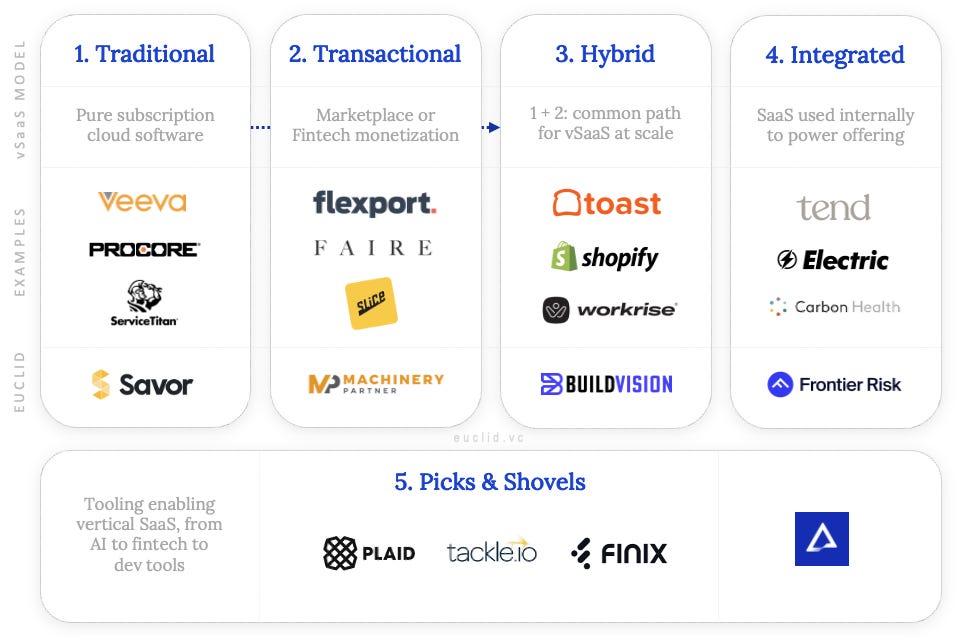
Credit: insights.euclid.vc
Security and compliance stand as crucial pillars when selecting between SaaS and traditional software. Both models offer different approaches to safeguarding your business data and meeting legal standards. Understanding these differences can guide you to the best choice for your company’s needs.
SaaS providers handle data storage and protection on your behalf. They use encryption and regular backups to keep information safe. Traditional software keeps data on your own servers, giving you full control. This control requires you to manage security measures and updates yourself.
Businesses must follow rules like GDPR or HIPAA depending on their industry. SaaS vendors often build compliance features into their platforms. This reduces the burden on your team. With traditional software, you must ensure your setup meets all legal demands. Compliance depends on your internal policies and IT staff.
Choosing a reliable SaaS vendor means trusting their security practices and uptime. Reputable providers offer service level agreements and transparency. Traditional software relies on your team to maintain and secure systems. Vendor support is limited to updates and patches, which you must apply.
Integration and compatibility are key factors in choosing between SaaS and traditional software. Your business needs software that fits well with existing tools. It must connect smoothly to avoid disruptions.
Understanding how each model handles integrations helps you make the right choice. Compatibility with your current systems and third-party tools is crucial. Let’s explore important aspects of integration and compatibility.
SaaS solutions often offer many third-party integrations. This allows your software to connect with popular apps easily. It reduces manual work and improves efficiency.
Traditional software may have fewer built-in integrations. Adding connections might require extra development or plugins. This can increase cost and complexity.
APIs let software communicate with other applications automatically. Most SaaS platforms provide open APIs for custom connections. This makes it easier to automate tasks and share data.
Traditional software APIs might be limited or harder to access. Custom API development can take time and resources. Check API support before committing to a solution.
Many businesses still rely on legacy systems. Traditional software often fits better with these older systems. It can run on local servers and work offline.
SaaS may face challenges integrating with legacy software. Cloud-based models need internet and modern protocols. Consider how well each model matches your legacy environment.
Performance and accessibility are key factors when choosing between SaaS and traditional software. These elements affect how smoothly your business runs and how easily your team can use the tools. Understanding these aspects helps you pick the right software model for your needs.
SaaS relies heavily on a stable internet connection. Without it, accessing the software can be difficult or impossible. Traditional software usually runs on local machines, reducing the need for constant internet access. This can be a major factor in areas with poor connectivity.
SaaS offers easy global access from any device with internet. Teams spread across different locations can work together seamlessly. Traditional software often requires installation on each device, limiting remote work flexibility. SaaS supports a mobile workforce better.
Traditional software often allows offline work since it is installed locally. This can be crucial for businesses in remote or low-connectivity areas. SaaS solutions usually need an internet connection, which can interrupt work if offline. Some SaaS providers offer limited offline features, but they are not always reliable.
Maintenance and support are crucial factors when choosing between SaaS and traditional software. These elements affect your business’s daily operations and long-term success. Understanding who handles maintenance and support helps you plan resources and avoid downtime.
SaaS providers manage software updates and fixes. They handle security patches and system upgrades automatically. This reduces your workload and keeps the software current. Support is often available 24/7 through chat, email, or phone. Traditional software vendors may offer support, but updates require manual installation. You must track new versions and schedule upgrades yourself.
Traditional software demands a strong internal IT team. Your staff must install, update, and maintain the system. This requires time, skills, and budget. SaaS shifts these tasks to the vendor, freeing your IT team for other duties. Your team focuses on user support and integration instead of system upkeep.
In SaaS, troubleshooting often starts with the vendor’s help desk. They resolve most technical issues remotely. If problems persist, your IT team coordinates with the vendor. Traditional software troubleshooting relies heavily on your IT staff. They must identify and fix issues onsite or via remote tools. This can take longer and may disrupt business operations.
Choosing between SaaS and traditional software depends largely on your business needs. Each model offers unique advantages. Understanding which fits your business style helps in making an informed decision.
Factors like company size, industry type, and growth plans shape this choice. These elements affect software costs, flexibility, and maintenance needs. Let’s explore these aspects to find the right fit for your business.
Small businesses often prefer SaaS due to its low upfront cost. They avoid heavy investments in hardware and IT staff. SaaS provides quick setup and easy updates, ideal for limited resources.
Large enterprises may favor traditional software for full control over data and customization. They can afford the infrastructure and dedicated support teams. This model suits complex workflows and strict security needs.
Industries with strict compliance rules may lean towards traditional software. It allows on-premises data storage, meeting legal requirements. SaaS can also comply but needs careful vendor selection.
Creative and tech industries benefit from SaaS’s flexibility and collaboration features. Frequent updates and cloud access enhance productivity. Industries with dynamic environments gain the most from SaaS.
For fast-growing businesses, SaaS offers scalability without heavy costs. Adding users or features is simple and quick. This model supports expansion and changing business demands effectively.
Traditional software may slow growth due to fixed capacities and upgrade expenses. It suits stable businesses with predictable needs. Growth requires planning and additional investments.
Hybrid approaches blend the best parts of SaaS and traditional software. This model suits businesses wanting flexibility and control. It allows companies to use cloud-based tools alongside on-premises systems. Hybrid solutions help balance cost, security, and performance needs.
Many businesses mix SaaS applications with traditional software. For example, core systems might run on local servers. Meanwhile, non-critical tasks use SaaS tools in the cloud. This combination supports smoother workflows and better data sharing. It also helps businesses avoid full migration risks.
Hybrid fits companies that need both stability and agility. Use it if sensitive data requires on-site storage. Also, consider hybrid when legacy software cannot move to the cloud. It suits businesses with varying internet reliability too. Hybrid allows gradual shifts to cloud services without disruption.
Hybrid offers flexibility and control over data and costs. It enables faster software updates for cloud parts. Yet, managing two systems can increase IT complexity. Integration between SaaS and traditional tools may need extra effort. Security must cover both local and cloud environments carefully.
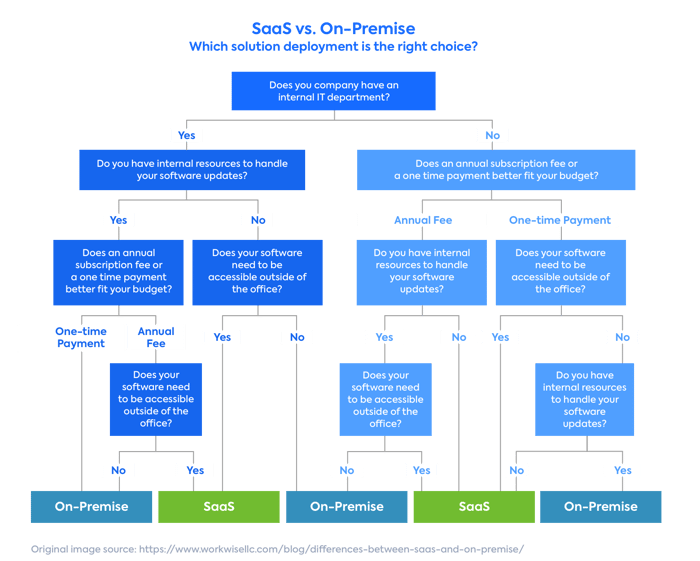
Credit: www.leanix.net
SaaS is cloud-based software accessed via the internet. Traditional software is installed locally on your hardware. SaaS offers subscription pricing, while traditional software usually requires a one-time license purchase.
SaaS typically has lower upfront costs due to subscription pricing. Traditional software demands higher initial investment for licenses and infrastructure. SaaS reduces maintenance expenses, making it cost-effective for many businesses.
Traditional software often allows extensive customization tailored to business needs. SaaS solutions offer limited customization but deliver faster updates and scalability. The choice depends on how much control you need over the software.
SaaS requires a stable internet connection since it is cloud-hosted. Traditional software can operate offline as it is installed locally. This makes traditional software suitable for areas with unreliable internet access.
Choosing between SaaS and traditional software depends on your business needs. SaaS offers flexibility, lower upfront costs, and easy updates. Traditional software gives more control and works without internet. Consider your budget, control needs, and how you want to manage software.
Both models have pros and cons worth weighing. Think about what fits your company’s size and goals best. This will help you pick the right software approach. Make a choice that supports your business growth and daily operations smoothly.







Leave A Reply Now