


Choosing the right software model can make or break your business growth. You’re probably wondering: should you go with traditional software that you install and own, or opt for SaaS—software as a service—that’s hosted online and accessed anytime?
Each option has its own strengths and challenges. But which one truly fits your unique business needs? You’ll discover the key differences, benefits, and drawbacks of SaaS versus traditional software. By the end, you’ll feel confident about making a choice that saves you money, boosts efficiency, and keeps your business ahead of the curve.
Keep reading to find out which model is the perfect match for you.
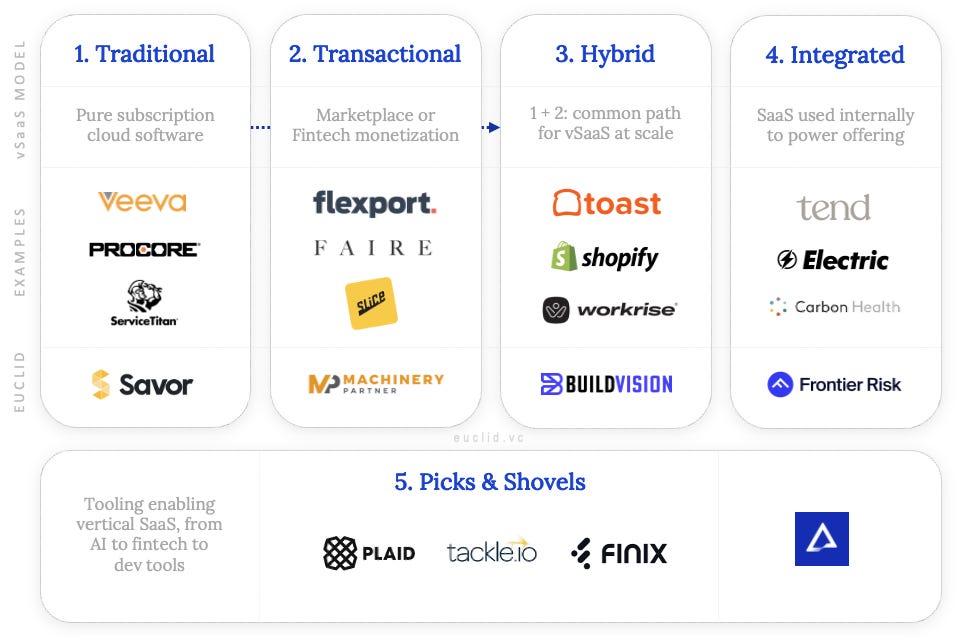
Credit: insights.euclid.vc
The Software as a Service (SaaS) model changes how businesses use software. Instead of buying software once, companies rent it over time. This model offers flexibility and ease. It suits many business sizes and types. Understanding the basics helps decide if SaaS fits your needs.
SaaS software uses a subscription pricing model. Businesses pay monthly or yearly fees. This reduces large upfront costs. Subscriptions often include support and new features. It helps budget software expenses clearly and predictably.
SaaS applications run on cloud servers. Users access software through the internet. No need to install or maintain programs locally. Cloud hosting allows access from any device. It supports remote work and quick scaling of users.
SaaS providers manage software updates automatically. Users get the latest features and fixes without manual action. This keeps software secure and reliable. It saves time and IT costs for businesses. Updates happen in the background with no downtime.
Traditional software has been the foundation of business tools for decades. It offers distinct features that appeal to companies wanting full control over their systems. Understanding these features helps decide if this model fits your business needs.
Below are key aspects of traditional software that define its use and management in the business environment.
Traditional software usually requires a one-time purchase. You pay once and own the software license forever. This means no recurring fees, which some businesses find more budget-friendly. Owning the license allows use without ongoing costs.
This model suits companies that want to avoid monthly or yearly payments. However, initial costs can be higher than subscription models.
Traditional software installs directly on your company’s computers or servers. This local setup gives full control over the software environment. Data stays within your premises, which enhances security for sensitive information.
On-premise installation needs IT staff to manage hardware and troubleshoot issues. It can be less flexible when expanding or upgrading infrastructure.
Upgrading traditional software is a manual process. You must download and install updates yourself. This can require time and technical knowledge from your team.
Manual upgrades allow control over when and how to update software. But delays in applying updates may cause security risks or missing new features.
Understanding the cost differences between SaaS and traditional software helps businesses make smart decisions. Costs vary in structure and timing, affecting budgets and cash flow. Breaking down these expenses clarifies which option fits your business needs better.
Traditional software usually requires a large one-time payment. This covers licenses and installation fees. Businesses must also invest in hardware and setup. These costs can be high and may strain initial budgets.
SaaS, on the other hand, has minimal upfront costs. You pay a small setup fee or none at all. There is no need to buy hardware or manage installations. This makes SaaS easier to start with for many companies.
Traditional software often has fewer ongoing costs. Maintenance, updates, and support can add to expenses. These fees may appear irregular but can be significant over time.
SaaS operates on a subscription model. You pay monthly or yearly fees that cover updates and support. This predictable expense helps with budgeting and cash flow management. The subscription includes continuous access to the latest features.
Traditional software costs add up through licenses, hardware, and IT staff. Over years, maintenance and upgrade expenses increase the total cost. Businesses need to plan for these long-term investments.
SaaS spreads costs over time with subscriptions. It reduces the need for in-house IT resources. The total cost can be lower, especially for small to mid-sized businesses. SaaS offers flexibility to scale costs as the business grows.
Deployment and access are critical factors when choosing between SaaS and traditional software. These elements determine how your team interacts with the software daily. Understanding the differences can help your business run smoothly and stay productive.
SaaS software requires a constant internet connection. It runs on cloud servers, so users need the internet to access it. Without internet, the software becomes unavailable. Traditional software usually works offline after installation. This means it does not rely heavily on internet access. Businesses with unstable internet might prefer traditional software for this reason.
SaaS offers easy remote access from any device. Employees can work from home, office, or on the go. This supports flexible work environments and collaboration. Traditional software often limits access to specific computers or networks. Remote work may require VPNs or remote desktops. SaaS simplifies access but depends on internet quality.
Traditional software needs physical infrastructure like servers and storage. Businesses must invest in hardware and maintenance. IT staff may be required to manage these systems. SaaS removes much of this burden by hosting software in the cloud. It reduces upfront costs and infrastructure management. Companies save time and resources with SaaS deployment.
Choosing between SaaS and traditional software depends greatly on control and customization needs. These factors influence how well the software fits your business processes. Control defines how much you can manage software settings and data. Customization refers to the ability to tailor software features and appearance to your needs. Both models offer different strengths in these areas.
Traditional software gives users high control over their environment. You install it on your own hardware and manage updates manually. This setup allows complete control of data storage and security. SaaS offers less direct control. The provider manages hosting, updates, and backups. Users access software through the internet. This can limit control over software changes and data access.
Traditional software often allows deep customization. You can modify source code or add custom modules. This suits businesses with unique workflows or complex needs. SaaS platforms usually offer standard features with configurable settings. Customization is mostly through built-in options or add-ons. Extensive changes are rare since the software is shared among many users.
SaaS excels at integrating with other cloud services via APIs. This enables smooth data flow between different tools. Integration is often easier to set up and maintain. Traditional software can integrate well but may require more effort. Custom connectors or middleware might be needed. On-premises setups sometimes face challenges connecting to cloud apps.
Security and compliance play a key role in choosing between SaaS and traditional software. Protecting business data and meeting legal rules affects daily operations and long-term success. Each software model handles these issues differently. Understanding these differences helps businesses make safer choices.
SaaS providers store data on cloud servers. They use strong encryption to keep data safe. Regular backups prevent data loss. Traditional software stores data locally. Businesses must secure their own servers and backups. This adds responsibility but offers more control over data security.
Businesses must follow laws about data privacy and security. SaaS providers often maintain certifications like GDPR and HIPAA. They update systems to meet changing rules. Traditional software needs manual updates and checks. Companies handle compliance in-house, which can require more resources.
SaaS vendors manage security updates and system monitoring. They fix vulnerabilities quickly to protect customers. This reduces IT workload for businesses. Traditional software users must install updates themselves. They carry full responsibility for system security and maintenance.
Scalability and flexibility are key factors when choosing between SaaS and traditional software. Both models offer different ways to grow and adapt as your business changes. Understanding how each handles user numbers, features, and resources helps pick the best fit.
SaaS platforms let you add or remove users quickly. You pay only for what you need. This suits businesses with fluctuating staff or seasonal demands. Traditional software often requires buying licenses for each user upfront. Changing user counts can be costly and slow. You might need to wait for new licenses or hardware upgrades.
SaaS providers regularly update features without extra cost. New tools appear automatically in your system. This keeps your software current and useful. Traditional software needs manual updates or new versions. Installing them can interrupt work. Sometimes, you must buy new software to get new features.
SaaS uses cloud resources managed by the provider. Your business does not worry about servers or maintenance. Resources scale smoothly with demand. Traditional software runs on your own servers or computers. You must invest in hardware and IT staff. Scaling up means buying more equipment and managing it yourself.
Performance and reliability are key factors in choosing between SaaS and traditional software. These aspects affect daily operations and user satisfaction. Both models offer different advantages and challenges in these areas.
SaaS providers usually maintain servers with high uptime guarantees. They handle maintenance and updates without interrupting service. Traditional software depends on your own hardware and network. Downtime risks increase if your IT setup is weak or outdated.
Traditional software often runs directly on local machines. This setup can offer faster response times for data-heavy tasks. SaaS performance depends on internet speed and server location. Some SaaS platforms optimize their systems to reduce delays and improve user experience.
SaaS solutions typically include automated backups and disaster recovery. Data is stored safely in the cloud with regular snapshots. Traditional software requires manual backup efforts. Recovery depends on your backup strategy and hardware reliability.
Choosing between SaaS and traditional software depends on your business type and needs. Different business sizes and industries benefit uniquely from each model. Understanding ideal scenarios helps you pick the best fit. This section explores where SaaS or traditional software excels.
Startups and small businesses often have limited budgets and resources. SaaS suits them well because it requires low upfront costs. Subscription plans allow predictable expenses and easy scaling. Updates and maintenance happen automatically, saving time and effort. SaaS enables quick setup and flexibility as the business grows.
Traditional software may be costly and complex for small teams. It needs hardware and IT support, which small businesses might lack. SaaS provides ready-to-use tools without heavy infrastructure investment. This helps startups focus on growth instead of technical challenges.
Large enterprises usually have complex IT environments and specific security needs. Traditional software offers more control and customization options. It allows integration with existing systems and on-premises data storage. Enterprises with strict compliance may prefer traditional software for data privacy.
SaaS can still work for large companies seeking agility. It supports collaboration across locations and reduces IT maintenance tasks. Many enterprises adopt hybrid models combining SaaS and traditional software. This balances control with flexibility and cost efficiency.
Certain industries have unique software requirements. Healthcare, finance, and manufacturing often demand high security and regulation compliance. Traditional software might better meet these strict standards. It allows tailored solutions and in-house data control.
Some industries benefit from SaaS’s quick updates and easy access. For example, marketing and retail sectors value SaaS for real-time analytics and customer management. Choosing depends on how critical customization and control are for your industry.

Credit: www.beecoded.io
Choosing the right software model can shape your business success. The decision between SaaS and traditional software depends on several key factors. Understanding these factors helps you pick the best fit for your needs. Consider your business goals, budget, and long-term plans carefully. This section guides you through these important aspects.
Define what your business aims to achieve with the software. Are you looking for quick deployment or complete control? SaaS offers fast setup and automatic updates. Traditional software provides more customization and control over data. Think about your team’s skills and the level of IT support available. Match your software choice to your business objectives.
Analyze your budget for software expenses. SaaS usually requires lower upfront costs due to subscription pricing. Traditional software demands a larger initial investment with licenses and hardware. Also, factor in ongoing maintenance and upgrade costs. Decide which spending model aligns better with your financial situation.
Look beyond immediate needs and focus on future growth. SaaS scales easily as your business expands, adding users or features quickly. Traditional software may need more effort and cost to scale. Consider how often you want to update or change your software. Plan for flexibility and sustainability in the years ahead.
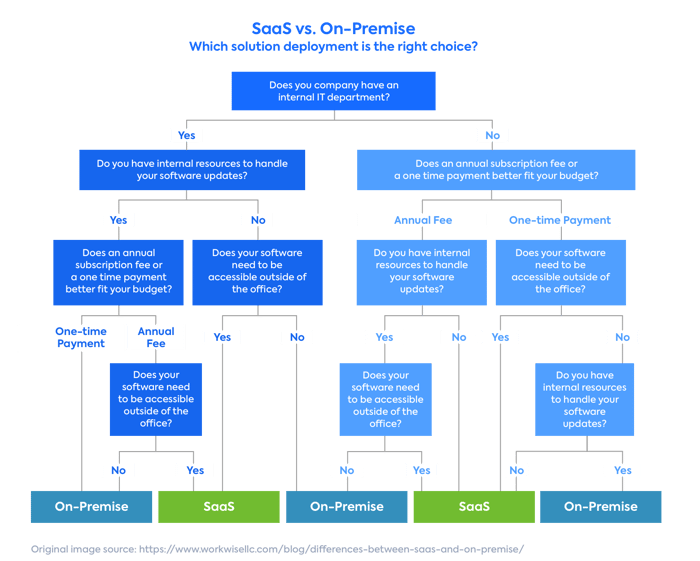
Credit: www.leanix.net
SaaS is cloud-based and subscription-based, while traditional software is installed locally and usually purchased with a one-time license fee. SaaS offers flexibility and remote access, whereas traditional software provides more control and customization on-premises.
SaaS typically has lower upfront costs due to subscription pricing and no hardware expenses. Traditional software requires a larger initial investment for licenses and infrastructure but may be cheaper long-term for some businesses.
SaaS providers handle maintenance, updates, and security automatically, reducing IT workload. Traditional software maintenance is managed in-house, requiring dedicated resources for updates and troubleshooting.
No, SaaS requires a stable internet connection for access and functionality. Traditional software can often operate offline since it is installed locally on user devices.
Choosing between SaaS and traditional software depends on your business needs. SaaS offers flexibility and lower upfront costs. Traditional software gives more control and works offline. Consider your budget, technical skills, and long-term goals. Think about how often you want to update your software.
Both models have benefits and challenges. The right choice supports your growth and daily operations. Take time to evaluate what fits your business best. This decision shapes your efficiency and success.







Leave A Reply Now