



Are you ready to turn your SaaS idea into a thriving business? Building your Minimum Viable Product (MVP) is just the first step.
The real challenge comes when you want to grow quickly and reach users around the world. You might wonder how to develop your software smartly, keep costs low, and scale without losing control. This article will guide you through every stage—from creating a strong MVP to scaling your SaaS for global success.
Stick with me, and you’ll discover practical strategies that can make your growth faster, smoother, and more profitable.

Credit: www.imaginarycloud.com
Scaling a SaaS product from a simple MVP to global growth requires smart decisions. One key choice is whether to build a custom SaaS solution. Many businesses start with off-the-shelf software. But as they grow, their needs change. Custom SaaS can provide the exact features and flexibility needed. Below are 5 clear signs your business needs a custom SaaS solution.
Standard software often fits common workflows only. If your processes differ, off-the-shelf tools create workarounds. This slows teams down and causes errors.
Custom SaaS solutions adapt perfectly to your specific business rules. They streamline operations and reduce manual tasks.
Running into limits like data caps, user restrictions, or feature gaps is frustrating. These limits block growth and reduce productivity.
Custom SaaS removes these barriers. You get tailored features and scalable infrastructure for growing teams and data.
Most businesses use multiple software tools daily. If these tools cannot connect well, data silos form. Teams waste time transferring info manually.
A custom SaaS solution integrates smoothly with existing systems. It automates data flow and improves collaboration.
Industries like finance, healthcare, and education require strict security standards. Off-the-shelf software may not meet all compliance rules.
Custom SaaS lets you build security features tailored to your needs. This lowers risk and protects sensitive data better.
Using public SaaS means waiting for vendor updates. You cannot change features or fix bugs quickly. This reduces agility.
Custom SaaS gives you control over development and release schedules. You can add features fast and fix issues immediately.
Building a SaaS product with Laravel requires smart planning and clear best practices. Laravel offers tools that speed up development and help scale your app smoothly. Following best Laravel SaaS practices ensures your project grows from a simple MVP to a reliable global service.
Use Modular Architecture for Better Code ManagementDivide your SaaS app into small, independent modules. Each module handles a specific feature or service. This setup helps developers work faster and makes future updates easier. Laravel supports modular design through packages and service providers.
Implement Multi-Tenancy CorrectlyMulti-tenancy allows one app to serve multiple customers safely. Laravel makes it easy to set up multi-tenant SaaS apps with these methods:
Choose the method that fits your app size and complexity. Use Laravel middleware to isolate tenant data and keep it secure.
Optimize Performance with CachingCaching reduces server load and speeds up response times. Laravel offers easy ways to cache data, queries, and views.
| Cache Type | Use Case | Laravel Feature |
|---|---|---|
| Data Cache | Store heavy query results | Cache facade, Redis |
| View Cache | Speed up Blade template rendering | Blade caching |
| Route Cache | Reduce routing overhead | php artisan route:cache |
Secure Your SaaS ApplicationSecurity is vital for SaaS products. Laravel includes many built-in features to protect your app:
Automate Testing for Reliable ReleasesTesting your SaaS app helps find bugs early and keeps features stable. Laravel supports many testing types:
Run tests automatically using tools like PHPUnit and Laravel Dusk. Continuous testing saves time and improves code quality.
Building a SaaS product requires fast development and easy updates. Laravel offers a solid framework to help developers create and grow SaaS apps efficiently. It simplifies many complex tasks and allows teams to focus on features that matter most. This makes the journey from MVP to global growth smoother and faster.
Laravel provides tools that speed up coding and reduce errors. Some key features include:
These features help developers save time and deliver a reliable product faster.
| Tool | Purpose | Benefit for SaaS |
|---|---|---|
| Laravel Horizon | Queue management | Monitors and manages background tasks smoothly |
| Laravel Passport | API authentication | Secures API access with OAuth2 standards |
| Laravel Nova | Admin panel | Quickly build a clean admin dashboard |
| Laravel Cashier | Subscription billing | Handles payment processing and subscriptions easily |
Laravel’s architecture supports growth without big rewrites. It allows:
This flexibility keeps your SaaS app stable as user numbers increase.
Launching a minimum viable product fast is critical. Laravel helps by:
Developers can build a working MVP quickly and start testing ideas.
Scaling a SaaS product is a critical step after launching your MVP. Efficient scaling means growing your user base, infrastructure, and revenue without losing product quality or customer satisfaction. It requires smart planning, right tools, and constant monitoring. Scaling too fast or without strategy can cause system crashes and unhappy users. Scaling too slow may let competitors take the lead. Here are key strategies to scale SaaS efficiently.
Reliable infrastructure supports more users and data without slowing down. Use cloud services like AWS, Azure, or Google Cloud. They allow easy resource scaling.
Monitor server performance regularly to prevent downtime.
Smooth onboarding helps users get value fast, reducing churn. Use in-app guides, tutorials, and FAQs. Automate repetitive support tasks with chatbots and helpdesk software.
Automated support frees your team to handle complex issues.
Pricing affects customer growth and revenue. Use tiered plans to serve different user needs. Consider usage-based pricing for fairness.
| Pricing Model | Description | Best For |
|---|---|---|
| Freemium | Free basic plan with paid upgrades. | Attracting many users quickly. |
| Tiered | Multiple plans with increasing features. | Different user segments. |
| Usage-Based | Charge based on usage volume. | Variable user needs. |
Data guides scaling decisions. Track metrics like monthly recurring revenue (MRR), churn rate, and customer lifetime value (CLTV). Collect user feedback regularly to improve features.
React quickly to negative trends to keep growth steady.
Choosing the right software model is crucial for your business growth. The decision between SaaS (Software as a Service) and traditional software affects costs, updates, and how users access your product. Understanding the differences helps find the best fit for your goals.
SaaS delivers software through the internet. Users pay a subscription fee and access the software via a web browser. This model offers several advantages:
This model suits businesses that want flexibility and fast deployment.
Traditional software is installed on local computers or servers. Customers buy a license and own the software indefinitely. Key features include:
This model fits businesses with stable needs and strict data control.
| Feature | SaaS | Traditional Software |
|---|---|---|
| Payment | Subscription (monthly/yearly) | One-time license fee |
| Installation | No installation needed | Installed on local devices |
| Updates | Automatic and frequent | Manual, less frequent |
| Access | Anywhere with internet | Usually limited to installed machines |
| Customization | Limited | More flexible |
Answer these questions to decide:
SaaS suits businesses needing flexibility and easy access. Traditional software works well for companies demanding control and offline use.
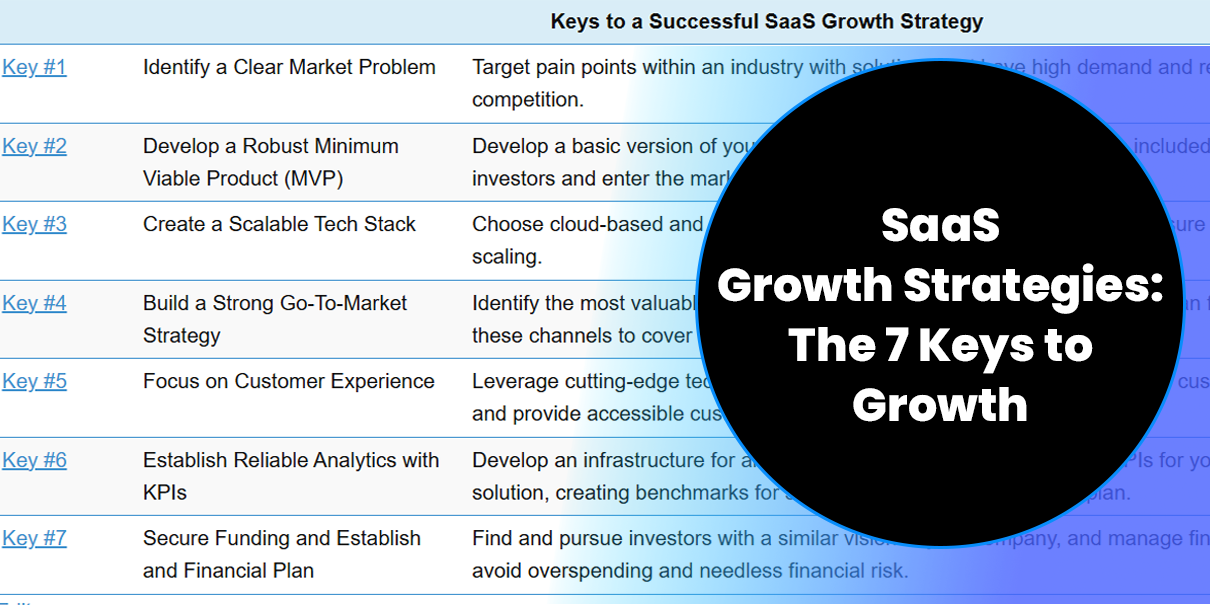
Credit: 7t.ai
Choosing the right software can save money and improve business operations. Custom SaaS solutions offer unique cost benefits. These benefits come from building software that fits specific needs. Unlike off-the-shelf products, custom SaaS grows with the business. It reduces waste and increases efficiency. Many companies find long-term savings by switching to custom SaaS.
Standard software often requires recurring license payments. These fees can add up quickly for many users. Custom SaaS removes these costs by creating a single tailored system. Businesses pay once for development and avoid ongoing license fees.
Custom SaaS fits perfectly with existing systems. This reduces the time and money spent on integration. Off-the-shelf software often needs expensive workarounds.
Maintenance is easier with custom solutions. Developers understand the code and can fix issues faster. This lowers support costs and downtime.
| Aspect | Custom SaaS | Off-the-Shelf Software |
|---|---|---|
| Integration Effort | Seamless and tailored | Often complex and costly |
| Maintenance Cost | Lower due to dedicated support | Higher with generic support |
| Downtime | Minimal and fast recovery | Longer and unpredictable |
Custom SaaS scales based on business growth. This avoids paying for unused features or capacity.
Costs grow only as needed. Businesses avoid large upfront investments for future needs. This pay-as-you-grow model fits budgets better.
Custom SaaS matches workflows precisely. Employees spend less time navigating software. This boosts productivity and reduces labor costs.
Automation of repetitive tasks cuts errors and speeds up processes. These improvements translate to significant savings.
SaaS development is a journey from a simple idea to a full product used worldwide. The first big step is creating a Minimum Viable Product (MVP). An MVP is a basic version of your software. It shows the core features and tests your idea with real users. Building an MVP fast helps save time and money. It also helps to get feedback early. This feedback guides your next steps in development and growth.
Start by writing down what problem your software will solve. Focus on the main features that solve this problem. Avoid adding too many features at first. A simple list of must-have features helps keep the project small and fast.
Select tools and platforms that allow quick development and easy updates. Popular choices include:
| Purpose | Technology | Reason |
|---|---|---|
| Frontend | React, Vue.js | Fast, reusable UI components |
| Backend | Node.js, Ruby on Rails | Quick server-side development |
| Database | PostgreSQL, MongoDB | Flexible and scalable data storage |
Work in short cycles called sprints. Each sprint adds small features or fixes bugs. This method helps you see progress and adjust quickly.
Before coding, create simple designs of your app. Use tools like Figma or Sketch. This step saves time by fixing design problems early.
Run tests on your MVP to find bugs and usability issues. Early testing prevents big problems later. Include users in testing to get real feedback.
// Example simple test for a login function function testLogin() { const result = login('user@example.com', 'password123'); if (result === 'success') { console.log('Test passed'); } else { console.log('Test failed'); } } 
Credit: www.azilen.com
MVP stands for Minimum Viable Product. It’s the initial version with core features to test market demand. Building an MVP helps save resources and gather user feedback for improvements before full-scale development.
Focus on optimizing performance, improving user experience, and expanding features. Invest in marketing and customer support. Use data analytics to guide scaling decisions. Ensure infrastructure can handle increased user load to maintain reliability.
Customer feedback highlights product strengths and weaknesses. It guides feature development and fixes issues quickly. Engaging users builds loyalty and trust. Feedback-driven improvements boost user satisfaction and drive sustainable growth.
Use cloud services with global data centers for speed and reliability. Implement CDN to reduce latency. Ensure scalable databases and automated deployment pipelines. Prioritize security and compliance to protect user data worldwide.
Building a SaaS product starts with a clear MVP. Focus on solving real problems first. Test, learn, and improve quickly. Scaling needs smart planning and strong technology. Keep users happy by adding useful features. Watch your market and adapt fast.
Growth happens step by step, not overnight. Stay patient and consistent in your efforts. Success in SaaS comes from steady progress. Keep your team aligned and goals clear. This approach helps your product grow worldwide.







Leave A Reply Now