


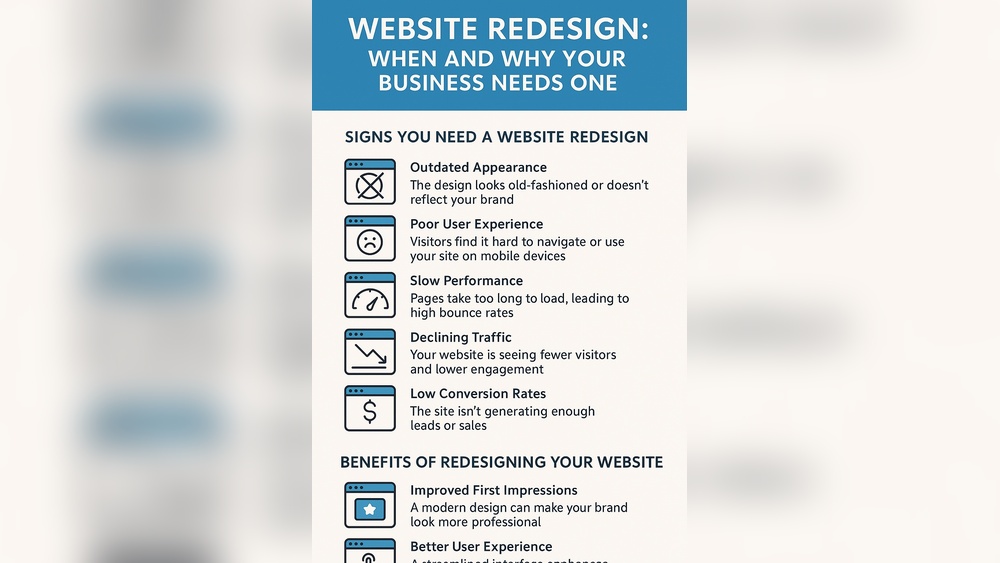
Is your business website truly ready for the mobile world? If your site isn’t easy to navigate on a smartphone or tablet, you could be losing customers without even realizing it.
Making your website mobile-friendly isn’t just a nice-to-have—it’s essential for keeping visitors engaged and boosting your sales. But how do you ensure your site performs smoothly on all devices while still looking great? You’ll discover simple, effective strategies to transform your business website into a fast, user-friendly, and high-performing platform that keeps your audience coming back.
Keep reading to unlock the secrets to mobile success and give your business the edge it deserves.

Credit: uxseopro.com
Mobile-friendly design is vital for any business website today. It ensures users on phones and tablets have a smooth experience. Good design boosts engagement and keeps visitors longer. It also improves your site’s performance and search ranking.
Focus on key elements that make your website easy to use on small screens. Simple adjustments can create a big difference. Here are the essentials to consider for mobile-friendly design.
Responsive layouts adjust the website to fit any screen size. They prevent horizontal scrolling and cut down on zooming. Using flexible grids and images helps the content look clean and organized. This design adapts to phones, tablets, and desktops automatically. It keeps your website attractive and easy to navigate on all devices.
Touchscreen optimization means making buttons and links easy to tap. Elements should be large enough to avoid mistakes. Spacing between clickable items reduces accidental clicks. Avoid hover-only features that don’t work on touchscreens. Design with finger-friendly zones to improve usability and user satisfaction.
Text must be clear and easy to read on small screens. Use simple fonts and avoid tiny sizes. Headings and paragraphs should have enough spacing. Contrast between text and background should be strong for visibility. Well-chosen fonts help users quickly scan and understand content.
Navigation should be straightforward and easy to find on mobile devices. Use hamburger menus or collapsible lists to save space. Limit menu items to the most important pages. Clear labels and icons guide users where they want to go. Simple navigation reduces frustration and helps users explore your site faster.
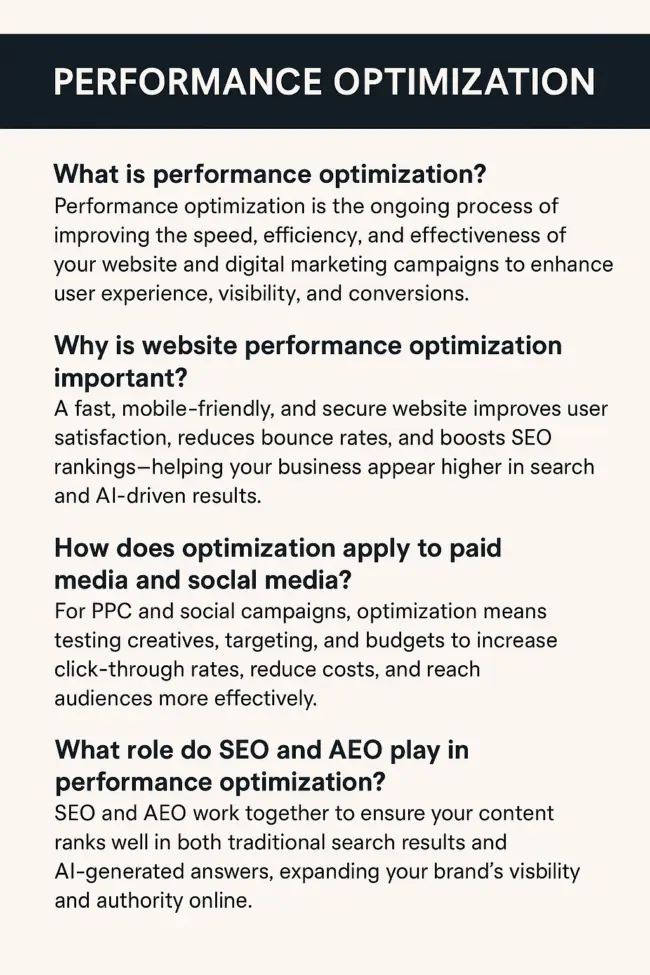
Optimizing website speed is crucial for mobile users. Slow loading frustrates visitors and increases bounce rates. Fast websites keep users engaged and improve search rankings.
Speed optimization requires smart techniques. Each step reduces load time and enhances performance. Focus on key areas to deliver a smooth mobile experience.
Images often cause slow loading on mobile devices. Compress them to reduce file size without losing quality. Use tools like TinyPNG or ImageOptim. Smaller images load faster and use less data. Choose the right format: JPEG for photos, PNG for graphics.
Every element on your page needs an HTTP request. Many requests slow down the site. Combine CSS and JavaScript files to cut requests. Use sprites for icons and small images. Fewer requests mean faster page loads.
Browser caching stores website data on the user’s device. Returning visitors load pages quicker. Set expiration dates on files like images, scripts, and stylesheets. This reduces the need to download files repeatedly.
Content Delivery Networks (CDNs) distribute your website files worldwide. They serve content from servers closest to the user. This lowers latency and speeds up loading. Popular CDNs include Cloudflare and Akamai.
Making your business website mobile-friendly improves its SEO in many ways. Search engines favor sites that work well on phones and tablets. Mobile optimization helps your site rank higher and attract more visitors. It also ensures users have a smooth experience, keeping them engaged longer. Below are key SEO benefits of mobile optimization.
Search engines like Google rank mobile-friendly sites higher in results. Mobile optimization shows your site is easy to use on small screens. This increases your chances of appearing on the first page. Higher rankings lead to more clicks and potential customers. A mobile-friendly design is now a ranking factor.
Mobile-optimized sites load faster on smartphones. Speed is critical for SEO because slow pages cause visitors to leave. Faster load times reduce bounce rates and improve user satisfaction. Search engines reward sites that load quickly with better rankings. Optimizing images and code helps achieve fast page loads.
Google uses mobile-first indexing for ranking sites. This means Google mainly looks at the mobile version of your site. If your mobile site is poor, your rankings will suffer. A responsive design ensures your content is consistent across devices. Mobile-first indexing makes mobile optimization essential for SEO success.
Mobile-friendly sites offer a better user experience. Easy navigation and readable text keep visitors on your site longer. Engaged users are more likely to explore and convert into customers. Lower bounce rates and longer sessions signal quality to search engines. Good user engagement boosts SEO and business growth.
Testing and monitoring tools help ensure your website works well on mobile devices. They identify issues and suggest fixes. These tools check loading speed, usability, and responsiveness. Regular use of these tools keeps your site smooth and user-friendly. Here are some key tools to test and monitor your site’s mobile performance.
Chrome Lighthouse is a free tool by Google. It audits your website for performance and mobile-friendliness. It gives detailed reports on speed, accessibility, and SEO. Use Lighthouse in Chrome DevTools or as a browser extension. It highlights problems and offers clear advice to improve your site. It helps make your website faster and easier to use on phones.
This tool checks if your site is easy to use on mobile. Enter your URL and get a simple yes or no result. It shows screenshots of how your site looks on mobile screens. The test points out issues like small text or touch elements too close. Fixing these improves user experience and search ranking. It’s quick and easy to use for any website owner.
BrowserStack lets you test your website on real devices and browsers. You can see how your site looks and works on many phones. It helps find problems that only appear on certain devices. Testing on real phones gives accurate results. BrowserStack saves time by avoiding the need for many physical devices. It ensures your site runs smoothly everywhere.
Performance analytics tools track your site’s speed and user behavior over time. Google Analytics and others show how visitors interact with your mobile site. You can spot slow pages and high bounce rates. These insights guide improvements to loading times and navigation. Monitoring performance regularly helps keep your site fast and user-friendly. It supports better decisions to enhance mobile experience.
Creating a mobile-friendly business website requires more than just responsive design. Content and usability play key roles in engaging visitors and keeping them on your site. Clear and easy-to-read content helps users find information quickly. Usability ensures smooth navigation and a pleasant browsing experience on small screens.
Focus on content and usability tips that improve mobile performance. These tips reduce frustration and increase user satisfaction. Simple layouts, readable text, and easy access to important features make a big difference. Follow these best practices to enhance your mobile site’s effectiveness.
Keep your text short and to the point. Use simple words and short sentences. Break content into small paragraphs for easy reading. Avoid long blocks of text that can overwhelm mobile users. Highlight key information with bullet points or bold text. This helps visitors scan content quickly and understand your message.
Place essential features at the top of the page. Focus on calls to action, contact info, and main products or services. Remove unnecessary items that distract or slow down the site. Use large buttons that are easy to tap on small screens. Organize content logically to guide users through your site smoothly.
Pop-ups can frustrate mobile users and cause them to leave. Limit or remove pop-ups on your mobile site. Use non-intrusive ads that do not cover content. Ensure ads do not slow down page loading times. A clean, distraction-free site improves user experience and encourages longer visits.
Make your website usable for everyone, including people with disabilities. Use readable fonts with sufficient size and contrast. Add alt text to images for screen readers. Ensure navigation works via keyboard or assistive devices. Test your site for accessibility to reach a wider audience and improve usability.
Advanced mobile performance tricks improve your website’s speed and user experience. Faster loading times keep visitors engaged. These techniques reduce data use and make navigation smoother on phones and tablets.
Applying these tricks boosts your site’s ranking on search engines. A high-performing mobile site attracts more visitors and leads to better conversion rates. Let’s explore key strategies to enhance mobile performance.
Lazy loading delays image loading until they appear on screen. This reduces initial page load time. Visitors see content faster without waiting for all images to load. It also saves bandwidth for users with limited data plans. Implement lazy loading with simple code or plugins. This method works well for pages with many images.
AMP is a framework that creates fast-loading mobile pages. It strips down unnecessary elements to speed up loading. AMP pages appear instantly and provide a smooth browsing experience. Search engines favor AMP, helping improve your site’s visibility. Set up AMP by following Google’s guidelines or using plugins. It is ideal for blogs and news sites.
Minimize and combine CSS and JavaScript files to reduce load time. Remove unused code to make files smaller. Use asynchronous loading to prevent scripts from blocking page rendering. Efficient CSS and JavaScript lead to faster interaction and better user experience. Tools like minifiers and bundlers simplify this process. Keep your code clean and lightweight.
Progressive Web Apps (PWAs) offer an app-like experience on mobile browsers. PWAs load quickly, even on slow networks. They work offline by caching important data. Users can add PWAs to their home screen for easy access. Implementing PWAs improves engagement and repeat visits. This approach blends the best of websites and mobile apps.
Boosting traffic through a strong mobile experience is crucial for any business website. Mobile users expect easy navigation and quick results. A smooth mobile experience keeps visitors engaged and encourages them to explore more pages. This increases the chance of turning visitors into customers. Focus on key areas to enhance mobile usability and attract more visitors.
Calls to action (CTAs) must be clear and easy to tap on mobile screens. Use bold buttons with simple text like “Buy Now” or “Learn More.” Place CTAs where users can see them without scrolling too much. This encourages quick responses and guides users toward desired actions. Avoid clutter around CTAs to reduce distractions and increase clicks.
Speed matters in mobile checkouts. Simplify forms by asking only for essential information. Enable autofill options to save time. Offer guest checkout without requiring account creation. Clear progress indicators help users know how many steps remain. A fast checkout reduces cart abandonment and improves sales.
Personalized content keeps users interested. Show product recommendations based on browsing history or location. Use language and offers that fit the user’s profile. Personalization makes the experience feel relevant and friendly. This connection encourages repeat visits and higher engagement.
Social media buttons allow easy sharing and connection. Include sharing options for popular platforms like Facebook and Instagram. Display live feeds or reviews to build trust. Social media links also drive traffic back to your site. This creates a cycle of engagement across channels.
Credit: bizopia.com

Credit: mraa.com
A mobile-friendly design ensures your site adapts seamlessly to all screen sizes. It improves user experience and accessibility on smartphones and tablets. Responsive layouts and optimized images are key elements. This design boosts engagement and lowers bounce rates, enhancing overall website performance.
Mobile-friendliness is a critical ranking factor for Google. A responsive, fast-loading site increases search visibility and organic traffic. Mobile-optimized content helps your site appear higher in search results, attracting more visitors. This leads to better user satisfaction and improved conversion rates.
Fast loading speed, easy navigation, and finger-friendly buttons are essential features. Optimized images and minimal pop-ups improve performance. Clear, concise content enhances readability on small screens. These factors contribute to a smooth, enjoyable mobile experience that retains visitors and drives conversions.
Use tools like Google’s Mobile-Friendly Test or Chrome Lighthouse. These tools analyze your site’s responsiveness, speed, and usability on mobile devices. They provide actionable insights to fix issues and improve mobile performance. Regular testing ensures your site stays optimized for mobile users.
Making your business website mobile-friendly boosts user experience and engagement. Fast loading times keep visitors interested and reduce bounce rates. Simple navigation helps users find what they need quickly on any device. Responsive design adapts your site to different screen sizes smoothly.
Regularly test and update your site to fix issues and improve speed. A mobile-friendly website supports better search rankings and attracts more customers. Start improving your site today for stronger online presence and success.







Leave A Reply Now