


Zoom is a tool people use to talk and see each other on the internet. It is like a phone call but with video. Many people use it for work, school, and to talk with friends and family. This article will explain what Zoom is and how it works.

Credit: www.youtube.com
Zoom is a video meeting app. It lets people connect from different places. You can see and hear others live. It is useful for meetings, classes, and talking with many people at once. You can join Zoom on your computer, phone, or tablet.
Zoom works by sending video and sound through the internet. You need a device with a camera and microphone. When you start a Zoom meeting, the app connects all people in the meeting.
Zoom has many features to help meetings go well. Here are some popular ones:
| Feature | What it Does |
|---|---|
| Video and Audio | See and hear people in the meeting live. |
| Screen Sharing | Show your computer screen to others. |
| Chat | Send messages to one or all people. |
| Recording | Save the meeting video to watch later. |
| Virtual Backgrounds | Change your background on video. |
| Breakout Rooms | Split people into smaller groups for talks. |
| Mute and Unmute | Turn off or on your microphone sound. |

Credit: www.webwise.ie
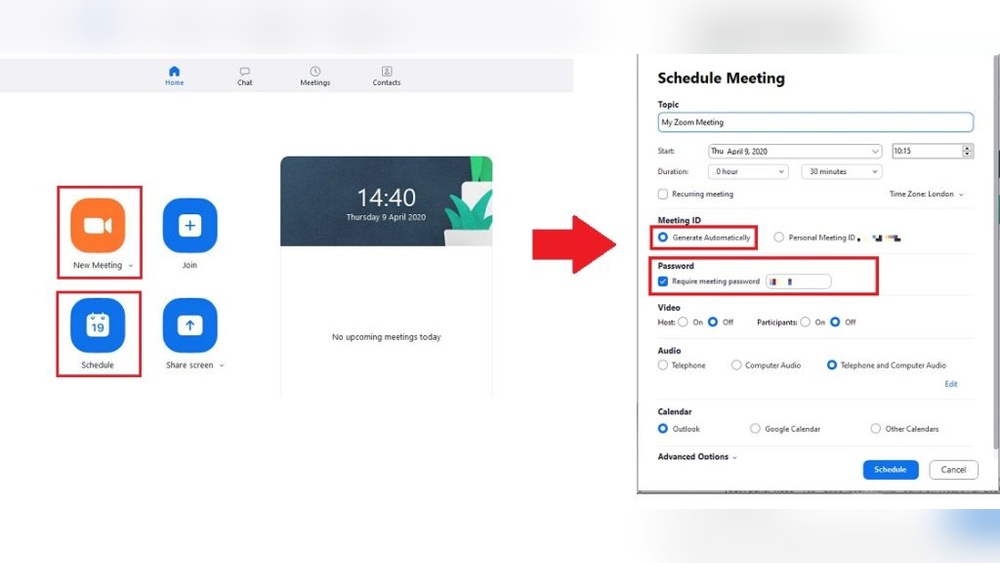
If you are new to Zoom, here is how to start:
Go to the Zoom website. Download the app for your device. You can also use Zoom on a web browser without downloading.
Sign up with your email or use Google or Facebook accounts. The free plan lets you use many features but has limits on meeting time.
Click the meeting link or enter the meeting ID. Type your name and join. You can turn your video and sound on or off.
Click “New Meeting” to start a meeting. Send the link to friends or coworkers. Control the meeting by muting others or sharing your screen.
Zoom has different plans for different needs. Here is a simple list:
| Plan | Cost | Key Features |
|---|---|---|
| Basic (Free) | Free | Up to 100 people, 40-minute meeting limit, unlimited 1-on-1 meetings |
| Pro | Paid (about $15/month) | Longer meetings, 1 GB cloud recording, user management |
| Business | Paid (custom price) | More users, admin features, company branding |
| Enterprise | Paid (custom price) | For large companies, unlimited cloud storage |
Most people start with the free Basic plan. It is enough for small meetings and personal use. Businesses often choose paid plans for more features.
Zoom offers many benefits. Here are some:
No tool is perfect. Zoom also has some problems:
Still, many people find Zoom useful for work and school.
Here are some simple tips to have better Zoom meetings:
Zoom works hard to keep meetings safe. It uses passwords and waiting rooms to stop strangers joining. Hosts can control who can share screen or talk.
Still, be careful. Only share meeting links with people you trust. Keep your app updated for the best security.
Zoom is a video meeting app. It helps people talk and see each other online. You can join or start meetings on many devices. Zoom has many features like screen sharing, chat, and recording. It offers free and paid plans. Many use Zoom for work, school, and staying in touch. It is easy to use but needs a good internet connection. Always use Zoom safely and follow simple tips for better meetings.
Now you know what Zoom is and how it works. Try it yourself and see how it can help you connect with others.
Zoom works by letting beginners schedule or join video meetings easily. Sign in, click “Schedule a Meeting,” set date/time, then save. Users can share video, audio, and screen. It supports chatting and reactions, making online communication simple and interactive for first-time users.
Zoom subscription costs vary by plan: Basic is free; Pro starts at $14. 99/month; Business and Enterprise plans have custom pricing.
Zoom’s disadvantages include security concerns, limited features on the free plan, and occasional connectivity issues. Large meetings require paid plans.
Yes, Zoom’s free Basic plan limits group meetings to 40 minutes. After that, the meeting ends automatically. To remove this limit, upgrade to a paid plan. Free one-on-one meetings have no time limit. This 40-minute restriction applies only to group video calls on the free tier.







Leave A Reply Now