



When you want to create designs, you might wonder which tool to choose. Canva and Adobe are two popular options. Both help you make images, posters, and more. But they are very different. This article will explain their differences. You will learn which one fits your needs best.
Canva is a simple design tool. It works on the web and on phones. You can use it for free or pay for extra features. It has many ready-made templates. Canva is made for quick and easy designs.
Adobe
Credit: www.blinkjarmedia.com
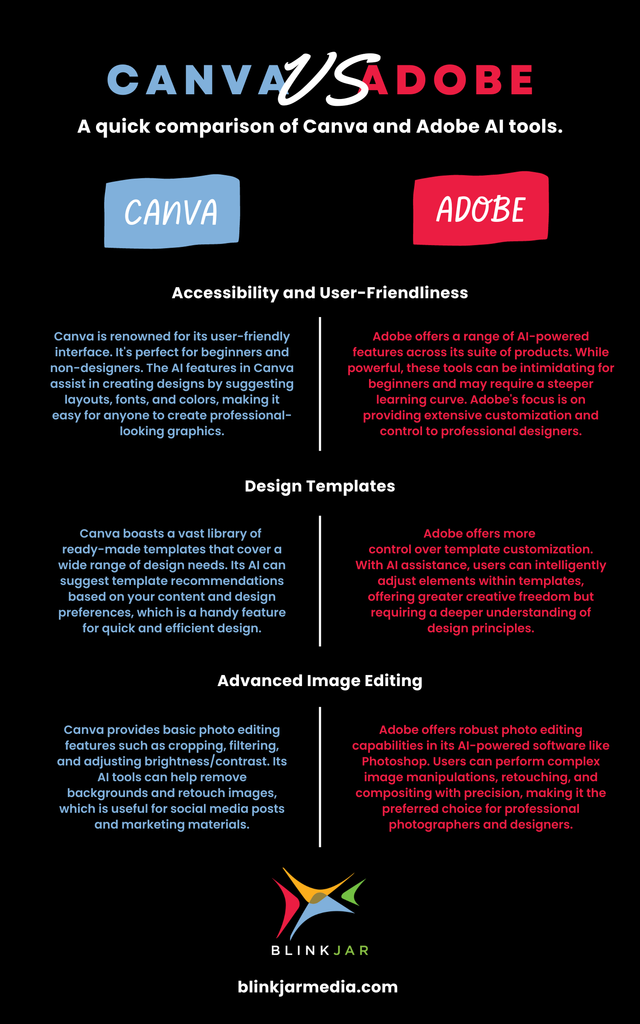
Canva is easy to start. You do not need training. Just drag and drop images or text. The interface is clean and simple. It uses many templates that make design quick.
Adobe tools have many buttons and options. They can be confusing at first. You might need to learn how to use them well. But once you do, you can make very detailed designs.
| Feature | Canva | Adobe (Photoshop, Illustrator, InDesign) |
|---|---|---|
| Templates | Thousands of ready templates for social media, posters, presentations | Limited templates, mostly blank workspace for full creative control |
| Image Editing | Basic editing like crop, filters, effects | Advanced photo editing and retouching |
| Vector Design | Limited vector support | Full vector design with Illustrator |
| Print Layout | Simple print design | Professional print layouts with InDesign |
| Collaboration | Real-time team collaboration and sharing | Limited collaboration tools, mostly file sharing |
Canva offers a free version. It includes many templates and tools. You can pay monthly or yearly for more features. The paid plan gives access to more templates, photos, and tools.
Adobe tools require subscription. You pay monthly for each app or a full suite. Adobe is more expensive. But it offers very powerful software.
It depends on your needs. Here are some questions to ask:
If yes, Canva is a good choice.
If yes, Adobe tools are better.
Credit: blog.scorevision.com
Some people use both tools. They start a project in Canva for quick ideas. Later, they move it to Adobe for final work. This way they get speed and quality.
Besides Canva and Adobe, other tools exist:
Canva is simple and fast. It works well for people with little design experience. It is great for online graphics and teamwork.
Adobe offers powerful tools for professional designers. It needs time to learn but allows full control. It is best for print and complex projects.
Choose Canva if you want easy, quick designs. Choose Adobe if you want detailed and professional results.
Think about what you need. Try both tools if you can. Find the one that helps you create best.
Adobe suits professionals needing advanced features and precise control for print and complex projects. Canva fits beginners and teams wanting fast, easy, template-based designs for social media and web. Choose Adobe for depth; Canva for speed and accessibility. Many use both in hybrid workflows.
Adobe InDesign excels in professional, complex print layouts with advanced control and typography. Canva offers easy, fast designs with templates and collaboration. Choose InDesign for precision and print quality; pick Canva for simplicity and quick social media graphics. Both tools serve different design needs effectively.
Adobe Express often outperforms Canva with advanced features and seamless Adobe integration. Visme excels in infographics and presentations. For UI/UX design, Figma offers superior tools. VistaCreate provides a strong free tier and ease of use. Choose based on your specific design needs.
Canva is a top design tool for beginners and quick projects, offering ease, templates, and collaboration. Professionals prefer Adobe for advanced features and precise control. Canva suits social media and fast designs, while Adobe excels in complex, print-ready work. The best tool depends on your specific design needs.







Leave A Reply Now