



Choosing the right design tool can be hard. Many people ask, “Canva or Adobe, which one is better?” Both tools help you create images, posters, and social media posts. But they work in different ways. This article will explain the main differences. It will help you pick the best one for your needs.
Canva is a simple, easy-to-use tool. It works online and helps people design quickly. It has many templates. You can drag and drop pictures and text. It is made for beginners or people who want fast results.
Adobe
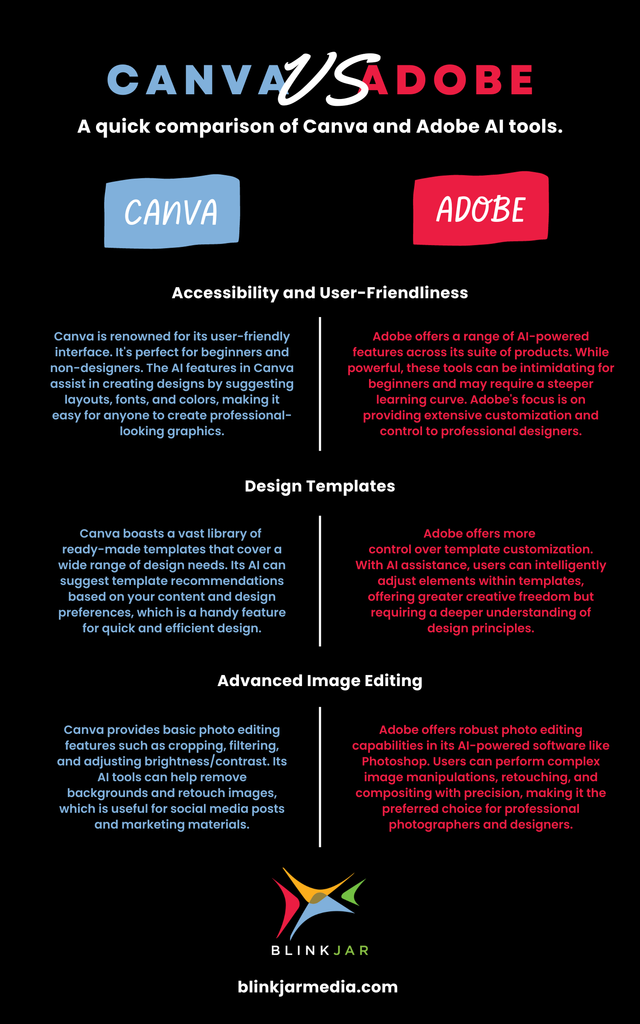
One big difference is how easy each tool is to use. Canva is very simple. You don’t need special skills. You pick a template, add your text and images, and you are done.
Adobe tools are more complex. They have many options and buttons. You need to learn how to use them. It can take weeks or months to get good at Adobe software.
Summary:
| Tool | Ease of Use | Best for |
|---|---|---|
| Canva | Very easy | Beginners, quick designs |
| Adobe | Needs learning | Professionals, detailed work |
Adobe tools offer many advanced features. For example, Photoshop lets you edit photos in detail. Illustrator allows drawing shapes and logos with precision. InDesign helps make books and magazines with exact layouts.
Canva has fewer advanced features. But it has many ready-made templates. You can use photos, icons, and fonts easily. It also supports collaboration, so teams can work together online.
Adobe is better for:
Canva is better for:
Canva has a free plan. Many features and templates are free. There is also a paid plan with more options. It costs less than Adobe.
Adobe software usually requires a monthly subscription. The price is higher. But you get many professional tools in one package. Adobe also has a free tool called Adobe Express, which is simpler and more like Canva.
Cost comparison:
| Tool | Free Version | Paid Plan Cost |
|---|---|---|
| Canva | Yes, limited features | Lower price, monthly or yearly |
| Adobe Creative Cloud | No (except Adobe Express) | Higher price, monthly subscription |
Credit: www.blinkjarmedia.com
If you are new to design, Canva is a great start. It helps you make nice images fast. You don’t need special training. It works well for social media posts, flyers, and invitations.
Small businesses and teachers like Canva. They can make professional-looking materials without spending much time. Also, teams can share and edit designs easily online.
If you want to work as a professional designer, Adobe is the better choice. Its tools let you create complex and high-quality designs. You can edit photos in detail or make exact layouts for books.
Adobe is used in many industries. It is the standard for graphic design jobs. If you want to learn serious design, Adobe skills are very useful.
Credit: blog.scorevision.com
Yes, many people use both Canva and Adobe. For example, they start a quick design in Canva. Then, they move the project to Adobe tools for final polishing.
This way, you get the best of both worlds. Canva saves time on simple parts. Adobe lets you add professional touches.
| Feature | Canva | Adobe |
|---|---|---|
| Ease of Use | Very easy | Complex |
| Design Power | Basic to medium | Advanced |
| Templates | Many ready-made | Few built-in |
| Cost | Free plus low-cost plans | Higher price |
| Best for | Beginners, fast designs | Professionals, print work |
| Collaboration | Easy online sharing | Limited (except Adobe Express) |
If you want to look beyond Canva and Adobe, there are other tools. Some are easier like Canva. Others offer special features.
Choose the tool that fits your needs and budget best.
Canva and Adobe serve different users well. Canva is perfect for fast, easy designs. Adobe is made for deep, professional work.
If you want simple and quick results, try Canva first. If you want to become a designer or need detailed control, Adobe is the way to go.
Remember, no tool is perfect for everyone. Your choice depends on what you want to create and how much time you have to learn.
Try both tools if you can. See which one feels better for you. Both can help you make great designs.
Adobe suits professionals needing advanced, print-ready designs with precise control. Canva offers user-friendly, quick designs with templates and easy collaboration for beginners and small businesses. Choose Adobe for complex projects; pick Canva for fast, accessible social media and web graphics creation.
Adobe InDesign excels in professional, complex print layouts with advanced typography. Canva offers user-friendly, fast designs ideal for social media and beginners. Choose InDesign for precision and print quality; select Canva for ease, templates, and quick collaboration. Each suits different design needs.
Adobe Express tops Canva for advanced features and seamless Adobe integration. Visme excels in infographics and presentations. VistaCreate offers ease with a strong free plan. Snappa suits quick social graphics. Figma and Affinity serve professionals needing specialized design tools beyond Canva.
Canva is a top design tool for beginners, offering ease, templates, and collaboration. Professionals may prefer Adobe for advanced features and precision. Canva suits quick, accessible designs, especially for social media and small businesses, but it’s not the best for complex, print-ready projects.







Leave A Reply Now