


Are you still running your business website on an outdated PHP version? If so, you’re not alone—and you might be putting your entire online presence at risk without even realizing it.
Using old PHP can slow down your site, cause compatibility headaches, and leave you vulnerable to security threats. But updating doesn’t have to be complicated or scary. This guide is designed just for you—to help you understand why staying current matters and walk you through simple steps to get your PHP version up to speed.
Keep reading to protect your business, boost your website’s performance, and stay ahead of the competition.

Credit: www.expedia.com
Using an outdated PHP version puts businesses at serious risk. These old versions no longer get updates or fixes. This leaves websites open to many problems that can harm the business. Understanding these risks helps in making the right decision to update PHP.
Old PHP versions do not receive security patches. Hackers find and exploit these weaknesses easily. This can lead to stolen data or website damage. Protecting customer information becomes difficult. Cyberattacks can cause loss of trust and revenue.
Outdated PHP slows down website loading times. Visitors may leave if pages take too long to open. Newer PHP versions run scripts faster and use less memory. Speed improvements help keep users engaged. Slow websites also hurt search engine rankings.
New plugins and themes often need the latest PHP versions. Older PHP may not support these tools correctly. This causes errors or broken features on the website. It limits the ability to add new functions. Updating PHP ensures smooth operation with modern software.

Credit: en.wikipedia.org
Knowing your PHP version is key for website health and security. Older PHP versions lack important updates and fixes. This can lead to slow sites and security risks. Checking your PHP version takes only a few steps. Use one of these easy methods to find out which version your server runs. This helps plan upgrades and avoid problems.
Many web hosts provide control panels like cPanel or Plesk. Log in to your hosting control panel. Find the section labeled “PHP” or “Software.” Here, you can see the current PHP version listed. Some panels allow switching PHP versions with a simple dropdown menu. This method is fast and user-friendly. It suits beginners and those who prefer a graphical interface.
Access your server using SSH or a terminal. Type php -v and press enter. The command returns the PHP version installed. This method works on most Linux and Unix servers. It gives detailed version info including build date. It requires basic command line knowledge but offers quick results. Use this if you have shell access to your hosting.
Use online PHP version checkers for a quick view. Upload a simple PHP file with php phpinfo(); ? to your server. Open the file in a browser. The page shows full PHP configuration and version. Alternatively, some websites scan your domain and report the PHP version. These tools help when you lack direct server access. Always delete the phpinfo file after checking for security.
Preparing for a PHP upgrade requires careful planning. This step helps avoid site crashes and data loss. Follow these key actions to ensure a smooth transition to a newer PHP version.
Create a complete backup of your website before upgrading. Include files, databases, and configurations. Use trusted backup tools or your hosting provider’s backup service. This backup lets you restore your site if something goes wrong during the upgrade.
Check any custom code your site uses. Old PHP versions may support functions that newer versions do not. Update deprecated functions and fix errors in the code. Testing your custom scripts on a staging site helps find issues early.
Evaluate all plugins installed on your site. Some plugins may not work with newer PHP versions. Visit plugin developers’ websites for compatibility information. Disable or replace plugins that cause conflicts to keep your site stable.
Credit: forum.osticket.com
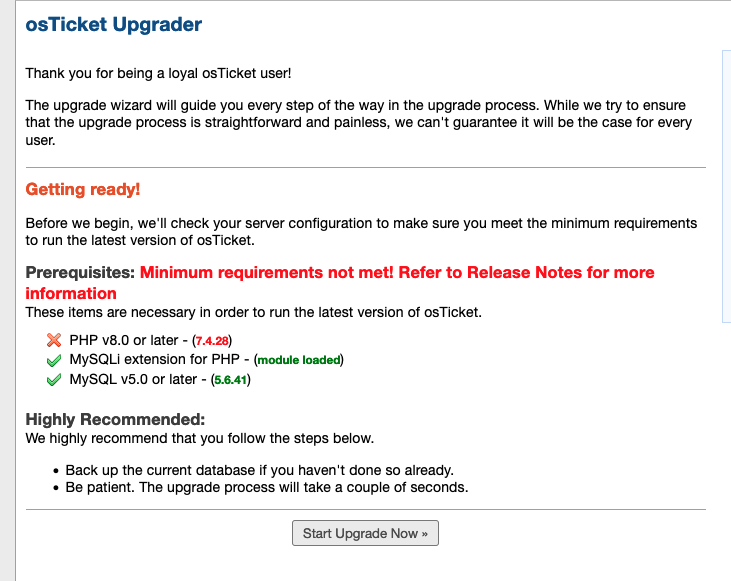
Upgrading PHP versions is essential for business websites using outdated software. New PHP versions offer better security, faster loading times, and improved compatibility. Staying on old versions exposes sites to risks and performance issues.
The upgrade process can seem complex but breaking it into clear steps helps. Businesses can upgrade using hosting provider tools or manually. Testing after the upgrade ensures everything works smoothly.
Many hosting providers offer simple tools to update PHP versions. Log in to your hosting control panel. Find the section for PHP settings or software management. Select the desired PHP version from the available list.
Click the update or apply button to start the upgrade. The system will switch PHP versions automatically. This method is quick and requires no coding knowledge. It is the safest choice for beginners.
Manual upgrades are for advanced users or custom server setups. Start by backing up your entire website and database. Download the latest PHP version from the official PHP website. Install the new PHP version on your server.
Update your server configuration files to point to the new PHP path. Restart your web server to apply changes. Check your website’s code for compatibility with the new PHP version. Fix any deprecated functions or errors that appear.
Testing is crucial to ensure your website works after the upgrade. Check all website pages for errors or broken features. Use tools to scan for PHP warnings or notices. Test forms, login pages, and payment systems carefully.
Monitor website speed and performance. Compare results with your previous PHP version. Fix any new issues immediately to avoid user problems. Regular testing prevents downtime and improves user experience.
Many businesses face problems running websites on old PHP versions. These issues can cause slow performance, errors, and security risks. Troubleshooting these problems is key to keeping your site stable and safe. This section helps you fix common PHP version issues fast.
Old PHP versions often clash with new plugins or themes. Check plugin requirements before updating PHP. Disable plugins one by one to find conflicts. Update plugins to their latest versions. Sometimes, code in themes or custom scripts needs changes to match newer PHP features.
Critical errors stop your website from loading. Turn on error reporting in PHP to see error details. Common errors include undefined functions or deprecated features. Fix these by updating or rewriting the affected code. If unsure, ask a developer for help. Backup your site before making changes to avoid data loss.
Revert PHP to an older version if updates cause big issues. Use your hosting control panel to switch PHP versions safely. Keep backups of your website before switching back. Test your site after reverting to ensure it works well. Plan for future updates to avoid repeated problems.
Keeping PHP updated is key for smooth website performance and strong security. Old PHP versions slow down sites and expose them to hackers. Businesses must maintain current PHP to protect data and improve user experience.
Regular updates also ensure compatibility with new tools and plugins. This section explains practical steps for maintaining updated PHP versions in your business environment.
Check your PHP version often to stay informed. Use hosting dashboards or command lines to verify the current version. Frequent checks help spot outdated versions before problems arise. Set a fixed schedule, like monthly, to review PHP status.
Automate PHP updates to reduce manual work and errors. Many hosting services offer automatic update options. Scheduling updates during low-traffic hours avoids disrupting visitors. Automated updates keep your site secure and running smoothly without constant attention.
Always back up your site before updating PHP. Test updates in a staging environment to catch issues early. Remove unused plugins and themes to lower security risks. Stay informed about PHP security patches and apply them quickly to protect your business.
Upgrading PHP brings many benefits for businesses. It improves security, speed, and support. These advantages help websites run smoothly and safely. Staying on an outdated version can cause problems and risks. Updating PHP keeps your site modern and reliable.
New PHP versions fix security problems found in older ones. They protect your site from hackers and malware. Using the latest PHP reduces the chance of data breaches. Security patches are only available for current versions. Upgrading helps keep customer information safe and builds trust.
Recent PHP releases run code faster than old versions. This speed boost improves user experience and reduces load times. Faster sites keep visitors engaged and lower bounce rates. Speed also helps your site rank better on search engines. Updating PHP makes your website more efficient.
Developers focus on current PHP versions for updates and tools. Older versions lose support and can cause compatibility issues. Using the latest PHP allows access to new features and improvements. This support makes it easier to fix bugs and add functionality. Upgrading PHP helps developers maintain your website effectively.
Log in to your hosting control panel. Locate the PHP version settings. Select the latest PHP version from the dropdown menu. Save changes and restart your server if needed. Always back up your site before updating to avoid data loss or errors.
PHP 7. 4 reached its official end of life in November 2022. Using it risks security vulnerabilities and compatibility issues. Updating to a supported PHP version improves performance and protects your website.
Log in to your hosting control panel. Backup your website. Locate PHP settings and select version 8. Save changes and test your site for compatibility.
Yes, PHP 8. 2 is stable and officially released. It offers improved performance, new features, and security enhancements. Many developers recommend upgrading to PHP 8. 2 to ensure better website speed and security. Always test your code for compatibility before updating your production environment.
Staying on outdated PHP versions puts your business at risk. Older versions lack security updates and cause site problems. Updating PHP improves website speed and compatibility with new tools. Plan your update carefully to avoid downtime or errors. Regular updates keep your site safe and running well.
Don’t let old PHP hold your business back. Take steps to modernize your technology today.







Leave A Reply Now