


When you work with clients, understanding their needs is just the starting point. The real challenge is turning those needs into clear, organized systems that everyone can follow.
This is where workflow mapping becomes your secret weapon. By breaking down complex processes into simple, visual steps, you gain clarity and control over how tasks get done. Imagine cutting through confusion, spotting bottlenecks, and creating smooth, efficient workflows that save time and boost productivity.
Ready to learn how to transform client demands into straightforward systems that work? Keep reading, because this guide will show you exactly how to map workflows that make a real difference.

Understanding the types of workflow maps helps to organize tasks clearly. Each map type shows processes in different ways. Some maps give a simple overview, while others show detailed steps. Choosing the right map depends on the goal and the audience. This section explains the main types of workflow maps used in business and project management.
Basic process maps show the main steps in a process. They use simple shapes and arrows. These maps help to see the flow from start to finish. They are easy to create and understand. Basic maps are useful for quick overviews and simple tasks.
High-level maps focus on the big picture. They show major stages without details. These maps help to understand overall workflow and key phases. They work well for executives and managers. High-level maps keep the process clear and simple.
SIPOC diagrams stand for Suppliers, Inputs, Process, Outputs, and Customers. They show important elements of a process. This map type helps identify who is involved and what is needed. SIPOC diagrams are great for defining scope and improving communication.
Detailed process maps show every step of the workflow. They include decisions, actions, and loops. These maps help find problems and improve tasks. Detailed maps require more time but offer deep insight. They are perfect for complex processes.
Swimlane diagrams divide the process by roles or departments. Each lane shows who does what and when. This helps clarify responsibilities and handoffs. Swimlane diagrams reduce confusion and improve teamwork. They show the flow across different parts of an organization.
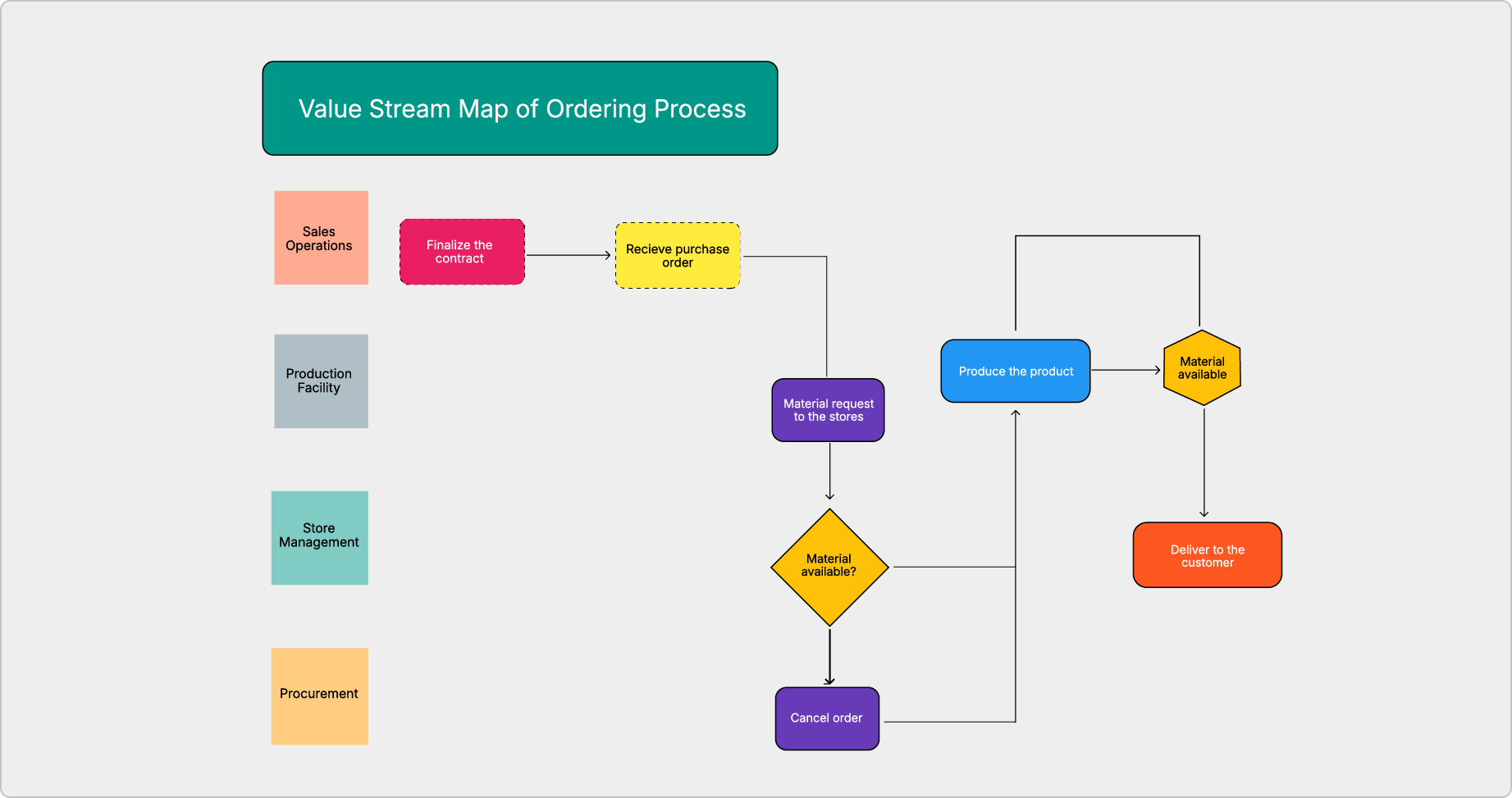
Value stream mapping focuses on value and waste. It shows how steps add value or cause delays. This map helps improve efficiency and reduce costs. Value stream maps are used in lean management. They highlight areas for process improvement.
Understanding the phases of workflow is essential for turning client needs into clear systems. Each phase builds on the previous one. Together, they create a seamless process that improves efficiency and clarity.
Breaking down the workflow into phases helps teams stay focused. It ensures that every task aligns with client goals. Let’s explore these phases step-by-step.
The first phase is collecting information. Gather all details about client needs and project goals. Use surveys, interviews, or existing documents. This data forms the base of your workflow.
Accurate information prevents errors later. It helps you understand what the client expects. Collect facts carefully and fully.
After gathering information, process the data. Analyze and filter it to find important points. Look for patterns and key requirements. This step turns raw data into useful insights.
Processing helps clarify what must be done. It highlights priorities and potential challenges. Keep this phase simple and focused.
Next, organize tasks based on processed data. Break down big goals into smaller, manageable steps. Assign tasks to the right team members. Set deadlines and resources.
Organizing tasks creates a clear roadmap. Everyone knows their role and what to do. This phase builds the structure of your workflow.
Review the planned steps carefully. Check for gaps, overlaps, or unclear instructions. Get feedback from the team and clients if possible. Adjust the plan to improve clarity and efficiency.
Reviewing avoids mistakes and confusion. It ensures the workflow matches client needs perfectly. Take time to refine and confirm every detail.
The final phase is executing actions. Follow the organized plan and complete each task. Monitor progress and solve problems as they arise. Keep communication open among team members.
Execution turns plans into results. It delivers the client’s desired outcomes. Track performance and make small fixes to stay on course.
Mapping client needs into clear workflows requires a structured approach. Each step helps turn vague requirements into organized processes. Following these steps ensures the workflow is easy to understand and use. It also helps avoid confusion and errors later.
Start by deciding what part of the client’s needs you will map. Set clear boundaries to keep the process focused. This prevents the map from becoming too complex or broad. Knowing the scope guides all other steps.
Write down every task needed to meet the client’s needs. Include tools, people, and information required. This list forms the building blocks of the workflow. It helps to see what is involved at a glance.
Arrange tasks in the exact order they happen. Note any decisions or branches in the process. Use simple, clear language for each step. This makes the workflow easy to follow and reduces mistakes.
Select the best format to show the workflow. Options include flowcharts, swimlane diagrams, or step lists. Pick one that fits the process complexity and audience needs. The right map type improves clarity and communication.
Use a tool or software to draw the workflow based on your list and sequence. Add shapes, arrows, and labels to represent tasks and flow. Keep the design clean and simple. This visual guide helps everyone understand the process.
Show the workflow map to clients and team members for feedback. Check for missing steps or unclear parts. Make sure it matches real-world actions. Sharing builds agreement and catches errors early.
Update the workflow as client needs or processes change. Use feedback and performance data to improve it. A workflow map is a living document, not a one-time task. Continuous refinement keeps it accurate and useful.

Credit: www.canva.com
Identifying workflow issues is the first step to creating clear systems that meet client needs. It helps uncover problems that slow down or complicate work. Spotting these issues allows teams to improve efficiency and quality. Understanding where workflows break down can save time and reduce errors.
Start by mapping out the current workflow clearly. Use flowcharts or diagrams to show each step from start to finish. This visual guide makes it easier to see the full process at a glance. It also helps everyone understand how tasks connect and flow.
Look for points where work gets stuck or delayed. These bottlenecks slow down the whole process and reduce productivity. Identify tasks that take too long or cause backups. Pinpointing these spots helps target improvements to speed up the workflow.
Check for repeated steps or unnecessary actions. Extra tasks waste time and resources. Simplify the process by cutting out duplicate or low-value activities. Streamlining workflow steps makes the system leaner and easier to manage.
Ask team members for input about the workflow. They often see problems that are not obvious on paper. Their feedback reveals practical challenges and ideas for fixing issues. Involving the team builds support for workflow changes.
Optimizing workflows is essential for turning client needs into efficient systems. It focuses on refining tasks to save time and improve results. Streamlined workflows reduce errors and increase team productivity. Clear, optimized processes make it easier to deliver quality work consistently.
Start by identifying tasks that do not add value to the final outcome. These could be repetitive actions or unnecessary approvals. Removing such tasks saves time and reduces confusion. Focus on activities that directly impact client satisfaction and project goals.
Creating standard procedures ensures everyone follows the same steps. This consistency improves quality and reduces mistakes. Documenting these procedures makes training new team members easier. Use clear instructions and simple language to keep standards high.
Identify which parts of the workflow affect results the most. Prioritize improvements in these areas for maximum benefit. Allocate resources to tasks that drive client value and business growth. This focus helps achieve better outcomes with less effort.
Technology plays a crucial role in making workflows more efficient. It helps to organize tasks, reduce manual work, and improve communication. Using the right tools can turn client needs into clear, simple systems. This section explores how technology supports workflow mapping and boosts productivity.
Workflow management tools help track tasks and deadlines. They provide a visual map of each step in a process. Teams can see who is responsible for what and when tasks are due. These tools reduce confusion and keep projects on schedule. Examples include Trello, Asana, and Monday.com. They allow easy updates and real-time collaboration. This keeps everyone aligned and informed.
Task automation saves time by handling repetitive jobs. It can send reminders, update records, or move data between apps automatically. Automation cuts down on human error and speeds up processes. Tools like Zapier and Microsoft Power Automate connect different software. They create workflows that run without manual input. This frees up time for more important tasks and improves accuracy.
Agile and Lean methods focus on delivering value quickly and reducing waste. Technology supports these methods by enabling fast feedback and frequent updates. Agile tools like Jira help teams plan sprints and track progress. Lean tools highlight bottlenecks and areas for improvement. Using these approaches with technology ensures systems stay flexible and efficient. Teams can adapt to client needs and improve workflows continuously.
Enhancing team collaboration is essential for turning client needs into clear systems. A well-mapped workflow ensures everyone understands the process. Teams work better when communication flows smoothly. Each member knows their part and how it fits into the bigger picture.
Strong collaboration reduces errors and speeds up project completion. It builds trust and encourages sharing ideas. Clear systems help teams stay organized and focused on goals.
Clear communication is the foundation of teamwork. Share updates regularly to keep everyone informed. Use simple language to avoid confusion. Encourage questions to clarify doubts quickly. Choose the right tools, like chat apps or video calls, for fast interaction. Good communication prevents mistakes and saves time.
Training helps team members understand new systems clearly. Provide hands-on sessions to practice workflows. Regular training keeps skills sharp and up to date. It boosts confidence and reduces errors. Investing time in training leads to smoother project execution. Everyone learns how to use tools and follow steps correctly.
Clear roles prevent overlap and confusion. Assign specific tasks to each team member. Make sure everyone knows their responsibilities and deadlines. When roles are defined, accountability increases. Teams work more efficiently without stepping on each other’s toes. Clear roles support a smooth and organized workflow.
Credit: businessmap.io
Measuring and testing changes is essential in workflow mapping. It ensures that new systems truly meet client needs. Without measurement, changes remain assumptions. Testing reveals what works and what needs adjustment. This phase builds confidence in the new processes and helps avoid costly mistakes.
Clear objectives guide the measurement process. Define what success looks like for each change. Objectives should be specific and easy to track. For example, reduce task completion time by 20% or increase client satisfaction scores. Clear goals help focus efforts and provide benchmarks for evaluation.
Pilot testing involves trying changes on a small scale first. This limits risk and uncovers hidden issues. Use real scenarios and users during pilots to get accurate results. Observe how the new system performs and note any difficulties. Pilot tests show if changes improve workflow or create new problems.
Feedback is vital for refining workflow systems. Collect input from all users regularly. Use surveys, interviews, or informal check-ins to gather opinions. Continuous feedback highlights areas needing improvement and confirms what works well. Acting on feedback keeps the system aligned with client needs and boosts overall success.
The 5 levels of process mapping are: basic process maps, high-level maps, SIPOC diagrams, detailed process maps, and swimlane diagrams. Each level offers increasing detail and clarity to improve process understanding and efficiency.
The 5 steps of mastering workflow are: define the process, list tasks and resources, document steps, choose the best map type, and review for improvement.
Improve process mapping by clearly defining the process, listing all tasks, and choosing the right map type. Visualize each step, eliminate redundancies, and gather team feedback. Use tools for clarity, standardize procedures, and review regularly to optimize and update the map continuously.
Document workflows using maps or charts to visualize processes. Identify and remove bottlenecks and redundant steps. Standardize procedures for consistency. Automate repetitive tasks with technology. Enhance communication and gather employee feedback. Prioritize high-impact improvements and continuously monitor results for ongoing optimization.
Clear workflow mapping turns client needs into simple, organized systems. It helps spot problems and fix them fast. Mapping shows each step and who does what. This clarity makes work smoother and saves time. Keep refining your maps to match changing needs.
Ask your team for feedback often. Small improvements add up to big results. Use these steps to build workflows that really work. Your clients and team will both benefit. Simple, clear systems make all the difference.







Leave A Reply Now