


If you have a SiteGround hosting account, you may wonder about databases. Databases are important. They store your website’s data. But what databases can you use with SiteGround? This guide will explain it clearly. Let’s dive in.
A database is a system that holds information. Websites need databases to work. For example, your blog posts, user details, and settings are in a database. Without one, your website cannot save or show this data.
There are many types of databases. Some are simple, some complex. SiteGround supports the most popular ones. You can use these to build your website easily.
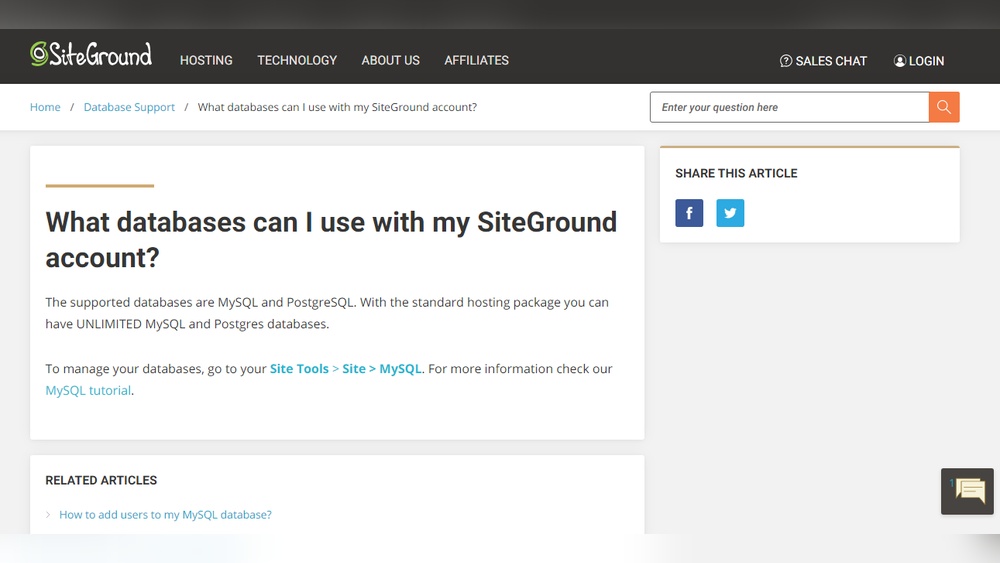
SiteGround mainly supports two types of databases:
These databases are powerful and well-known. They help your website run smoothly. Both are SQL databases, which means they use a language called SQL to manage data.
MySQL is very popular for websites. It is easy to use and fast. Most WordPress websites use MySQL. SiteGround lets you create unlimited MySQL databases with your hosting plan. This means you can have many websites or projects on one account.
PostgreSQL is another strong choice. It is known for handling complex data. It is reliable and has more advanced features than MySQL. SiteGround also allows unlimited PostgreSQL databases.
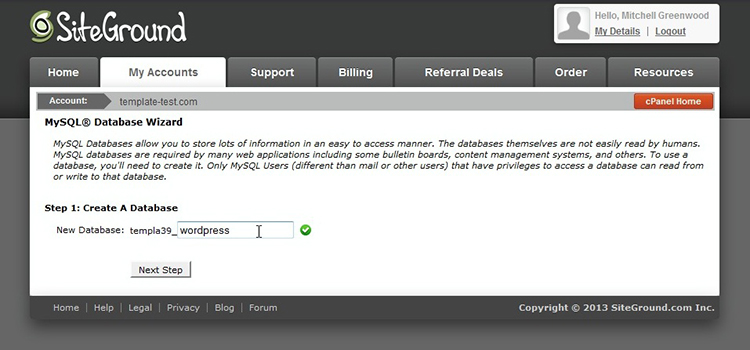
Creating a database on SiteGround is simple. Follow these steps:
That’s it! Your database is ready to use. You can connect your website or app to it now.
SiteGround offers tools to manage your databases. Here is how:
| Database Type | Management Tool | How to Access |
|---|---|---|
| MySQL | phpMyAdmin | Go to Site Tools > Site > MySQL > phpMyAdmin and click “Access phpMyAdmin”. |
| PostgreSQL | PostgreSQL Manager | Go to Site Tools > Site > PostgreSQL > PostgreSQL Manager. |
These tools let you browse tables, run queries, and change data easily.
Good news! SiteGround does not limit your database numbers. You can have unlimited MySQL and PostgreSQL databases. This is great for developers, businesses, or anyone with multiple websites.
Credit: web.brianshim.com
Choosing between MySQL and PostgreSQL depends on your needs:
Most beginners start with MySQL because it is easier to find help online.
After creating your database, you need to connect it to your website. Usually, you will need:
Enter these details in your website or app settings. For example, WordPress asks for these during setup.
WordPress sites on SiteGround use MySQL databases. SiteGround’s WordPress hosting is ready for MySQL. When you install WordPress, it asks for database details. You can create the database first, then enter the info.
Managing your WordPress database is easy with phpMyAdmin. It lets you edit content, fix errors, or backup your data.
SiteGround does not support databases like MongoDB or Firebase. These are NoSQL databases. They are different from MySQL and PostgreSQL. But for most websites, MySQL or PostgreSQL is enough.
If you need NoSQL databases, you might use external services. But for simple and standard websites, stick with SiteGround’s supported databases.
| Feature | Details |
|---|---|
| Supported Databases | MySQL, PostgreSQL |
| Number of Databases Allowed | Unlimited |
| Database Management Tools | phpMyAdmin (MySQL), PostgreSQL Manager |
| Database Names | Created automatically or custom |
| Use With WordPress | MySQL |
| External Databases | Not supported (NoSQL) |
Credit: zemez.io
SiteGround supports MySQL and PostgreSQL databases. Users can create unlimited MySQL and PostgreSQL databases via Site Tools. Manage MySQL databases using phpMyAdmin within Site Tools. This setup suits various website needs, ensuring reliable database performance and easy management on SiteGround hosting.
To create a database in SiteGround, go to Site Tools > Site > MySQL. Click “Create Database” and follow prompts. Assign a user to the database to complete setup. SiteGround supports unlimited MySQL and PostgreSQL databases for easy management and scalability.
To connect to a MySQL database in SiteGround, go to Site Tools > Site > MySQL. Click “Access phpMyAdmin” to manage your database. Check your database names under the Databases tab to identify the correct one for your site.
Choose MySQL or PostgreSQL for your website database, both supported by SiteGround. Manage them easily via Site Tools.
SiteGround supports two main databases: MySQL and PostgreSQL. Both are reliable and powerful. You can create many databases on your hosting plan. Managing them is easy with SiteGround’s tools.
Choose MySQL if you want simple and popular support. Choose PostgreSQL for advanced features. Remember, your website needs a database to save and show data. Now, you know what to use with SiteGround.
Start creating your databases today and build your website confidently!







Leave A Reply Now