



Are you ready to take your web application beyond borders and reach users all around the world? Scaling your app globally might sound complex, but with the right approach, you can make it happen step by step.
In this guide, you’ll discover simple strategies to handle more users, keep your app running smoothly, and grow your online presence without headaches. Whether you’re just starting out or looking to expand, this beginner’s guide will help you build a strong foundation for global success.
Keep reading, and you’ll learn how to turn your local app into a worldwide hit.

Credit: www.snk-corp.co.jp
Choosing the right architecture is crucial for scaling your web application globally. The architecture determines how your application handles traffic, manages data, and integrates new features. A poor choice can lead to slow response times and downtime. A good architecture supports growth and adapts to different user needs worldwide. It also simplifies maintenance and future upgrades.
Consider your team’s skills, project size, and expected traffic before deciding. Let’s explore common architecture options that work well for global scaling.
A monolithic architecture combines all functions into a single codebase. It is simpler to develop and deploy initially. But as your app grows, it becomes harder to manage and update.
Microservices break the app into small, independent services. Each service handles a specific function. This makes scaling easier because you can update parts without affecting the whole system. It also allows using different technologies for different services.
Microservices fit global apps better but need more setup and coordination. Monolithic suits smaller projects or early stages.
Serverless architecture runs code on demand without managing servers. Cloud providers handle scaling automatically. You pay only for the compute time your code uses.
It is ideal for apps with unpredictable or spiky traffic. Serverless reduces operational work and speeds up deployment. However, it may add latency for cold starts and limits long-running tasks.
This option suits apps needing quick global reach with low infrastructure overhead.
Load balancing spreads user requests across multiple servers. It prevents any single server from becoming overloaded. This improves response times and uptime.
There are different types of load balancers: hardware, software, and cloud-based. They can distribute traffic based on server health, user location, or session data.
Choosing the right load balancing method ensures smooth user experience worldwide. It also supports automatic scaling as traffic grows.
Managing data efficiently is vital for scaling web applications globally. Optimizing data management helps keep your app fast and reliable. It also reduces delays and avoids data loss across different regions. Focus on smart database scaling, effective caching, and consistent data handling to deliver a smooth user experience everywhere.
Databases often become bottlenecks in global web apps. Scaling databases means handling more users and more data without slowing down. Two main methods exist: vertical scaling and horizontal scaling. Vertical scaling upgrades your current database server with better hardware. Horizontal scaling adds more database servers to spread the load. Techniques like sharding split data into smaller parts across servers. Replication copies data to multiple servers to improve read speed and fault tolerance. Choose the right method based on your app’s needs and growth plan.
Caching stores frequently accessed data closer to users. It cuts down the time to fetch data from the database. Use browser caching for static files like images and scripts. Server-side caching stores data in memory for quick access. Content Delivery Networks (CDNs) cache data in servers worldwide. This reduces latency for global users. Cache invalidation ensures users see updated data. Set proper cache expiration times. Caching improves speed and lowers database load, making your app more scalable.
Data consistency means all users see the same data at the same time. It is challenging in global apps due to network delays. Strong consistency ensures data updates appear instantly everywhere. This can slow down your app. Eventual consistency allows some delay but improves speed. Use conflict resolution techniques to handle simultaneous updates. Choose consistency levels based on your app’s function. For example, financial apps need strong consistency. Social apps can work with eventual consistency. Balancing consistency and performance is key for global scaling.
Scaling a web application globally demands a strong, flexible infrastructure. Cloud infrastructure offers this by providing resources on demand and across many regions. This setup supports traffic spikes and user growth without manual intervention. Cloud platforms help maintain performance and reduce latency for users worldwide. They also simplify management and lower costs compared to traditional data centers.
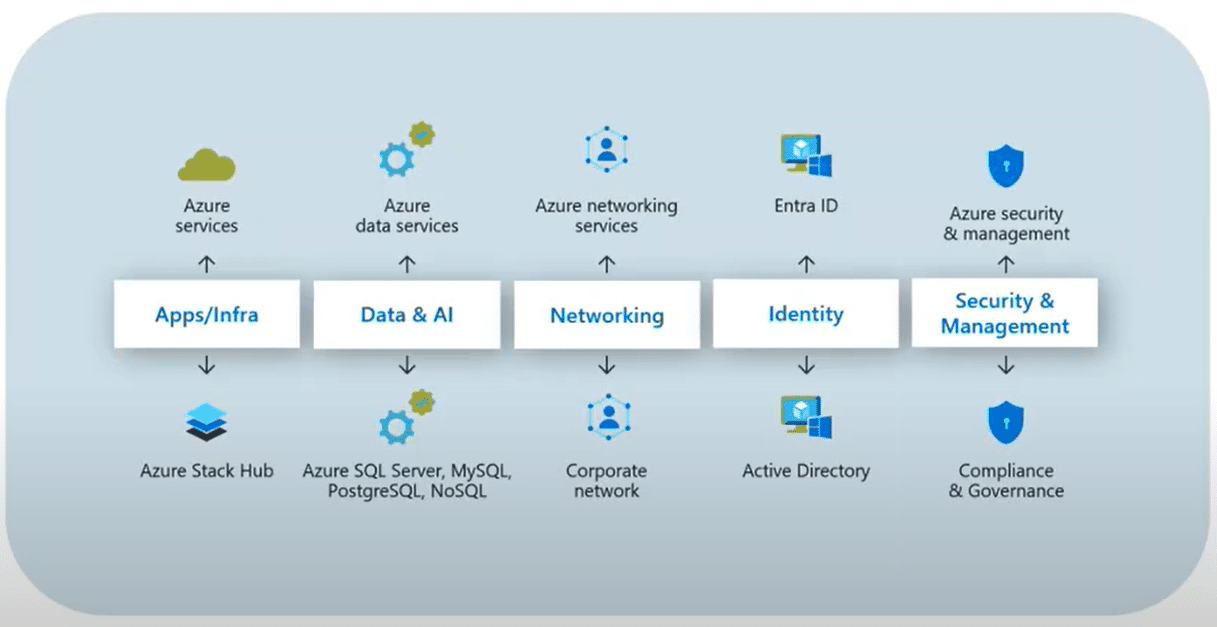
Choosing the right cloud provider is key to successful scaling. Leading providers include Amazon Web Services (AWS), Microsoft Azure, and Google Cloud Platform (GCP). Each offers unique strengths in pricing, services, and global reach. AWS has the largest market share and most services available. Azure integrates well with Microsoft products. GCP provides strong data analytics and machine learning tools. Evaluate your app’s needs and budget before deciding.
Auto scaling adjusts resources automatically based on demand. This feature prevents downtime during traffic surges. Cloud providers offer auto scaling tools that monitor CPU, memory, and network usage. When usage increases, they add more servers; when it decreases, they reduce them. This ensures cost efficiency by only using resources when needed. Auto scaling also improves user experience by maintaining fast response times.
Cloud providers operate data centers worldwide. Deploying your app closer to users reduces latency and speeds up load times. These data centers are organized into regions and availability zones. Regions cover broad geographic areas; zones are isolated locations within regions. Choosing multiple regions helps with redundancy and disaster recovery. Using global data centers ensures your app remains accessible and reliable worldwide.

Credit: www.amazon.com
Improving application performance is essential for scaling your web app globally. Fast and smooth user experiences keep visitors engaged and satisfied. Optimizing how your app handles requests and delivers content reduces delays and server stress. This section explains key ways to boost performance effectively.
Choosing the right server-side language affects app speed. Some languages run faster and use fewer resources. For example, Go and Rust offer high performance with low memory use. Node.js is popular for handling many connections simultaneously. Using efficient languages helps your app respond quickly to user requests.
Reducing the work your server does lowers response times and saves costs. Cache data that does not change often to avoid repeated calculations. Offload tasks like image processing to separate services. Use asynchronous processing for long tasks so the server stays responsive. Keep code simple and avoid unnecessary computations.
Content Delivery Networks (CDNs) store copies of your app’s files across the world. This brings content closer to users, cutting down load times. CDNs handle traffic spikes smoothly and reduce server load. Using a CDN improves reliability and speeds up delivery of images, scripts, and videos. It is a must for global scaling.
Ensuring your web application stays reliable and available is vital for global success. Users expect fast, uninterrupted access no matter where they are. Downtime or slow performance can hurt your reputation and cause loss of customers.
Building a strong foundation for reliability means planning for failures and responding quickly. This section covers key strategies to keep your app up and running worldwide.
Redundancy means having backup systems ready to take over instantly. Use multiple servers across different regions. This way, if one server fails, others handle the traffic without downtime.
Store data in several places to avoid data loss. Load balancers can spread user requests evenly. This prevents any single server from becoming overloaded.
Disaster recovery is your plan for major failures or attacks. Regularly back up your data and test restoring it. Keep backups in separate geographic locations to avoid losing everything in one event.
Create clear steps for recovery teams to follow. Automate recovery processes where possible to save time. Quick recovery reduces user disruption and protects your business.
Continuous monitoring tracks your app’s health and performance. Use tools to watch server status, response times, and traffic patterns. Detect issues before users notice them.
Set up alerts for unusual activity or errors. Alerts help your team act fast to fix problems. Good monitoring keeps your app stable and users happy.
Managing traffic and user load is critical for a web application that serves users worldwide. Traffic spikes can overwhelm servers and cause slow responses or downtime. Proper management ensures smooth performance and a good user experience across regions.
Handling many users at once means distributing requests efficiently. This section covers key techniques to control traffic and keep your app stable as it grows globally.
Rate limiting controls how many requests a user can make in a given time. It prevents overload from too many requests at once. This helps protect your servers from crashes and abuse.
Set limits based on user roles or IP addresses. When limits are reached, return a clear message to the user. Rate limiting keeps your app responsive even under heavy traffic.
Queue management organizes incoming requests to avoid server overload. Requests are placed in a queue and processed one by one or in small batches.
This method smooths traffic spikes and ensures every request is handled fairly. It reduces errors and timeouts during busy periods. Queues also allow retrying failed tasks without losing data.
Message brokers help scale apps by decoupling components and managing communication. They store and forward messages between services asynchronously.
This approach allows your app to handle more users without slowing down. Message brokers balance load, improve fault tolerance, and enable easy scaling. Popular tools include RabbitMQ, Kafka, and AWS SQS.
Scaling your web application globally means more users and more risks. Security must be a top priority. Protecting user data, securing APIs, and handling DDoS attacks are key areas to focus on. These steps help keep your app safe and reliable for users everywhere.
User data is sensitive and must be handled carefully. Use encryption for data in transit and at rest. Secure login methods like multi-factor authentication add extra protection. Limit access to data only to necessary parts of your system. Regularly update your software to fix security flaws.
APIs connect your app with other services and must be secure. Use strong authentication methods such as API keys or OAuth tokens. Validate all inputs to prevent attacks like injection or cross-site scripting. Monitor API usage to detect unusual activity early. Keep your API documentation private and update it often.
DDoS attacks try to overwhelm your app with traffic. Use traffic filtering tools to block suspicious requests. Distribute your servers across multiple locations to reduce impact. Set up rate limiting to control how often users can make requests. Have a response plan ready to act quickly if an attack happens.
Credit: stoneridgesoftware.com
Testing and monitoring at scale are crucial for global web applications. They ensure your app runs smoothly under heavy user loads. Detecting issues early helps maintain user trust and prevent downtime.
Effective testing simulates real-world traffic and stress on your system. Monitoring tracks performance and detects anomalies continuously. Together, they provide insights to optimize and scale confidently.
Load testing tools simulate many users accessing your app simultaneously. They reveal how your app performs under stress. Popular tools include Apache JMeter, Gatling, and Locust. Choose tools that fit your tech stack and budget. Run tests regularly to catch bottlenecks early.
Track key metrics to measure your app’s health. Important metrics include response time, error rates, and throughput. Monitor CPU and memory usage on your servers. High latency or error spikes signal problems. Use dashboards to visualize these metrics clearly.
Logs capture detailed info about your app’s operations. Structure logs consistently for easy analysis. Include timestamps, user IDs, and error details. Store logs centrally using tools like ELK Stack or Splunk. Regularly review logs to spot trends and fix bugs quickly.
Global scaling means expanding your web app to serve users worldwide. It involves optimizing performance, managing data across regions, and ensuring reliability under increased traffic.
Use load balancing and auto-scaling in cloud environments. These distribute traffic evenly and automatically add resources during peak demand to maintain performance.
Proper data management ensures fast access and consistency across regions. It reduces latency and avoids data conflicts, improving user experience worldwide.
A Content Delivery Network (CDN) caches your content near users globally. It speeds up delivery, reduces server load, and enhances app responsiveness.
Scaling your web application globally takes careful planning and effort. Start with a strong foundation and keep your users in mind. Use simple tools and techniques to handle growth smoothly. Test often and fix issues quickly to avoid big problems.
Remember, growing step-by-step helps you stay in control. Stay patient and keep learning as you expand. This way, your app can reach more people around the world successfully.







Leave A Reply Now