



Are you tired of spending countless hours on the same boring tasks day after day? Imagine freeing up that time to focus on what really matters—growing your business, learning new skills, or simply enjoying a better work-life balance.
The secret lies in automating those repetitive chores using AI and smart tools. You’ll discover simple, practical ways to hand off your routine work to intelligent systems that never get tired or make mistakes. Ready to unlock your productivity and reclaim your time?
Let’s dive in and explore how you can start automating repetitive work today.
AI automation transforms the way repetitive work gets done. It helps businesses and individuals save time and effort on daily tasks. Using AI tools, many routine jobs run smoothly without constant human input. This shift allows workers to focus on creative and strategic activities.
The benefits of AI automation go beyond speed. It also improves accuracy and work quality. Automating repetitive tasks reduces mistakes caused by fatigue or distraction. This leads to better results and fewer corrections.
AI automation boosts overall productivity. It handles large volumes of work quickly and consistently. Teams can achieve more with less stress and fewer delays. These advantages make AI a valuable asset in any workflow.
AI automation handles tasks like data entry, scheduling, and email replies fast. It frees up hours that humans would spend on repetitive work. This saved time can be used for important projects and problem-solving. Automating these tasks reduces the need for constant supervision.
Humans make mistakes, especially with repetitive tasks. AI systems follow rules exactly and do not get tired. This lowers errors in data processing and reporting. Fewer errors mean less rework and more reliable outcomes. Consistency improves trust in the automated processes.
AI works around the clock without breaks or slowdowns. It completes tasks faster than people can. This speed helps teams meet deadlines and handle more work. By automating routine jobs, employees can focus on creative and strategic tasks. Productivity rises as work quality and output improve.

Automating repetitive tasks saves time and reduces errors. The first step is spotting which tasks to automate. Not all tasks suit automation. Focus on tasks that happen often and follow clear rules. This section helps you identify these tasks and decide which to automate first.
Many jobs include tasks repeated daily. Examples are data entry, email sorting, and scheduling meetings. Other tasks include generating reports and updating spreadsheets. These tasks take time but need little creative thinking. Automation tools can handle such tasks easily.
Choose tasks that are rule-based and predictable. Tasks with clear steps work best. Also, consider tasks done frequently or that consume many hours. Tasks prone to human error benefit from automation. Avoid automating tasks that need judgment or creativity.
Focus on tasks that save the most time. Automate tasks that block your daily work. Start with easy tasks to build confidence. Then automate complex tasks step-by-step. This approach leads to faster results and less frustration.
AI tools for automation come in various forms, each designed to handle different types of repetitive tasks. Choosing the right tool depends on the nature of the work you want to automate. Some tools focus on mimicking human actions, while others streamline entire workflows. Understanding these types helps you pick the best solution for your needs.
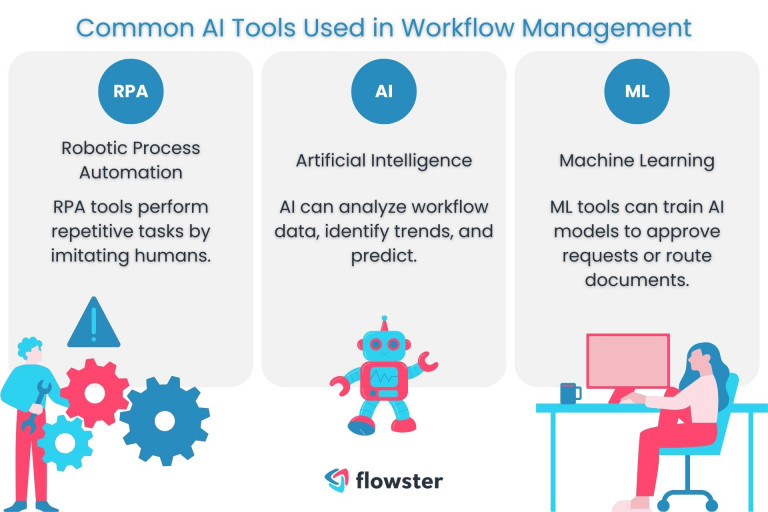
RPA uses software robots to perform rule-based tasks automatically. These bots can mimic human actions like clicking, typing, and reading screens. Tasks such as data entry, invoice processing, and report generation are common uses. RPA works well with structured data and repetitive processes. It reduces errors and speeds up workflows without changing existing systems.
AI chatbots handle customer queries and routine communication efficiently. They use natural language processing to understand and respond to questions. Chatbots can book appointments, provide product information, and solve simple issues. They work 24/7, reducing the need for human support. This tool saves time and improves customer experience by offering instant responses.
These platforms connect different apps and automate multi-step processes. They allow users to create workflows that trigger actions across various tools. For example, when a form is submitted, it can automatically notify the team and update a database. Workflow platforms help streamline complex tasks without coding. They boost productivity by reducing manual handoffs and keeping tasks organized.

Choosing the right automation tool is key to streamlining repetitive tasks. The tool must fit your existing systems and meet your current needs. It should also adapt as your business grows. Selecting an unsuitable tool wastes time and resources. Focus on tools that align with your goals and technical setup.
Check if the tool connects with apps you already use. Good integration saves time and reduces errors. It allows data to flow smoothly between platforms. The tool should support common software like email, CRM, and spreadsheets. Strong integration means less manual work and easier automation.
Choose tools with simple interfaces. Easy-to-use tools reduce training time and errors. Look for clear instructions and visual workflows. Non-technical users should handle the tool comfortably. A user-friendly tool helps your team adopt automation faster.
The tool should grow with your business. It needs to handle more tasks and users over time. Flexible tools adapt to different workflows and processes. Avoid tools that limit automation to fixed rules. Scalability and flexibility keep your automation effective long-term.
Setting up AI automation is a key step to reduce repetitive work. It helps you save time and avoid errors. This process starts with understanding your tasks and ends with a smooth, automated workflow.
Careful setup ensures AI tools work properly. It also lets you control how tasks get automated. Follow these steps to set up AI automation effectively.
Begin by listing all steps in your current process. Note each action and decision point. Identify which tasks happen often and take up most time. Highlight parts that follow clear rules. These are best for automation.
Create a simple flowchart or list to visualize the work. This map guides the AI setup. It shows where automation fits and what it should do.
Use your workflow map to set clear rules for automation. Define triggers that start the AI actions. Set conditions that guide each task. For example, send an email if a form is filled.
Choose the right AI tool or platform that matches your needs. Input the rules carefully. Keep instructions simple to avoid confusion. Confirm the AI understands each step and trigger.
Run tests to see how the automation works in real situations. Check for errors or missed steps. Watch for delays or incorrect actions. Test multiple scenarios to cover all cases.
Gather feedback and adjust rules as needed. Refine the process until it runs smoothly. Regular checks help maintain good performance. This ensures your automation stays reliable and useful.
Practical automation examples show how AI and tools simplify daily repetitive tasks. These examples help save time and reduce errors. They allow focusing on important, creative work instead. Below are some common tasks businesses and individuals automate successfully.
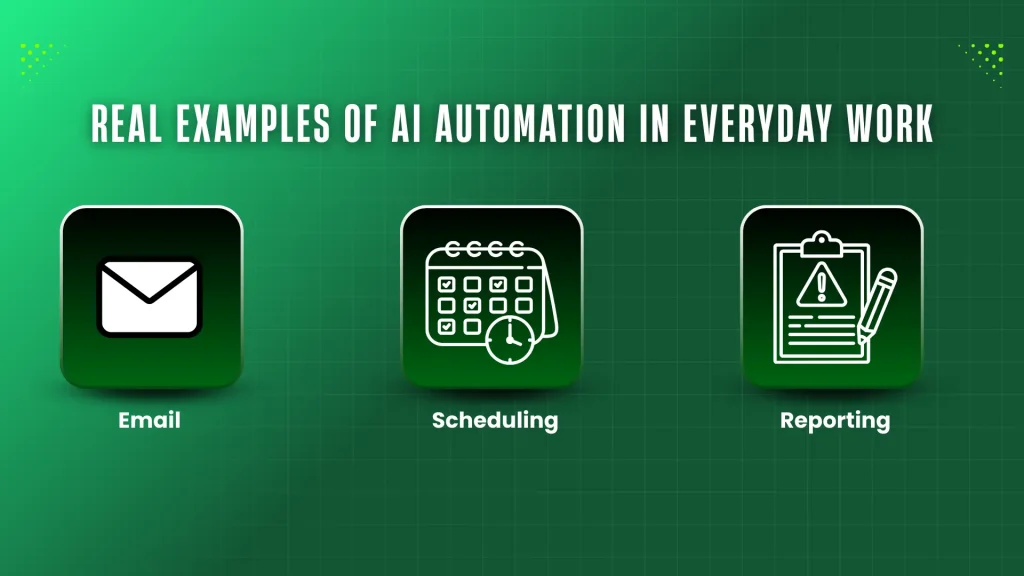
AI tools can read and understand emails automatically. They send replies based on common questions or requests. This saves hours spent answering routine emails manually. For example, customer support teams use AI to handle FAQs. It ensures quick and consistent responses anytime.
Automation can also sort emails by priority. Important messages get flagged while less urgent ones wait. This helps avoid missing critical emails. Setting up templates for replies speeds up the process more. AI learns from past replies to improve over time.
AI-powered scheduling tools manage meetings without human help. They check calendars, find free slots, and suggest meeting times. This removes the back-and-forth emails usually needed to agree on a time. Users can share their availability links to simplify booking.
Reminders and notifications are sent automatically before meetings. AI can also reschedule or cancel appointments if conflicts arise. This keeps calendars organized and up to date. Such automation reduces missed meetings and double bookings.
Manual data entry wastes time and risks errors. AI tools extract data from forms, invoices, or emails automatically. They input this data into systems without human intervention. This speeds up workflows and improves accuracy.
Report generation becomes faster too. AI collects and analyzes data, then creates reports based on templates. Users receive real-time insights without waiting for manual reports. This supports faster decision-making and better business tracking.
Measuring the success of automation is crucial for any business using AI and tools. It shows if automation meets goals and helps improve processes. Without proper measurement, it is hard to know the real impact. Focus on key areas to get clear and useful insights.
Track how much time automation saves on repetitive tasks. Compare the time spent before and after automation. Use tools that log time or manual reports from employees. Even small time savings add up over weeks and months. This helps justify the investment in automation.
Check if automation reduces errors in work. Automated systems should make fewer mistakes than manual work. Measure error rates before and after automation. Fewer errors mean better quality and less rework. Accuracy improvements boost customer satisfaction and save costs.
Ask employees how automation affects their daily work. They can share if automation makes tasks easier or faster. Feedback reveals hidden issues or benefits not seen in data. Positive feedback shows acceptance and motivation. Use surveys or informal talks to collect honest opinions.
Automating repetitive work with AI and tools brings many benefits. Yet, it also presents challenges that teams must face. Overcoming these challenges is key to successful automation. Understanding common obstacles helps create smoother automation processes. This section explores how to handle complex tasks, ensure data security, and manage change resistance effectively.
Not all tasks are simple or rule-based. Some require judgment and adaptability. AI struggles with tasks that need deep understanding or creativity. Break down complex tasks into smaller, clear steps. Use AI for parts that follow strict rules. Combine AI with human input to handle exceptions. This mix improves accuracy and efficiency.
Automation often involves sensitive data. Protecting this data is critical. Choose AI tools with strong security features. Use encryption to keep data safe during transfer and storage. Limit access to authorized users only. Regularly update software to fix security gaps. Clear policies help prevent accidental data leaks.
People may fear losing jobs or control due to automation. This fear causes resistance to new tools. Communicate clearly about benefits and goals of automation. Involve employees early in the process. Provide training to build confidence in using AI tools. Show how automation reduces boring tasks and frees time for creative work.
AI automation is evolving fast and shaping the future of work. It changes how businesses handle repetitive tasks. This helps save time and reduce errors. Understanding future trends can prepare you for the next wave of AI tools. These trends will make automation smarter and easier to use.
Machine learning models are becoming more accurate and faster. They learn from data without being explicitly programmed. This allows AI to handle complex tasks better. Future AI will predict outcomes and adapt to new situations. This makes automation more flexible and reliable.
AI will connect more deeply with existing software and systems. This integration helps automate workflows across different tools. Businesses can streamline operations without switching platforms. AI will work silently in the background to improve efficiency. The result is smoother processes and less manual work.
AI agents act like personal assistants for specific tasks. They can manage emails, schedule meetings, and organize data. These agents will become smarter and handle more complex jobs. They learn user preferences and improve over time. This trend will free workers from routine duties and boost productivity.
Credit: flowster.app
AI automates repetitive tasks by using algorithms to perform rule-based actions like data entry, scheduling, and email responses, boosting efficiency.
Automate repetitive tasks by identifying routine activities, choosing the right tools, setting up workflows, and monitoring results consistently.
The 30% rule in AI suggests automating tasks that take up 30% of work time to boost efficiency and productivity.
Yes, AI can repeatedly perform tasks, especially rule-based ones like data entry, scheduling, and report generation.
Automating repetitive work with AI and tools saves time and effort. Choose tasks that repeat often and suit automation. Use simple tools that fit your needs and skills. Test your setup to ensure it works well. This frees you to focus on more important work.
Small steps lead to big improvements in productivity. Start now to make your daily tasks easier.







Leave A Reply Now