



Do you want to sell your web template online? ThemeForest is a great place to start. It is a popular website where many people buy and sell web templates. This guide will help you upload and sell your web template on ThemeForest. We will explain every step in simple words.
ThemeForest is a part of Envato Market. It is a marketplace for website templates and themes. Designers from all over the world sell their work here. Buyers come to find good templates for their websites. If you create web templates, this is a good place to show your work and earn money.
Before you sell, you need an Envato account. Envato is the company that owns ThemeForest. Here is how to make an account:
Now, you have an Envato account. You can use this to upload your templates.
ThemeForest has rules for selling web templates. Your template must be:
Also, if you are selling WordPress themes, you must use WordPress features correctly. Your theme should not have errors or security problems.
Before uploading, get your files ready. Here is what you should do:
Make sure your template works perfectly. Test it on different devices and browsers.

Credit: www.youtube.com
ThemeForest has specific standards. Your template must follow these rules:
| Requirement | Description |
|---|---|
| Pixel Perfect | Your design should look sharp and clean. |
| Responsive Design | Must work on all screen sizes. |
| Code Quality | No errors in HTML, CSS, or JavaScript. |
| Documentation | Clear instructions on template use. |
| Security | Safe code without vulnerabilities. |
| Licensing | Use only licensed or free assets. |
Check these carefully before you upload. Templates that don’t meet these rules will be rejected.
Now it is time to upload your template to ThemeForest. Follow these steps:
After submission, Envato’s team will check your template. This can take several days.
Your template must pass a review before selling. The review team checks:
If your template is good, it will be approved. If not, you will get feedback. Fix the issues and submit again.
Once approved, your template is live on ThemeForest. But how do you get buyers?
Try these tips:
Remember, good reviews help sell more. Ask your buyers to leave honest feedback.
Listen to your buyers. Fix bugs and update your template.
New web standards come often. Keep your templates fresh and modern. This helps you sell more over time.
ThemeForest pays authors a percentage of each sale. The amount depends on your total sales and exclusivity.
| Type | Author Fee Percentage |
|---|---|
| Exclusive Author | Up to 70% |
| Non-Exclusive Author | Up to 40% |
If you sell many templates, you can earn more money. Selling on ThemeForest can be a good source of income.
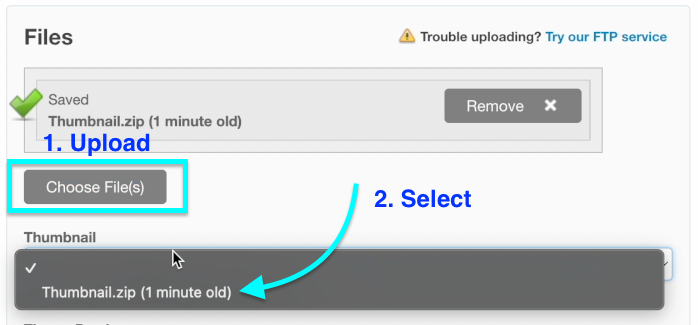
Credit: hayk-simonyan.medium.com
Selling your web template on ThemeForest takes time and effort. Follow these steps:
With patience and care, you can build a good income. ThemeForest offers a big audience for your web templates. Start today and share your designs with the world.
Create an Envato account and prepare a pixel-perfect, responsive template with documentation. Upload it to ThemeForest for review. Once approved, start selling and promote your template for better visibility and sales.
Upload a complete, pixel-perfect theme or template with clean HTML/CSS/JavaScript. Include documentation, responsive design, and follow WordPress or Envato coding standards. Ensure security, optimization, and proper use of APIs. Create an Envato account and submit all required files for review before publishing.
Selling website templates can be profitable with quality designs and the right platform. ThemeForest offers a large audience to boost sales. Success requires pixel-perfect, responsive templates with proper documentation. Consistent marketing and updates increase earnings and passive income potential in this growing digital market.
Yes, you can sell websites made with templates if the template license permits it. Ensure proper customization and client approval. Use platforms like ThemeForest or Envato for wider reach and better sales opportunities. Avoid charging premium rates for template-based websites due to faster turnaround and limited originality.


Leave A Reply Now